
Get listed on Mapquest
Make sure your business is found when users search for you on MapQuest Business Listing! This step-by-step guide will tell you all you need to know to get your business listed on MapQuest.
MapQuest is a U.S.-based online web mapping service. Initially established under the name Cartographic Services, MapQuest is currently owned by System1. It offers mapping services such as getting directions, planning a route, traffic, and road construction data, among other things. To get your business listed on MapQuest, follow the steps below:
- Go to the Mapquest Homepage & click on the “Claim your Business” link.
- Fill in your business information.
- Choose a plan to purchase the claim & manage your MapQuest listing.
Benefits of Listing Your Business on MapQuest
MapQuest is one of the oldest online mapping services and still attracts 700+ million searches and 30+ million users every month. It remains a preferred tool for businesses and commercial drivers who rely on it for route optimization, and it’s widely used by logistics teams to plan efficient multi-stop routes.
Beyond that, many people still turn to MapQuest for everyday navigation. Listing your business on multiple platforms, including MapQuest, helps you strengthen visibility and maximize your local presence.
Here’s why you should consider listing your business on MapQuest:
- Increase visibility: Your business shows up in more local searches, especially for people who rely on MapQuest for directions.
- Build credibility: A verified business listing on MapQuest, complete with your address, phone number, and other details, signals to users that your business is legitimate and active. It also allows you to display recent customer reviews, which helps build trust and credibility.
- Boost local SEO: Listing your business consistently across reputable platforms like MapQuest sends positive signals to search engines about your credibility and reliability.
- Gain local insights: MapQuest’s self-gathered user location data, Local Intelligence, provides valuable information about how customers find and interact with your business, including routes, keywords, and points of interest.
- Simplified management via Yext: MapQuest listings are now managed through Yext. This means that when you claim your MapQuest listing, you’ll do it through Yext’s platform, which can also distribute your business information to other directories. The result is less effort on your part and a broader, more consistent online presence.
How to Add & Claim Your MapQuest Listing
Step 1: Search For Your Business
Search MapQuest for your business name and address. If a listing is already there, claim it instead of creating a duplicate.
Step 2: Navigate to the MapQuest Login Form
Visit the MapQuest home page. On the left-hand side of the page, you’re going to see three dots in a vertical line. Click on it to reveal the sidebar.
Scroll down the sidebar to find the “Claim your Business” button. Click on it.
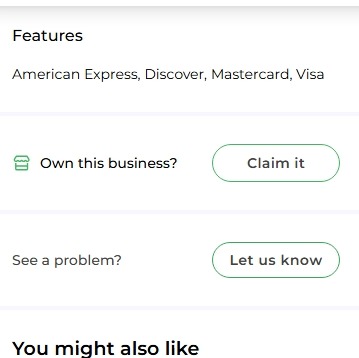
Alternatively, you can search for your business using the search bar at the top left of the MapQuest homepage. Once you find your business, look for an “Own this business?” section with a “Claim it” button. Click on it.
Step 3: Fill in Your Information
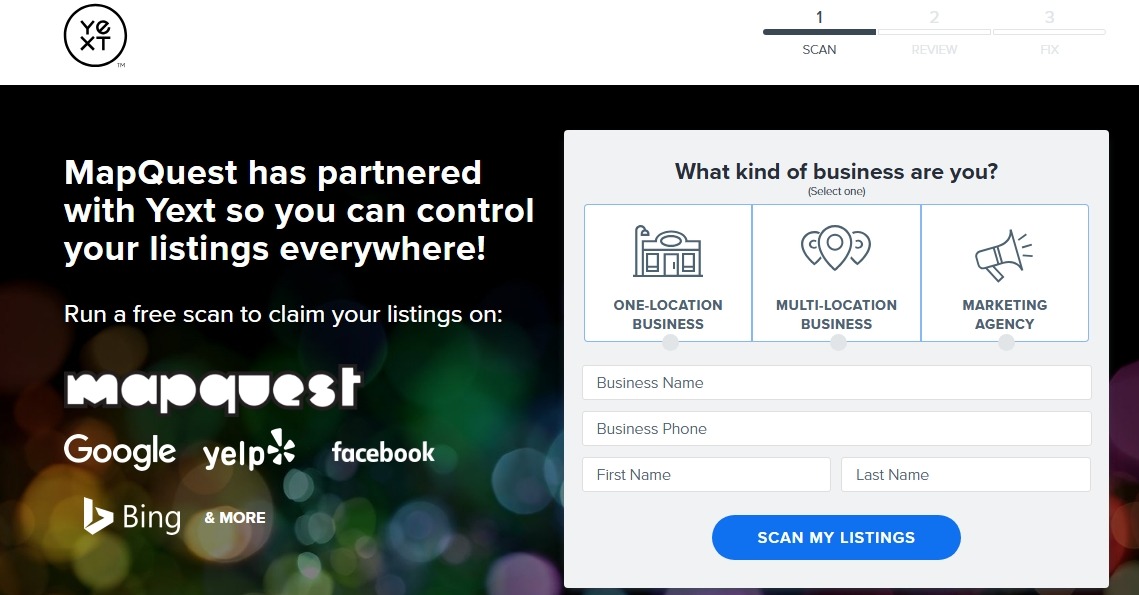
MapQuest will take you to the Yext-powered platform where you can submit your claim.
You need to fill out this form to claim or add your business on MapQuest.
Fill out the fields in the form with the exact information you want to display on MapQuest.
Choose one of the following:
- One-location business
- Multi-location business
- Marketing agency
Enter your business name, phone number, and other information.
Click on “Scan My Listings” after that.
Step 4: Scan & Correct Your Listings
Yext scans your business across multiple directories. Review the scan results and fix any missing or inconsistent information.
Step 5: Choose a Plan
You will then be presented with packages that you need to purchase to claim and manage your MapQuest listing. Select a package that fits your budget, and you’ll be directed on how to progress through the platform.
If you’re not interested in the pricing options, you can manage your MapQuest listing through Synup, which integrates directly with MapQuest and helps you control your listings across multiple directories. Here’s how:
- Log in to your Synup account.
- Go to the Listings tab.
- Navigate to Premium Listings.
- Click the MapQuest logo to manage your listing and associated settings.
Tips for Optimizing Your MapQuest Listing
- Keep your information consistent everywhere: Always exactly match your business name, address, and phone number (NAP) on Google, Yelp, your website, and other directories. You don’t want small differences to hurt your SEO.
- Add high-quality photos: This helps get more clicks and build trust faster.
- Encourage and respond to reviews: Ask satisfied customers to leave reviews on MapQuest, and make sure to respond quickly. This helps improve the customer experience and encourages people to return.
- Leverage tools to manage multiple listings: Because MapQuest runs through Yext, you can use the platform to keep your business details accurate and consistent across many directories. Synup is another great option if you want to simplify the process and save time.
See our guide on Top 10 white label local listing management tools.
- Use local keywords for better discovery: Use relevant keywords in your business description so customers can easily find you. You can add these terms in the description field when filling out the listing form.
Conclusion
While MapQuest may not have the global reach of Google Maps, it remains a trusted tool for navigation. Listing your business on MapQuest alongside other directories like Google, Yelp, and Apple Maps helps maximize your local visibility. Using tools like Synup ensures your information stays accurate and consistent across platforms, making it easier to reach and engage more customers.
FAQs
- Why should businesses list on MapQuest?
MapQuest reaches real users and provides an additional trusted citation that can help local discovery and SEO. It still gets tens of millions of visits monthly, so it can drive local traffic.
- Is it free to list a business on MapQuest?
Yes, a basic MapQuest business listing is free. While MapQuest directs businesses to Yext for claiming and management, Yext’s services are paid if you choose to use them. However, simply appearing on MapQuest does not require any payment.
- How to claim my MapQuest listing?
Search for your business on MapQuest, then go to the “Own this business?” section and click “Claim it.” Follow the verification steps and complete the form.
- How long does it take for a MapQuest business listing to appear?
If you choose the free listing, verification may take a few days. Paid options through Yext can get your business verified within hours.
