
Top 10 Vcita Alternatives for Marketing Agencies

Top Vcita Alternatives

​If you are running a marketing agency, you must now be used to the mid-month panic. That is the day you realize you have invoices to send, 20 reputation reports to manually pull up, and zero idea if your HVAC client in Des Moines actually paid their bill last month.

​You probably started with Vcita because it was an easy, “Day 1” tool. It’s what you need when you land your first plumbing client and just need a pay-now button and a calendar that doesn't glitch. But as you grow, you realize it was built for a solo service client and not a scaling team. 

We are looking at the top 10 Vcita alternatives that let you manage 10, 20, or 50 client businesses from a single dashboard. More importantly, if you want tools that let you set up a new client in five minutes, get out of the way, and keep 30-50% of the profit margin in your pocket, keep reading.

​TL;DR: Top 10 Vcita Alternatives for Marketing Agencies

  • ​Running a scaling agency of 10 to 20 businesses on Vcita leads to a predictable crisis when it's time to send invoices, monthly reports, and more.
  • Why Switch from Vcita (The Limitations)
    • ​Context switching may lead to mistakes and wasted time.
    • Inability to manage multi-location scalability; designed for the “single business” user.
    • ​Vcita users report being "nickel and dimed” even with high-tier plans.
    • ​Specific data synchronization via Zapier often fails.
  • ​Non-Negotiable Feature Requirements
    • ​Filterable command center
    • ​Proposal-to-payment flow.
    • ​Predictive forecasting for "at-risk" clients.
  • ​The Top 10 Breakdown
    • ​Synup OS: The only "Agency OS" that bundles 40 million business leads with fulfillment tools
    • ​Nimble: Uses a browser extension to "hover" over LinkedIn profiles and instantly see social history before a meeting.
    • ​Keap: Uses a visual canvas for complex sequences but is noted for having a dated interface.
    • ​Dubsado: The "White Glove" choice, where the proposal, contract, and deposit happen on one branded screen.
    • ​Thryv: Charges high fees (up to $646/mo + onboarding) but includes a website and 50+ directory syncs.
    • ​Close CRM: A "Formula 1" car for sales; uses a power dialler to help reps hit 100 calls a day without a desk phone.
    • ​FreshBooks: Best for "non-accountants" needing to track contractor costs against client revenue.
    • ​Insightly: Features relationship mapping to see the web of connections between different contacts in a project.
    • ​Salesforce: Noted for the 2025 Agentforce AI launch, which charges $0.10 per action for automated tasks.
    • Freshsales: Uses Freddy AI to suggest the “next best action” for a lead for as low as $9/month.

​Why Switch from Vcita?

​Vcita is a good entry-level tool for a solo operation. But you can’t run a high-volume agency on a tool built for a local pet groomer. When you are managing 12 locations at $150 a pop, every minute of manual labor is a direct hit to your pocket.

​The “Margin Killer” Manual Work

With Vcita, you still have to jump between tabs to update a Google Business Profile for a plumber in Jersey or respond to a Yelp review for a lawyer in Toronto. Besides the time suck, this “context switching” is where mistakes happen.

​Fragmented Data and “Ghosting” Clients

​When your performance data (like actual clicks, calls, and review counts) is disconnected from your CRM, you are essentially flying blind. You cannot see the churn signals until it is too late, you won’t know a client is unhappy until they stop paying the invoice, or “ghost” your check-in calls.

​The “Nickel and Diming” Trap

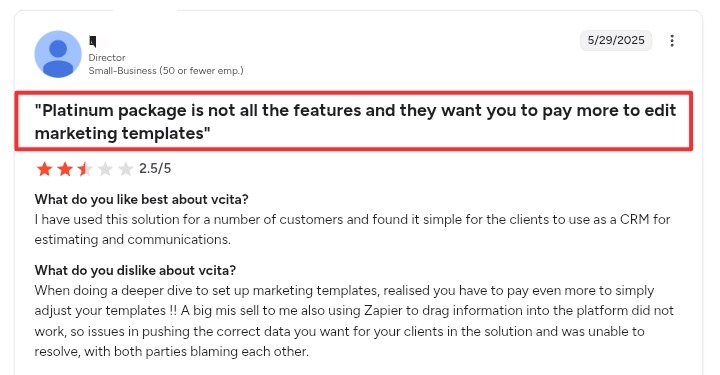
No growing agency wants to hit a paywall for basic functionality. Users have reported major frustrations even after upgrading to high-tier plans. A user on G2 highlighted a “big mis-sell” where the user discovered they had to pay even more just to adjust marketing templates despite being on a “Platinum” package.

Source: G2

​Inability to Manage Multi-Location Scalability

Vcita is designed for the “single business” user. It lacks a centralized command center where an agency lead can view many different locations in a single filterable grid. There is also no built-in client health score to tell you which of your 15 HVAC clients is about to cancel 

What Features to Look For in a Vcita Alternative?

For efficient operation, scaling, and/or outpacing the competition, your next platform must go beyond basic administrative support and become a high-velocity business engine. Here are four specific, high-impact features to look for:

  • All-in-One Client Hub: Pick a tool where clients can sign papers, pay bills, and see project updates in one private login area. This keeps everything in one spot. It should have a great mobile app so you can run your whole business even from mobile.
  • Elegant Marketing & Sales Automation: Your software should be like a 24/7 assistant that automatically emails new leads the second they fill out your form. For example, instead of you manually typing "thank you" notes, a good system sends a series of helpful messages to turn interested strangers into paying customers. This ensures you never lose a sale just because you were too busy to reply.
  • Easy Payments: Choose a system that sends automatic payment reminders so you don't have to ask clients for money awkwardly. It should also handle multi-currency billing and multiple payment gateways without added complexity. 
  • No Barriers to Communication: A good tool should also have a one-click booking calendar that syncs with your phone to prevent double-booking. Good AI features can even summarize your meetings into a to-do list so you don't have to take manual notes.

Simple Setup and Fair Pricing: The software should be easy to learn without needing a tech expert or buzzing support every day. Make sure it connects easily with tools you already use, like your bank, email, or even Zapier. Most importantly, the price should remain steady as you grow, rather than hit you with hidden fees.

​Synup

​Best Suited For: Mid-sized Marketing & Advertising Agencies
Source: Synup

​What Synup Does

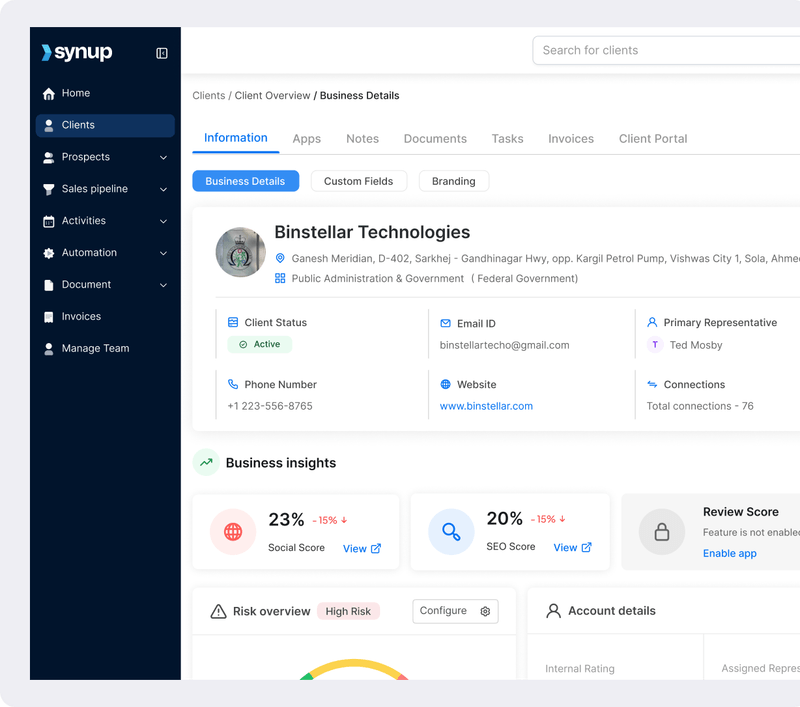
Synup OS is a full growth engine. Most CRMs tell you who the client is, but Synup tells you how the client is doing. It pulls together sales, onboarding, billing, and fulfillment into one dashboard.

​The biggest differentiator is that Synup gives you white-label marketing apps (Listings, Reviews, Social) that you can hand over to your clients. You can literally offer your own “agency-branded” app suite to your local businesses at no extra cost, making you look like an enterprise-level firm while keeping your overhead rock-bottom.

​Key Features

​🏆 White-Label Client Portal & Reporting: Give every client a portal with your logo where tasks, files, and reports live together.

🏆 Lead Acquisition & Prospecting: In addition to upgrading your post-lad workflows, you also get to pull your prospecting efforts onto the same tool. Access a database of over 40 million business contacts with 150+ filters (industry, location, SEO gaps, etc.) to identify and acquire high-intent leads.

🏆 Sales Pipeline & CRM: Track leads, deals, tasks, and communications within a unified sales pipeline. It includes features like email integration, activity reminders, and a detailed customer activity timeline.
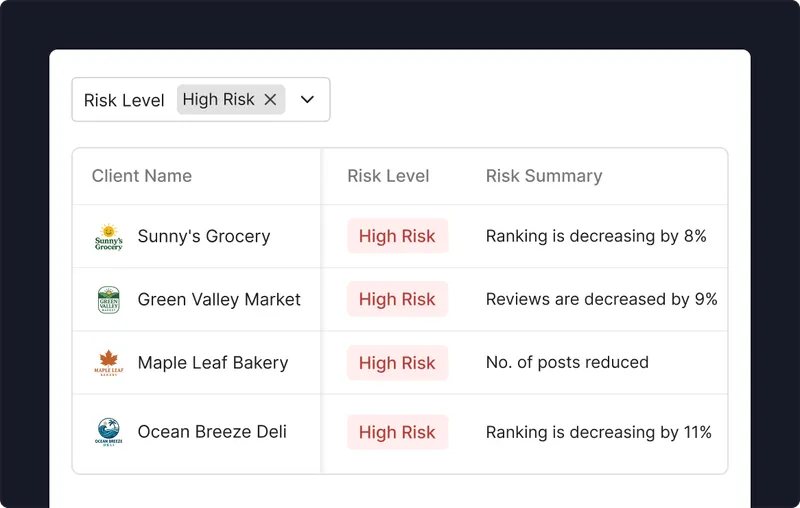
🏆 The Client Table Command Center: A filterable grid where you can see every location, their health score, and which services are active. 

🏆 Automated Invoicing & Payments: A flexible, agency-ready payment system that supports global gateways like Stripe and PayPal, along with automated one-time, split, or recurring invoicing. You can also customize your invoices to boost professionalism.

🏆 Integrated Fulfillment: Push local listing updates or manage reputation across Google and Yelp directly from the OS.

🏆 Churn Forecasting: Predictive insights that flag “at-risk” accounts based on performance data. 

🏆 Sales Pipeline & CRM: Track leads, deals, tasks, and communications within a unified sales pipeline. It includes features like email integration, activity reminders, and a detailed customer activity timeline.

Source: Synup

What Makes Synup The Best Vcita Alternative

​Synup solves the scalability problem. While Vcita forces you to build “manual bridges” between your sales and your work, Synup integrates them. Plus, the ability to white-label the entire experience means you are building equity in your own brand, not someone else's.

​Benefits of using Synup

  • Stop Agency Churn: By seeing live performance metrics alongside client data, your account managers can be proactive instead of reactive.
  • Scale Without Bloat: Automate the repetitive drudge work of onboarding so your team can handle 3x the client load without burning out.
  • Increased Per-Client Revenue: Easily upsell new services (like reputation management or social posting) because the tools are already built into the platform you are already using.
  • Real-Time Client Insights: Operate with a single source of truth for every client. You’ll get access to a dashboard with a complete, up-to-date view of every client. This includes payment information, engagement, risk factors, and more. This lets you identify opportunities to upsell, improve, or even pull back.
  • Track Your Work: Store all client interaction data, calendar events, tasks, check-ins, and due dates in one intuitive view. This keeps every team member aligned and provides smart reminders so nothing gets missed.

​Pros

​✅ Full white-labeling for portals and mobile apps.

✅ Unified dashboard for both agency ops and client fulfillment.

✅ Built-in predictive analytics to spot churn early.

​Cons

​🚫 Likely too much “horsepower” for a solo freelancer with 2 to 3 clients.

What Customers Say

“I love how Synup brings together effortless listings updates, review management, and local page creation in one clean, centralized platform—saving time and boosting local visibility. It was surprisingly easy to implement and get started with, even without a dedicated technical team. Their customer support team is also incredibly responsive and helpful whenever I have questions or need assistance.”

- Review collected by and hosted on G2.com.
​Nimble

​Category: CRM & Relationship Management

What Nimble Does

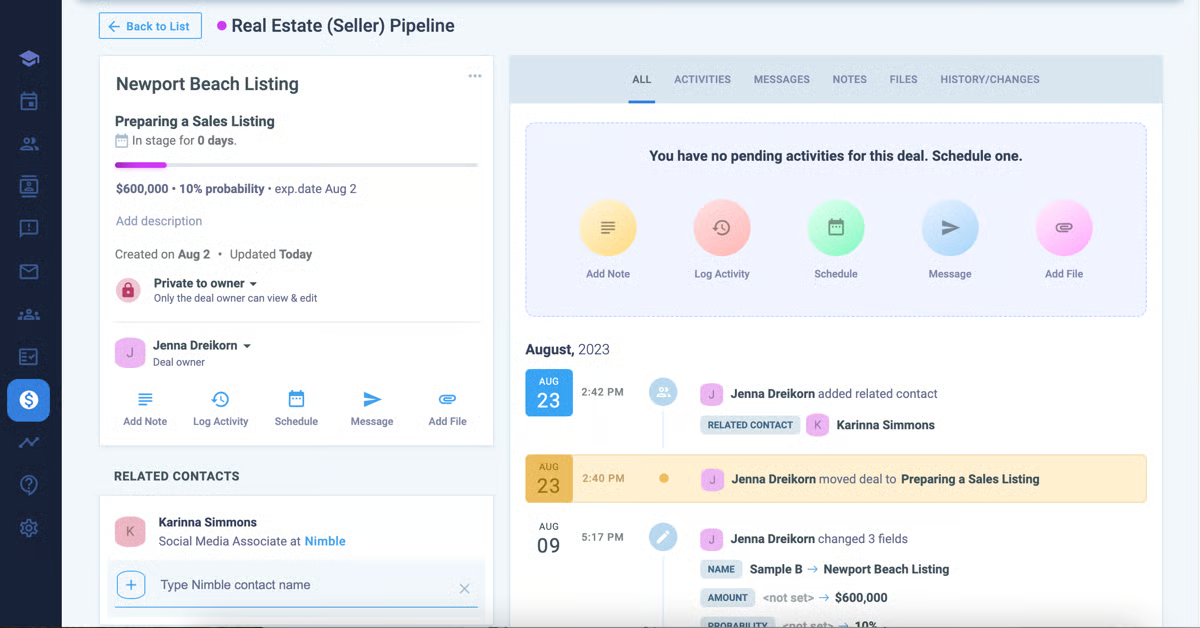
Nimble is built for relationship-first agencies. If your growth strategy relies on networking, local chamber events, and high-touch outreach, Nimble is a strong fit. It is a social CRM that lives inside your inbox. Compared to Vcita’s more structured approach, Nimble feels more fluid, pulling in context from LinkedIn, X, and email history so you have a complete picture of each contact before you hit send.

Source: G2

Key Features

  • Unified Email Marketing Suite: Now includes a built-in HTML Drag-and-Drop Editor and AI Intent Message Generator. Supports unlimited email sends (bypassing the typical 500-2,000/day provider limits) when using the Nimble Email Marketing add-on ($15/month).
  • Robust contact management (ORM - Object/Relationship Management): Automatically builds contact records, enriching them with social/business data, and syncing with Microsoft 365/Google Workspace.
  • Nimble Prospector: A browser extension that auto-enriches contact records with data like company revenue, industry, and executive social handles.

​Benefits of Nimble

  • Cost Reduction: By consolidating CRM, Email Marketing, and Social Listening, agencies can save an average of $200+ per month in SaaS subscriptions.
  • Zero-Admin Maintenance: Nimble automatically maps every email, meeting, and social interaction to a single timeline. It boasts a 99% "plan to renew" score because it eliminates the manual data entry that kills most CRM adoption.
  • Immediate ROI: Most users see measurable outreach results within the first 30 days, thanks to AI-assisted prospecting tools.

​Pricing

  • Nimble Business: $29.90/user/month.

Nimble offers discounts when you choose to be billed annually.

​Pros

​✅ Best-in-class social media and contact enrichment.

✅ Very low barrier to entry for small teams who hate complex software.

​Cons

​🚫 No built-in fulfillment tools for agency services (Listings, SEO, etc.).

🚫 Limited invoicing and payment features.

What Customers Say

​”As a small business owner, I have tried several software programs to help me keep an up-to-date and comprehensive contact process with both current clients and potential leads. This program stood out for being intuitive, fairly easy to use, and it fulfilled all of my requirements. What's more is that this is relatively inexpensive, and they are particularly sensitive to small business operations.”

- Review collected by and hosted on G2.com.
Keap

Category: CRM & Marketing Automation

What Keap Does

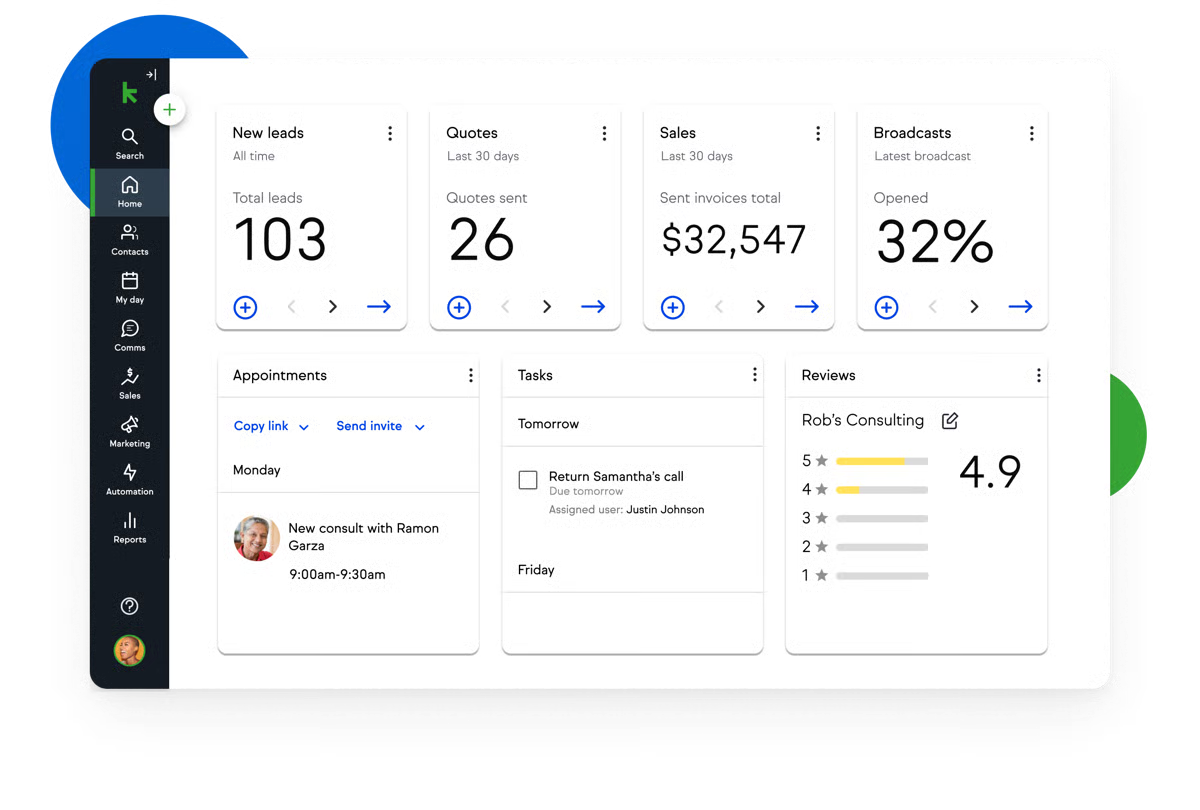
Keap, formerly Infusionsoft, is the big engine of small business automation. For agencies that enjoy building complex funnels, such as multi-step email sequences for niche clients like dental groups, Keap is hard to match. It is well-suited for agency owners who want to set up sophisticated automations once and let them run with minimal ongoing effort. 

Source: G2

Key Features

  • Advanced Automation Builder: A visual canvas to build sequences for everything from lead capture to invoice reminders.
  • Automated Billing: It “chases” late payments with automated email triggers, reducing manual collections work.
  • Lead Scoring: Automatically tags and ranks leads based on engagement.
  • CRM and Pipeline Management: Centralizes contacts, deals, and client activity in a customizable pipeline, giving agencies clear visibility into every stage of the client lifecycle.

​Benefits of Keap

  • Consistent Follow-Up: Keap ensures those 7 to 10 touches needed to close an SMB deal happen automatically.
  • Reduced Admin Overhead: Automating appointments and follow-ups can save hours of staff time every week.
  • Improved Cash Flow: Automated invoicing, payment reminders, and recurring billing help agencies get paid faster and reduce revenue leakage.

​Pricing

Keap recently simplified to a unified model starting at $299/month for basic features with 1,500 contacts and 2 users.

​Pros

​✅ The most robust automation engine in the SMB market.

✅ Combines CRM, billing, and landing pages in one tool.

​Cons

​🚫 Can be overwhelming and expensive for simple agency needs.

🚫 Interface can feel dated compared to modern “App-style” CRMs.

What Customers Say

“Keap was a great starting point for marketing and automation, with its pipelines and stages working really well. It serves as a solid introduction to CRM. However, it does not offer enough flexibility for complete customization.”

- Review collected by and hosted on G2.com.
​Dubsado

​Category: Business Management Solution

What Dubsado Does

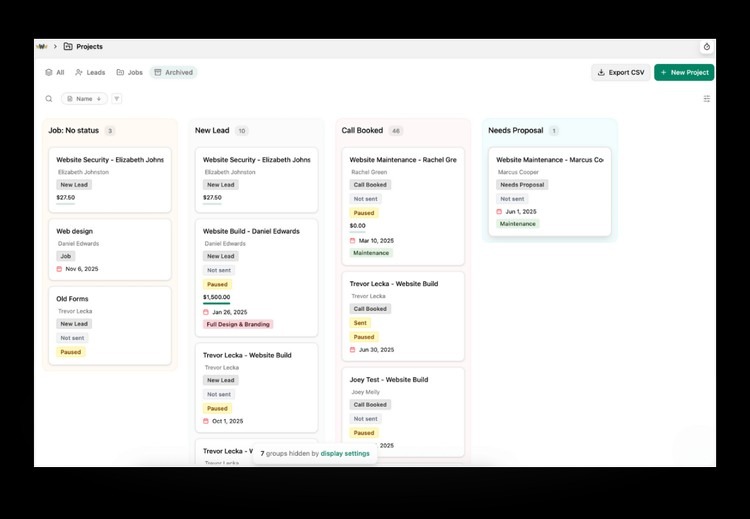
​Dubsado is built for white glove agencies. If you charge $5,000 for a website project or $2,000 per month for high-end strategy retainers, the presentation of your process matters. Dubsado lets you create interactive, fully branded proposals that feel like mini sales pages and reinforce a premium client experience.

Source: Dubsado

​Key Features

  • Interactive Proposals: Allows clients to select a package, sign the contract, and pay the deposit on one screen.
  • Client Portals: A dedicated, branded space where clients see every invoice and contract. It includes 3 additional users for free on most plans.
  • Workflow Automation: Triggers like “Send 'Welcome Guide' once contract is signed” help you look organized from day one.

​Benefits of Dubsado

  • Higher Close Rates: When your proposals look this professional, you can justify higher price points.
  • Seamless Onboarding: It removes the friction between a “yes” and a signed contract.
  • Track Progress: Identify revenue patterns, compare month-by-month goals, and pipeline health.

Pricing

  • Starter Plan: $35/month 
  • Premier Plan: $55/month.
  • Add-on Brands: $10/month per additional brand.

Discounts are available on annual billing.

​Pros

​✅ The gold standard for branded, interactive proposals.

✅ Very affordable for solo or small boutique agencies.

​Cons

​🚫 No fulfillment tools (you still need separate software for SEO/Ads).

🚫 Automation does not scale well for very large teams (30+ users).

What Customers Say

“It’s brilliant for keeping contracts, invoices, scheduling, and time tracking all in one place. The first time I sent a proposal to a client, it was accepted, the contract signed, and the invoice paid within 5 minutes of me sending it.”

- Review collected by and hosted on G2.com.
​Thryv

​Category: All-in-One Small Business Software
Source: Thryv

​What Thryv Does

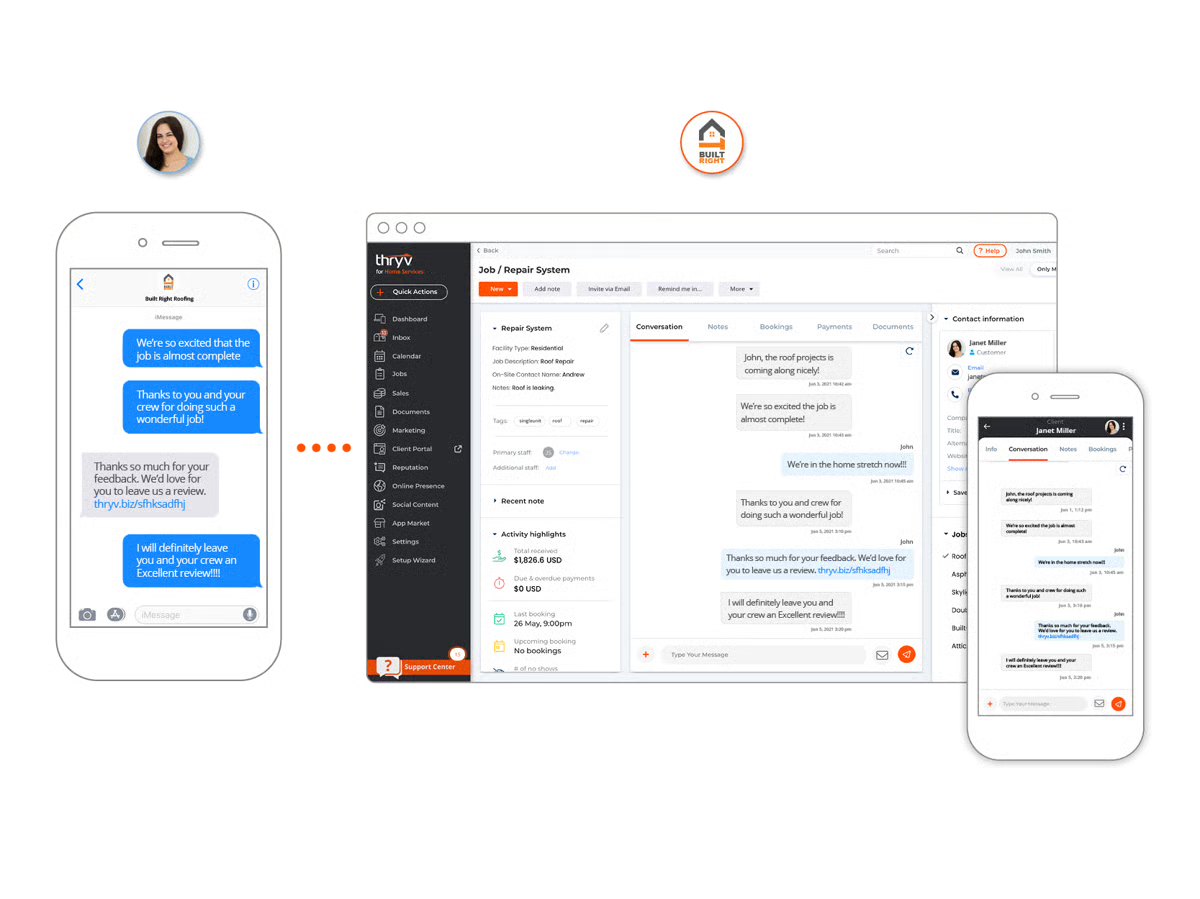
Thryv is one of the closest direct competitors to Vcita, but it takes a more aggressive approach to marketing and fulfillment. While Vcita focuses primarily on scheduling, payments, and client management, Thryv positions itself as an all-in-one business command center for local service businesses. In addition to appointments, it layers in tools for marketing execution, listings management, and customer communications aimed at helping local shops run and promote their business from a single platform.

​Key Features

  • Listings Management: Syncs business data across 50+ directories (Yelp, Google, Bing) to boost local SEO.
  • Social Media Management: A built-in tool to schedule posts across Facebook, Instagram, and LinkedIn.
  • AI Review Response: Uses AI to help small businesses respond to customer feedback quickly and professionally.
  • Keap’s CRM: A recent acquisition means that you get access to Keap’s CRM and automation features. Organize customer data, manage your scheduled calls, and send out invoices.

​Benefits of Thryv

  • Marketplace Presence: It helps local businesses show up where customers are searching.
  • Simplified Tech Stack: It replaces 3 to 4 other tools, saving local business owners time and software fees.

Pricing

  • Marketing Center: Starts around $244/month.
  • Bundles: Starts at $646/month (includes 50+ local listings and a website). Goes up to $1,475/month.

​Pros

​✅ Comprehensive marketing suite (listings/social) included.

✅ Built specifically for the needs of local service businesses.

​Cons

​🚫 Can be very expensive for small agencies to manage internally.

🚫 Requires a one-time onboarding fee (often $250+).

What Customers Say

​”When it comes to marketing automation, Thryv is the best I have used. It comes with awesome features for lead capture, lead scoring, and handles email marketing really well. In addition to scheduling, the tool also makes it easy to design and build landing pages. I like the social media marketing features and the fact that using and understanding Thryv is straightforward.

With Thryv, we have taken our business to the next level, and this is a plus.”

- Review collected by and hosted on G2.com.
Close CRM

​Category: Sales-Focused CRM

What Close Does

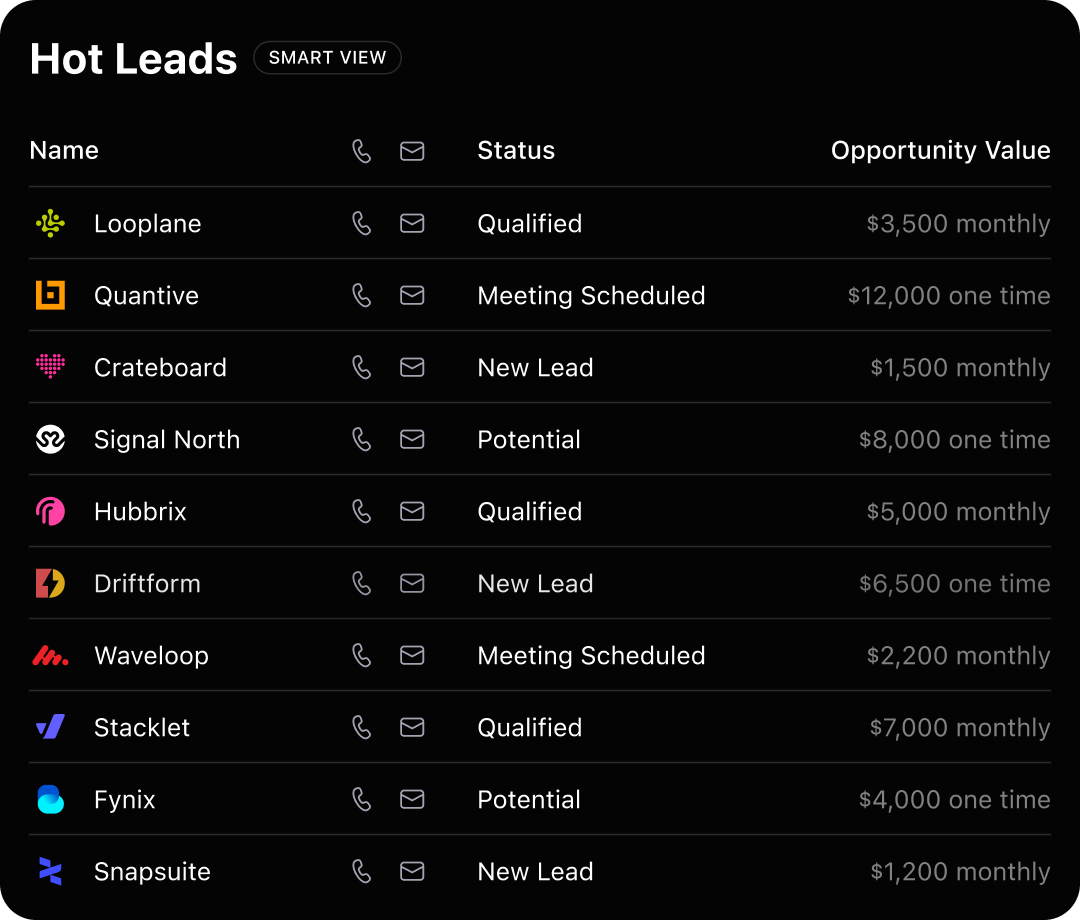
Close is often described as the Formula 1 car of CRMs because it prioritizes speed and high-volume sales activity. It is built around powerful calling and SMS features, automatic activity logging, and fast workflows that keep reps in motion without unnecessary clicks. If your agency has a team of closers who spend most of their day dialing leads to sell services like reputation management or SEO packages, Close is one of the best tools on this list for maximizing call efficiency and conversion rates.

Close also includes built-in email sequences, pipeline visibility, and reporting designed to support B2B sales teams that run heavy outbound and touch-based outreach.

Source: Close

​Key Features

  • Built-in Power Dialer: Reps can work through a list of 100 leads in record time without picking up a desk phone.
  • AI Enrich: Automatically pulls data like contact titles and company details directly into the record.
  • Activity Dashboards: Provides SDR and AE teams with real-time visibility into their calling and emailing performance.

​Benefits of Close CRM

  • Massive Productivity Boost: Teams frequently report higher call volume and more meetings booked after switching to Close, largely due to its built-in dialer and minimal data entry requirements.
  • Faster Response Times: Service companies benefit from faster response times with an integrated CRM.
  • Reduced Admin Work: Automatic call logging, email tracking, and activity capture eliminate manual CRM updates, allowing sales reps to spend more time selling.

​Pricing

  • Essentials Plan: $49/user/month
  • Growth Plan: $109/user/month
  • Scale: $149/user/month

​Pros

​✅ The fastest CRM for high-volume outbound sales.

✅ Incredible built-in calling and SMS capabilities.

​Cons

​🚫 No invoicing or payment processing.

🚫 Not designed for client management after the sale is closed.

What Customers Say

“Close is incredibly intuitive — the ease of use is one of its biggest strengths. From day one, our team could navigate the platform without training, and it’s made daily tasks feel effortless.”

- Review collected by and hosted on G2.com.
​Freshbooks

​Category: Accounting & Invoicing

What FreshBooks Does

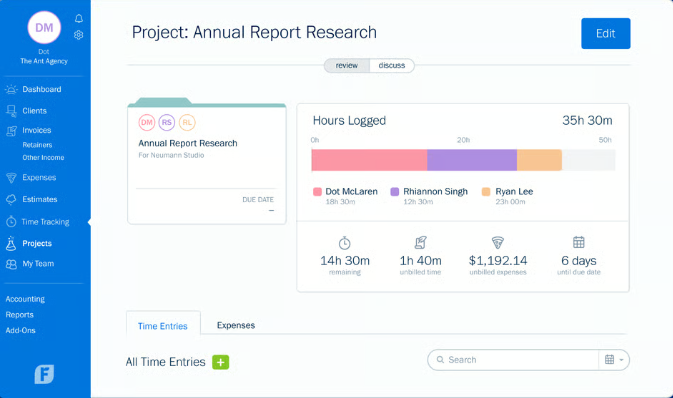
FreshBooks is built for agency owners who are still managing their finances in spreadsheets. While Vcita focuses on payments and basic billing, FreshBooks is full accounting software designed to handle the complete financial picture. It tracks billable hours, generates professional invoices, automates recurring billing, manages expenses, and provides robust reporting so you can see exactly how profitable each client or project is. FreshBooks also integrates with banks and payment processors, making reconciliation easier, and supports multiple currencies for agencies working with international clients.

Source: Freshbooks

​Key Features

  • Automated Invoicing: Set it up once, and FreshBooks sends the bill every month, including automatic late fees.
  • Project Profitability: See exactly how much you are spending on contractors vs. what the client is paying you.
  • Time Tracking: A built-in timer that flows directly onto the client’s invoice, ensuring every billable minute is captured.

​Benefits of FreshBooks

  • Faster Payments: Agencies using FreshBooks often get paid faster than with Vcita 
  • Tax-Time Ease: Everything is categorized and ready for your accountant, saving you a massive headache.
  • Clear Profit Visibility: Track client and project profitability in real time, helping agencies make informed decisions about pricing and resource allocation.

​Pricing

  • Lite: $8.40/month 
  • Plus: $15.20/month 
  • Premium: $26/month 

Customized pricing is also available. Discounts are available with annual billing.

​Pros

​✅ Extremely easy to use for “non-accountants”.

✅ Excellent mobile app for tracking expenses and sending invoices on the go.

​Cons

​🚫 Very limited sales CRM features (no pipelines or lead tracking).

🚫 No marketing fulfillment tools.

What Customers Say

“FreshBooks is extremely easy to use, even for someone without an accounting background. The interface is clean, intuitive, and saves me time when creating invoices, tracking expenses, or managing projects. Despite being user-friendly, it still offers a strong set of features like time tracking, recurring invoices, and payment reminders. It strikes the perfect balance between simplicity and functionality, which makes it a great tool for small businesses.”

- Review collected by and hosted on G2.com.
Insightly

​Category: CRM & Project Management

What Insightly Does

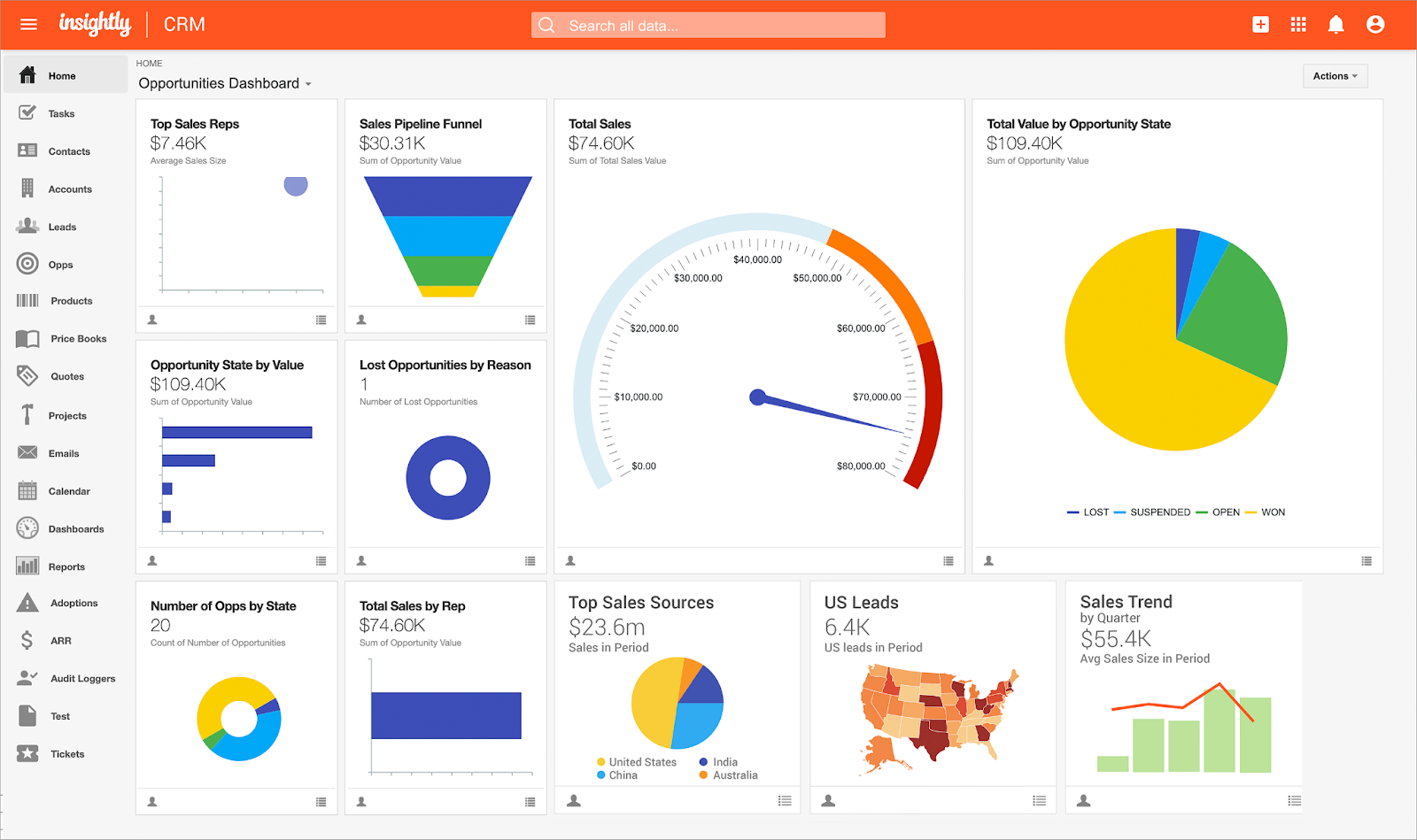
Insightly is a strong bridge between sales and delivery. In many agencies, CRM and project management live in separate systems, which creates handoff gaps after a deal closes. Insightly brings those worlds together by combining CRM with built-in project management. When a deal is marked as won, it can be converted directly into a project with tasks, milestones, and owners already in place.

This makes Insightly a good fit for agencies that deliver complex, multi-phase work, such as a three-month website build followed by an ongoing SEO retainer, where clean transitions from sales to execution matter.

Source: Insightly

​Key Features

  • Project Management Integrated: Track tasks, milestones, and project pipelines right alongside your sales contacts.
  • Relationship Mapping: See the “web” of connections between different contacts and companies.
  • Workflow Automation: Automate the “hand-off” from the sales team to the account manager by creating up to 2,000 automated tasks per month on some plans.

​Benefits of Insightly

  • Better Fulfillment: Projects do not get lost in transition after the contract is signed.
  • Unified View: Everyone on the team (sales and ops) sees the same client history.
  • Built-In Accountability: Tasks, milestones, and owners are assigned easily when deals convert to projects.

​Pricing

The Insightly CRM is priced in the following tiers.

  • Plus: $29/user/month
  • Professional: $49/user/month
  • Enterprise: $99/user/month

The All-in-One Insightly package includes CRM, marketing automation, app connect, and support and ticketing. It’s priced as follows:

  • Plus: $349/month
  • Professional: $899/month
  • Enterprise: $2,599/month

​Pros

​✅ Best CRM for agencies with complex, multi-step delivery processes.

✅ Highly customizable to fit unique business flows.

​Cons

​🚫 The interface can feel a bit “clunky” and dated compared to newer tools.

🚫 Requires more setup time than a simple Vcita-style tool.

What Customers Say

“What I like best about Insightly is how it combines CRM and project management in one platform, so you can track a customer from first lead all the way through delivery. It’s also very easy to use, with clean workflows and strong email and calendar integration.”

- Review collected by and hosted on G2.com.
​Salesforce

​Category: Enterprise CRM

​What Salesforce Does

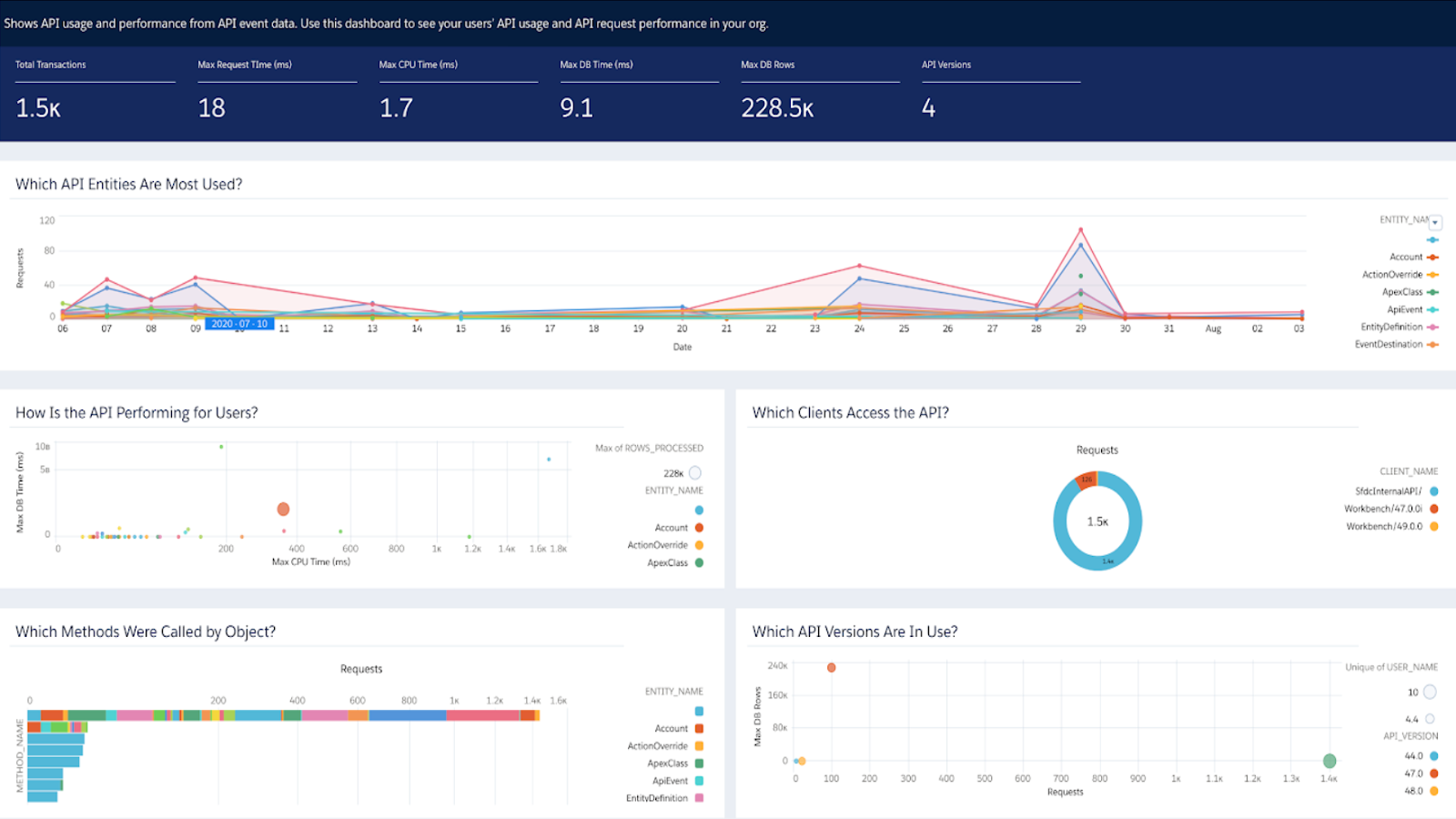
​Salesforce is the sun around which the enterprise CRM world revolves. It is infinitely powerful and can be customized to do literally anything you want. However, for a 10-person agency, it is often overkill. It is best suited for massive agencies that manage thousands of businesses and need to integrate with proprietary data systems.

Source: Salesforce

​Key Features

  • Agentforce AI: Launched in 2025, this uses a “Flex Credit” model, charging roughly $0.10 per action for AI-driven customer service and sales tasks.
  • Infinite Customization: You can build custom objects and unique workflows for every niche you serve.
  • Data Cloud: Includes 2.5 million “Data Services Credits” per year on certain editions to power advanced analytics.

​Benefits of Salesforce

  • Future-Proof: You will never outgrow Salesforce. It can scale from 1 user to 100,000.
  • Complete Visibility: A “360-degree view” of your entire business.
  • Ecosystem and Customization: Salesforce’s customization allows agencies to tailor workflows, reporting, and integrations to match even the most complex sales, marketing, and service operations.

​Pricing

  • Starter Suite: $25/user/month
  • Professional: $80/user/month
  • Agentforce Add-On: $125/user/month for unlimited internal AI agent usage.

​Pros

​✅ The most powerful and flexible CRM in the world.

✅ Industry-standard reporting and security.

​Cons

​🚫 Extremely steep learning curve: often requires a dedicated admin.

🚫 High implementation costs, often ranging from $50,000 to $150,000 for mid-market firms.

What Customers Say

​”I like how the Salesforce Platform is easy to use, whether you're an admin or a developer. Creating new lightweight apps using pre-existing components is incredibly simple. I appreciate the excellent security it provides to the organization through the privileges concept. It's the best CRM for getting leads and converting them into opportunities. The simple UI with great objects like accounts, contacts, and leads, etc., really stands out.”

- Review collected by and hosted on G2.com.
​Freshsales

​Category: Modern AI-Powered CRM

​What Freshsales Does

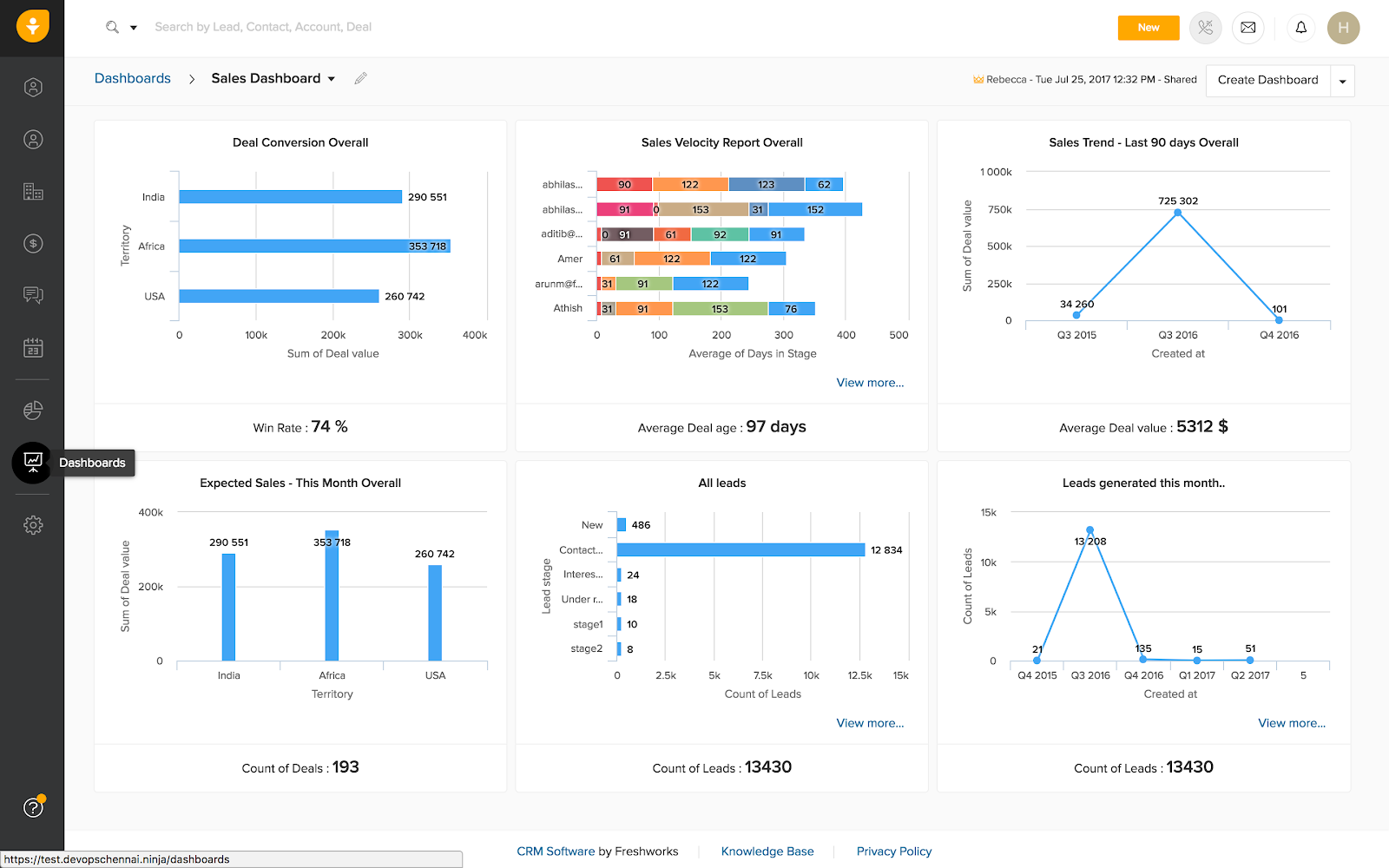
​Freshsales by Freshworks is a modern, easy-to-use CRM designed for growing sales teams. It serves as a strong middle ground for agencies that need more structure and automation than Vcita offers but are not ready for the cost or complexity of Salesforce. Freshsales focuses on usability while still supporting core sales workflows like lead management, pipelines, and automation.

It includes Freddy AI, Freshworks’ built-in AI assistant, which helps score leads, surface insights, and recommend next-best actions, so sales reps know who to follow up with and when.

Source: Freshsales

​Key Features

  • AI Lead Scoring: Freddy AI analyzes engagement patterns to flag hot leads and nudge you to follow up.
  • Built-in Chat & Phone: Communicate with leads via WhatsApp, chat, or phone directly from the CRM without third-party setup.
  • Visual Sales Pipeline: A clean, Kanban-style view that makes it easy to drag deals from “Proposal” to “Closed Won.”

​Benefits of Freshsales

  • Low Barrier to Entry: Most teams can get a working setup in under 30 minutes.
  • Competitive Price: It offers a lot of “enterprise-grade” features like AI and automation starting as low as $9/month.

​Pricing

  • Growth: $9 to $15/user/month
  • Pro: $39/user/month
  • Enterprise: $59 to $69/user/month

​Pros

​✅ Modern, intuitive interface that teams actually enjoy using.

✅ Great AI-driven insights for smaller budgets.

​Cons

​🚫 Reporting can be a bit rigid compared to more advanced CRMs.

🚫 Mobile app performance can sometimes be inconsistent.

What Customers Say

“Freshsales overall is quite a good product, but sometimes the advanced automation and reporting features seem a bit complex, especially for new users.”

- Review collected by and hosted on G2.com.

Summing Up…

Vcita often falls short for scaling agencies managing high-volume, low-margin SMB accounts due to manual fulfillment gaps and fragmented data. 

Synup OS is a premier “agency operating system” that unifies CRM, white-labeled client portals, and automated fulfillment (listings, reviews, social) into one single source of truth. Other top contenders include Nimble for relationship tracking, Keap for complex automation, and Close CRM for aggressive outbound sales. 

By switching to a dedicated agency platform, you can eliminate spreadsheet nightmares, protect profit margins, and stop client churn through proactive health monitoring. 

​Get Started with Synup

​Synup OS is the only operating system on this list built from the ground up for the unique chaos of high-volume agency life. It does not just manage the relationship but also the work.

​By centralizing your sales, onboarding, and fulfillment on a single platform, you stop profit-leaking manual labor and start scaling. Book a demo with Synup today and see how you can offer your own white-labeled marketing apps to your clients while cutting your internal admin time.

Best Vcita Alternative: FAQs

  1. ​What is the best Vcita alternative for local marketing agencies?

If you manage high-volume SMB accounts, Synup OS is a strong choice. While Vcita is designed primarily for solo practitioners and small service businesses, Synup is built as an agency operating system. It goes beyond scheduling and billing to support actual fulfillment. With white-labeled marketing tools for listings management, reviews, and social media, Synup allows agencies to manage multiple clients and locations from a single platform.

  1. ​Are there free alternatives to Vcita?

While platforms like Freshsales or Salesforce offer limited free tiers, they are usually lite versions that won”t help you scale. You will typically need a paid plan. If you are serious about protecting your profit margins, free usually ends up costing you more in manual labor and tool sprawl.

  1. What Vcita alternative allows me to white-label?

Synup OS and Thryv offer the strongest white-labeling options. Synup OS specifically allows you to brand the entire client portal and the fulfillment apps themselves. This makes your agency look like it has proprietary technology, which builds massive trust with clients and justifies your management fees.

¡Asóciese con Synup hoy mismo!

Reserve una llamada con nuestro gerente de asociaciones para explorar soluciones de crecimiento personalizadas para su agencia.