Top 7 Dashclicks Alternatives for Marketing Agencies

Top Dashclicks Alternatives

Most agencies are still running their businesses on a messy, cobbled-together collection of software or tools that don’t talk to each other. So, confusion increases. Revenue leaks. 

If you’re here, Dashclicks is probably no longer fitting cleanly into your workflow, or you’re evaluating whether it ever should. Maybe the customization feels shallow. Maybe white-labeling isn’t white-label enough. Or maybe, as your client count grows, the economics are starting to feel off.

If your agency is tired of stitching multiple point tools together (Dashclicks or otherwise), this guide evaluates the alternatives.

We will show you which is best at reporting, operations, billing, automation, client delivery, or white-labeling. We compare features, pros/cons (from user sentiment), and map features to real business benefits so you can decide with confidence.

TL;DR

  • Dashclicks provides great support but reveals some limitations, especially for agencies looking to scale up or refine. 
  • Some Dashclicks alternatives to pick from:
    • Synup: Best for mid-size marketing and advertising agencies
    • AgencyAnalytics: Good for client reporting & dashboards for agencies
    • Whatagraph: Automated marketing reporting, intelligence & visual dashboards
    • Teamwork: Project & resource management with client work focus
    • Keap: SMB-focused CRM & marketing automation
    • Vendasta: White-label reseller & operations platform for agencies
    • GoHighLevel: All-in-one agency CRM, automation, and client fulfillment platform

Why Switch from Dashclicks?

Dashclicks isn’t bad. It has built a solid name in white-label fulfillment, and the $199/month price tag looks friendly. But once agencies scale, the cracks show. 

Users switch when the platform they use creates more coordination work than it saves. 

Here’s what agencies usually report regarding the reasons for switching.:

  • Limited Customization Beyond the Surface: 

Agencies point out that while branding works well at a visual level, deeper customization requires workarounds. Need for deeper white-labeling, agency-centric operational controls, or native local SEO and reputation features (listings, reviews, social) pushes many agencies away.

  • The Fulfillment Lock-In:

One of the biggest reasons for switching is lock-in. If your “free” platform depends on using their fulfillment, you’re not running your ops; rather, you’re renting them. While Dashclicks offers “free” platform access to agencies that use their fulfillment services, many agencies feel constrained. This is fine early on. But it gets uncomfortable when you want control.

  • Feature Bloat:

Dashclicks bundles everything together, whether you need it or not. If you’re not selling social, for example, you’re still paying for it. So agencies that focus on specific services end up paying for functionality they’ll never use.

  • Fulfillment Quality Concerns: 

Fulfillment quality is generally good, but not perfect. Some users have reported inconsistency during peak volumes. Multiple G2 reviews have mentioned “communication issues” and “poor customer support.”

Given MarTech growth (14,106 products as per ChiefMartec’s 2024 landscape report and continuing expansion), agencies are choosing fewer, better-integrated platforms that let them consolidate operations and reclaim time. 

Smart agencies compare multiple alternatives first before buying. Those who compare 3–5 platforms report way higher satisfaction later. 

Yes, switching tools is annoying, but choosing the wrong one is worse.

What Features to Look For in a Dashclicks Alternative?

Use this checklist when you evaluate Dashclicks alternatives (we’ll reference these in our list below!):

  1. Agency OS/white-label capability: Client-facing portals and rebrandable apps. Custom domains. Zero vendor fingerprints.
  2. Billing & e-sign/invoicing: Proposals, e-sign, and pay workflow in one place. Recurring invoices and bundles are among the basic stuff. 
  3. Client reporting & dashboards: Flexible templates, live widgets, export options. 
  4. Local SEO & reputation: Listings, review monitoring/responding, indexation.
  5. Tasks/project/CRM: Integrated pipeline, tasks & handoffs.
  6. Integrations & data connectors: Ad platforms, analytics, POS, payment gateways.
  7. Security, multi-currency & compliance: For agencies with global clients.
  8. Pricing transparency & realistic time-to-value: Transparent pricing. No hidden per-seat fees. No “professional services” charges.
  9. Responsive customer support: Support matters more than feature lists. When the client portal breaks before a client call, you need a human.

Synup

Best suited for: Mid-sized Marketing & Advertising Agencies

What Synup Does

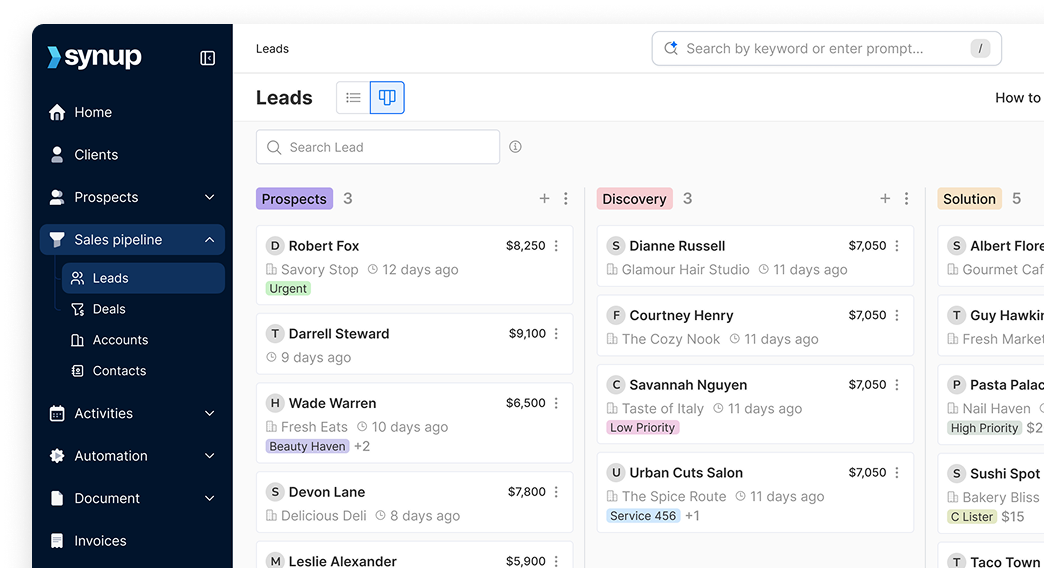
Synup is the best alternative to Dashclicks. It’s built as an agency operating system, not a single-purpose tool. Synup OS combines client lifecycle management, local SEO & reputation tools, CRM/tasks & workflows, and proposals, invoicing, payments & e-sign into a single platform that can be white-labeled for agencies and multi-location brands. 

Unlike Dashclicks, Synup is designed to run agency operations end-to-end, not just fulfillment. The OS provides client portals, churn forecasting, and free rebrandable marketing apps for end clients.

Synup allows you to manage the entire client lifecycle (sales, onboarding, delivery, billing, and retention) on a single platform. Plus, you get a full suite of white-label marketing apps (listings management, reviews, social, local SEO) that can be deployed to every client without additional platform fees.

Unlike platforms that stitch together multiple tools, Synup was architected as a single ecosystem. That means no data silos or hopping tabs. Instead, you get one source of truth for the entire client lifecycle.
Key Features

🏆Lead Generation & Sales Intelligence: Built-in SMB lead database with targeting by industry, geography, digital gaps, and online presence weaknesses. So pitches are problem-led, not generic.

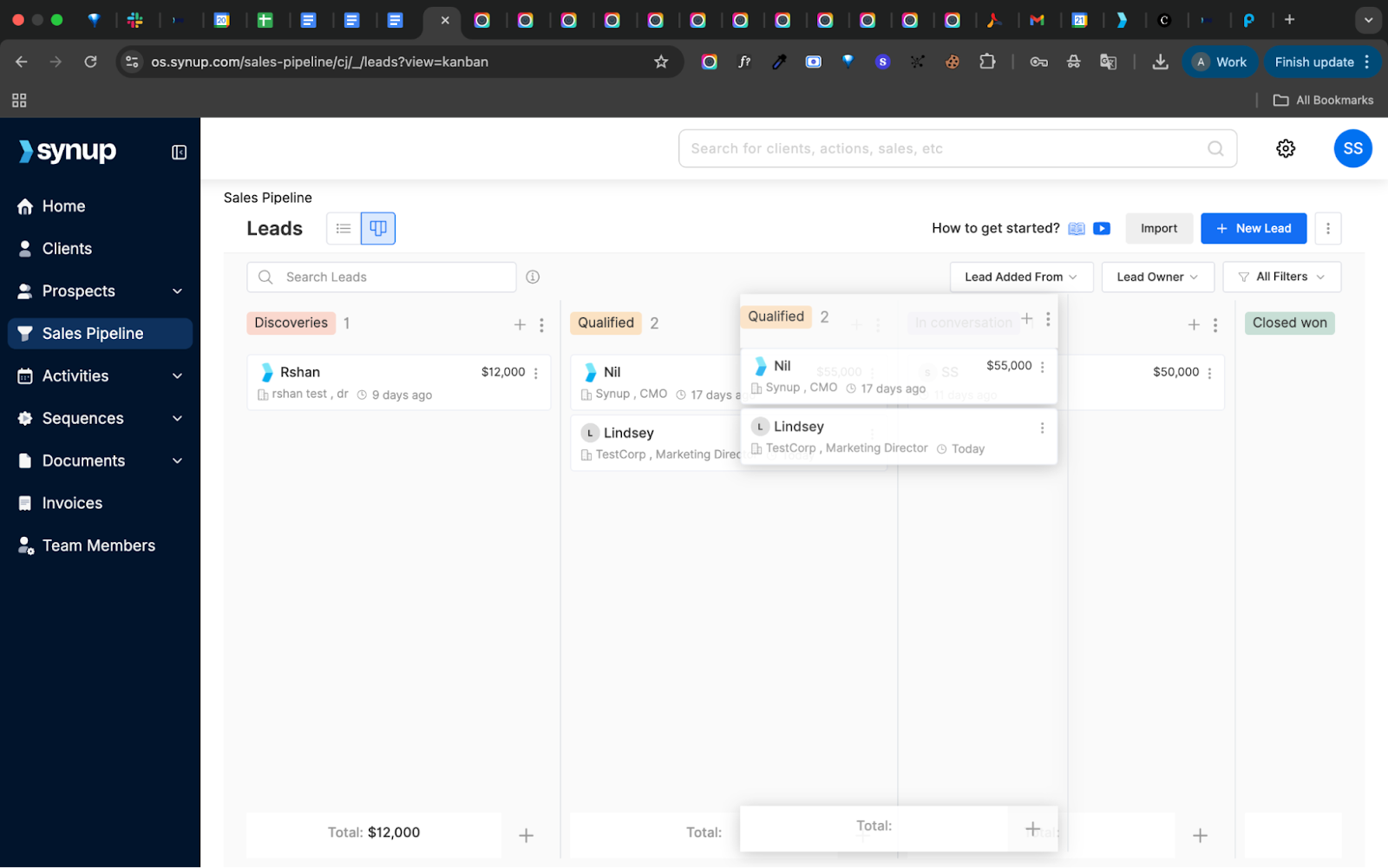
🏆Visual Sales Pipeline: Custom stages, automated task triggers, proposals, e-signatures, and revenue forecasting with full team visibility. Track when documents are viewed, signed, and paid.

🏆AI-Driven Churn Forecasting: Synup analyzes engagement, service usage, support tickets, and billing behavior to assign client health scores, flagging churn risk before it happens.

🏆Automated Invoicing & Payments: One-time, split, and recurring invoices. Branded templates, Stripe/PayPal gateways, multi-currency, online payments, late reminders, financial reporting, and accounting integrations without manual reconciliation.

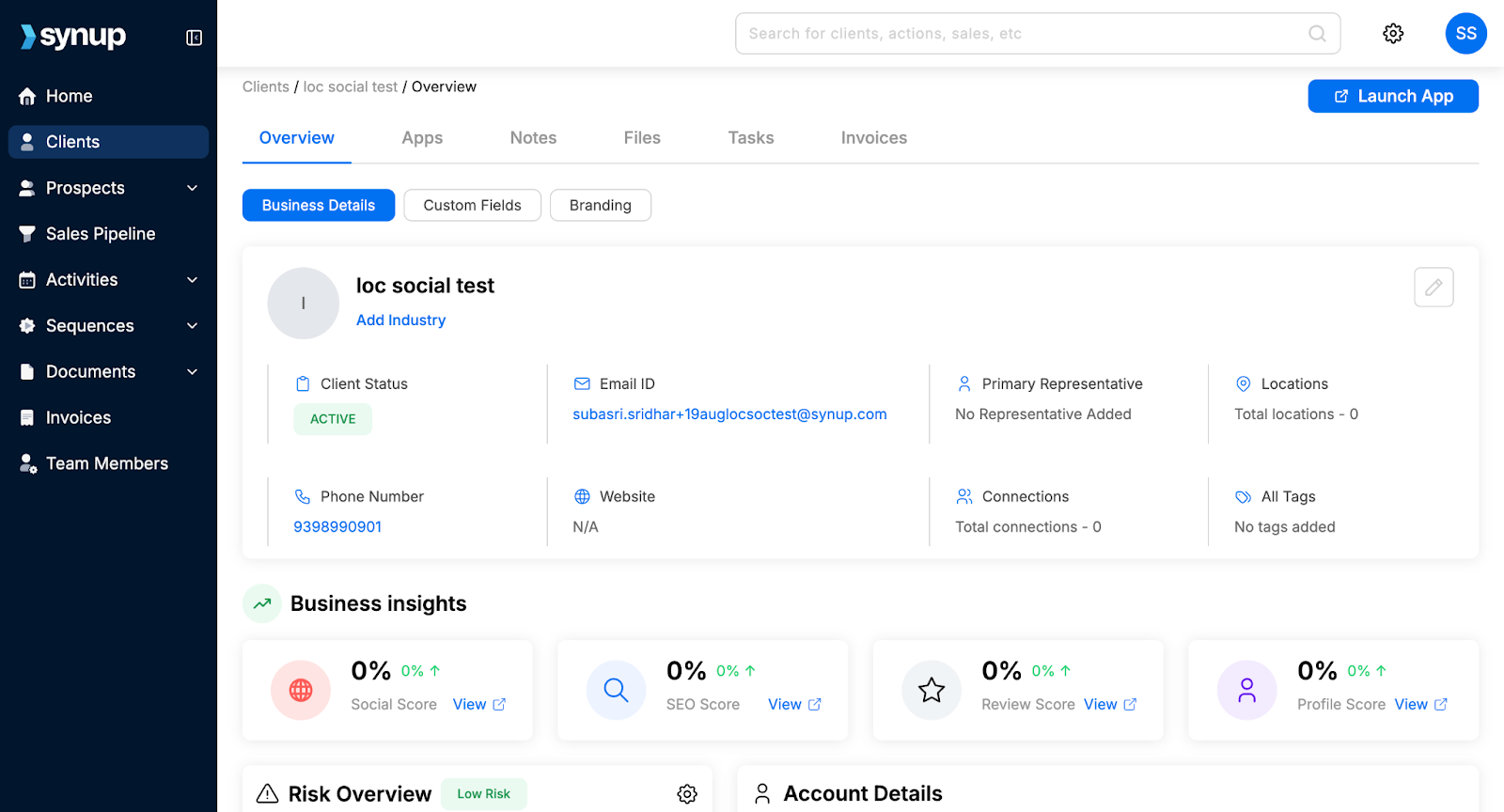
🏆Centralized Client Dashboard: A single view for every client: contracts, services, billing, communication history, performance, and custom business-specific fields.

🏆White-Label Client Portal: Fully branded portals where clients access reports, manage listings, respond to reviews, publish social posts, and request support under your domain.

🏆Task & Activity Tracking: Internal project tracking with controlled client visibility, keeping collaboration clean and professional.

🏆Listings Management & Indexation: Publish to business directories. Monitor and respond to reviews.

What Makes Synup The Best Dashclicks Alternative

Dashclicks centers on fulfillment. Synup centers on agency ownership. 

Synup is the best for agencies that need a single, white-label hub that handles local SEO, listing management, reputation, billing & client portal, i.e., agencies that want productized services to resell alongside delivery.

The big unlock is that you’re not forced into someone else’s fulfillment. You can deliver in-house, outsource selectively, or use Synup’s built-in marketing apps. Your margins, your rules.

Another kicker is the churn forecasting. Synup tracks engagement, usage, tickets, and payments to flag at-risk clients before they ghost you. In an industry where acquiring a client costs 5–7× more than retaining one, that’s not just a “nice to have.”

Add in true white-label portals, automated billing, AI-assisted sales and reporting, and zero per-client software fees. Suddenly, scaling doesn’t punish you financially.

Bottom line: Synup is infrastructure. Not a crutch. DashClicks may help you launch, but Synup is what keeps your operation running smoothly.

Also Read: Why We Built Synup OS and How It’s Changing the Game for Agencies

Benefits of Using Synup

Here are the benefits that Synup’s features deliver:

Streamlined Operations

Replace 5–10 tools with one system. One login, one interface, one source of truth for every client interaction. Teams report saving 5–8 hours per week from reduced context switching alone.

Faster Cash Collection and Predictable Revenue Growth

Churn alerts, lead scoring, and pipeline forecasting create visibility you can actually plan around. Integrated proposals, e-signatures, and payment reduce Days Sales Outstanding (DSO) because there’s no file-handoff between sales and finance. Agencies report 20–30% shorter sales cycles.
Better Client Retention

Branded portals increase engagement while reducing support overhead. This directly improves retention.

Sell White-Label Products Quickly

Rebrandable client apps become additional revenue streams without dev work. You can add services, team members, and markets without platform constraints.

Higher Profit Margins

No per-client pricing. Margins improve as you scale. You also control fulfillment decisions. Outsource when convenient, fulfill in-house when profitable.

Unified Client Intelligence

Everything you need, from contracts and performance to communication, in one place.
Pros

✅Comprehensive agency OS with white-labeling and local SEO capabilities

✅Integrated invoicing/e-sign reduces tool switching

✅Churn forecasting is industry-leading

✅Free marketing apps (listings, reviews, and social management) for all clients

✅True white-label everything (from client portals to reports to notifications)

✅Transparent pricing with no hidden fees

Cons

🚫Best suited for agencies managing 5+ clients

How to Get Started with Synup

  1. Book a demo at synup.com.
  2. Map your current workflow to identify which Synup features replace your existing tools.
  3. Synup provides onboarding and templates for proposals/invoices. Import your client data into Listings using Synup's migration assistance (included in onboarding).
  4. Enable proposals & payments.
  5. Customize your white-label branding, including domain, logo, colors, and email templates.
  6. Launch a white-label client portal.
  7. Configure automated workflows for lead nurturing, client onboarding, and recurring invoicing. Also, configure payment gateway (Stripe/PayPal) and e-sign templates.
  8. Measure impact over 60–90 days.

What Customers Say

“Synup is robust in supporting businesses in managing all the business listings in multiple search engines. The tool allows social media posting, which increases the SEO visibility and centralized communication

The program provides dynamic review monitoring support, where all the feedback from clients is well identified and analyzed for sentimental reasons. The software creates brilliant SEO visibility, something that makes the search ranking escalate and increase.

The tool has robust social media planning, which entails continuous content creation and publishing with AI-supported scheduling.” 

- Review collected by and hosted on G2.com.
AgencyAnalytics

Category: Client reporting & dashboards for agencies

What AgencyAnalytics Does

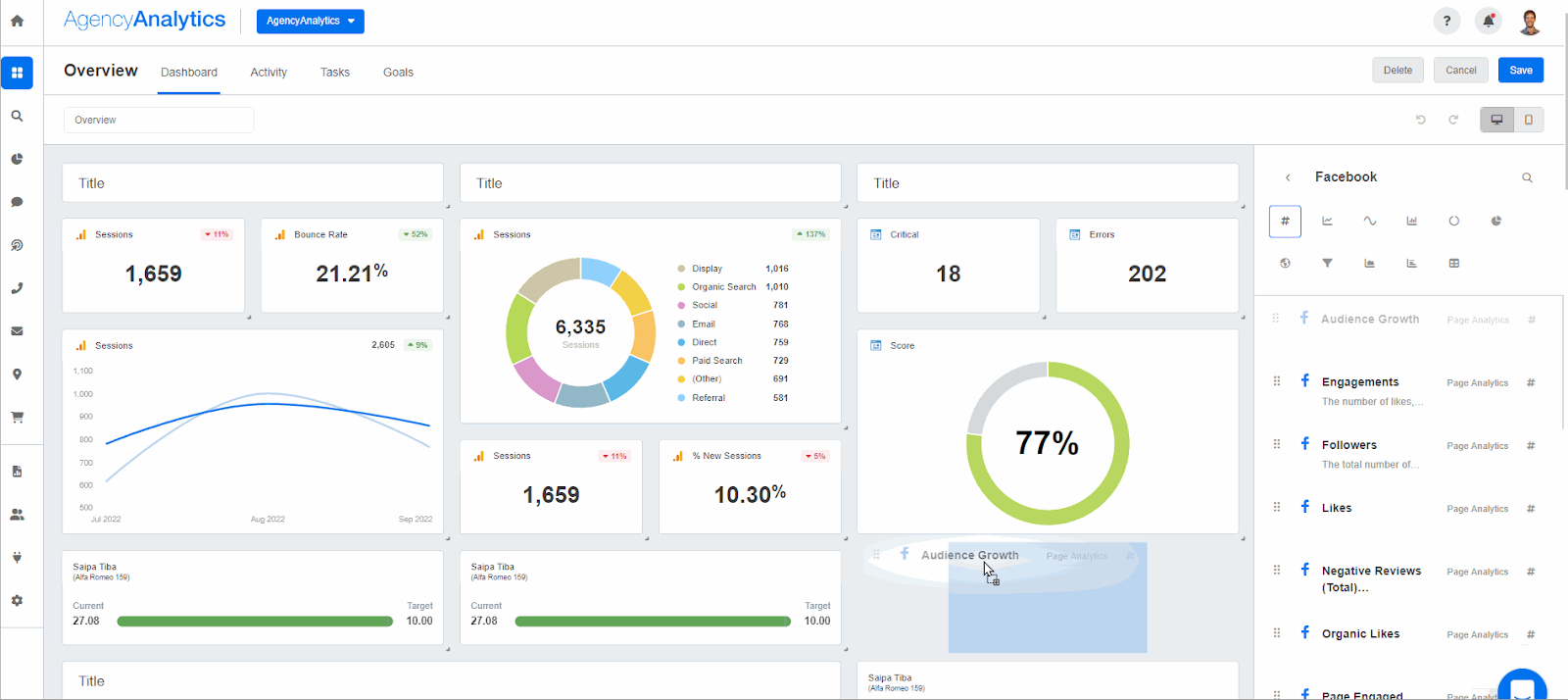
AgencyAnalytics focuses on automated client reporting and live dashboards tailored to agencies. It connects 80+ integrations and offers white-label reports and client portals.

AgencyAnalytics does one thing extremely well: reporting. If your agency’s value is PPC, SEO, and performance storytelling, this tool makes you look polished and prepared without wasting hours.

Just don’t confuse it with an agency operating system. There’s no CRM. No billing. No project management. It’s a reporting powerhouse, not an agency brain.

If you already have operations covered and just need reporting to stop sucking time, it’s excellent. 

Key Features

  • 80+ integrations (Google Ads, Analytics, Search Console, social, CRMs)
  • White-label PDF reports & client portals
  • Custom dashboards and templates
  • Automated report scheduling
  • Built-in SEO reporting modules

Benefits of AgencyAnalytics

  • Rapid client reporting with reusable templates (saves hours/week)
  • Professional, on-brand deliverables without heavy design work
  • 24/7 dashboards reduce client status-check emails.
  • Quickly spot anomalies across all accounts with centralized monitoring.

Pricing

  • Freelancer: $79/month
  • Agency: $239/month
  • Agency Pro: $479/month

AgencyAnalytics also offers custom Enterprise pricing. There are also discounts on pricing when choosing to bill annually. 

Pros

✅Easy to use and quick onboarding.

✅Strong support for building agency templates.

✅Extensive integration coverage

Cons

🚫It has limited functionality beyond reporting. Some users request deeper native billing or proposal features. You will need separate tools for agency operations.

🚫Occasional connector instability.

What Customers Say

“I like how easy AgencyAnalytics is to use and how clean the dashboards look. The automated reporting saves a lot of time, and it’s great being able to pull data from multiple platforms into one place and share clear, client-friendly reports.

Sometimes the platform can feel a bit limited in terms of customization, especially when trying to fine-tune reports or dashboards. A few integrations don’t always update as smoothly as expected, and certain features take some time to learn or require extra setup.” 

- Review collected by and hosted on G2.com.
Whatagraph

Category: Automated marketing reporting, intelligence & visual dashboards

What Whatagraph Does

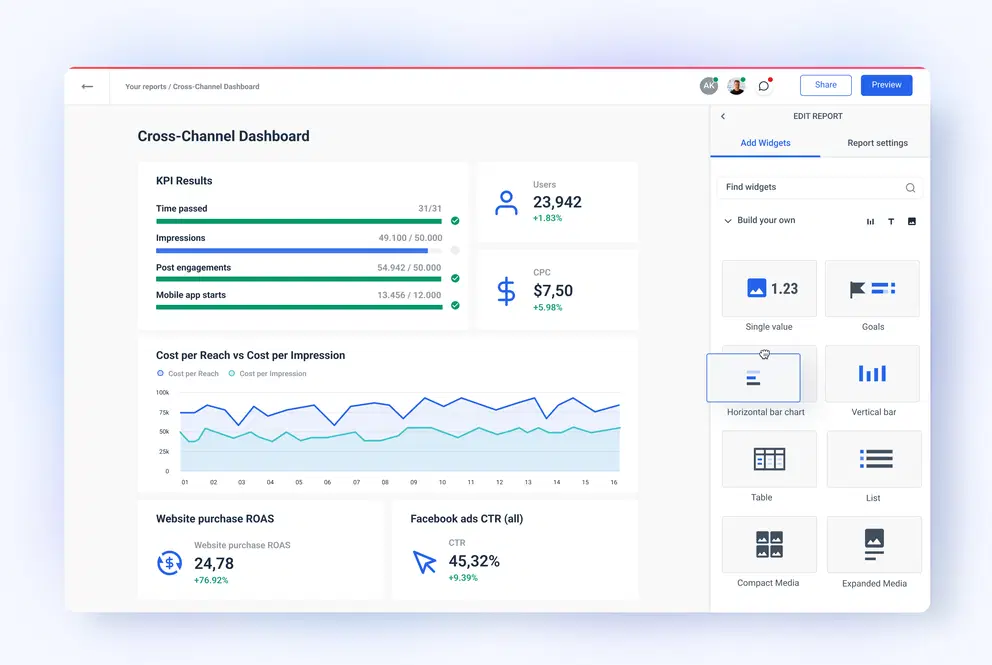
Whatagraph turns marketing data into client-friendly visual reports and dashboards with credits-based connectors and automated scheduling. It connects, cleans, and visualizes cross-channel marketing data to deliver fast, client-ready reports and actionable marketing insights.

Whatagraph emphasizes visual appeal, automation, and data storytelling over raw functionality. While similar to AgencyAnalytics in reporting, Whatagraph differentiates itself through its design-first philosophy. Its reports aren’t just functional; they’re visually engaging, infographic-style dashboards paired with AI-generated insights that marketers enjoy reviewing.

Key Features

  • Multi-channel connectors (social, ads, analytics). 
  • Automated PDF & email reporting; templated visuals. 
  • Usage credits model (source credits = connected accounts).
  • Natural language AI summaries explain performance trends in plain English.
  • BigQuery integration to push/pull data to/from warehouses for advanced analytics.

Benefits of Whatagraph

  • Visual, executive-ready reporting that non-technical clients understand.
  • Saves time by automating repetitive reporting tasks.
  • Linked templates (edit once, update all clients)
  • AI summaries that explain performance in plain English

Pricing

Whatagraph uses a credit system. 

  • Start: $286/month
  • Boost: $724/month

Discounts are available when billing annually. Customized pricing is also available. A free tier exists for limited use.

Pros

✅Clean dashboards and easy integrations with ad platforms.

✅Superior visual design (Reports are attractive and professional)

✅Customer support with quick, helpful guidance is consistently praised

Cons

🚫Premium pricing makes it expensive compared to similar-function alternatives.

🚫Occasional data mismatches (Manual verification may be needed)

🚫Limited customization beyond templates (Deep custom structures require workarounds)

🚫Reporting only (No CRM, billing, or delivery workflows)

🚫Price/credit model can be confusing at scale for agencies with many client accounts.

What Customers Say

“Apart from all the valuable things the tool has in itself, throughout the years we've chatted with their support for minor issues multiple times, and they were very quick to fix everything of even make improvements based on our feedback. Stellar group of people, these.

Once in a while the data does not match what the source is reporting. Usually it's a problem of the tool's API, as I see it. Whatagraph is just pulling data from them.” 

- Review collected by and hosted on G2.com.
Teamwork

Category: Project & resource management with client work focus

What Teamwork Does

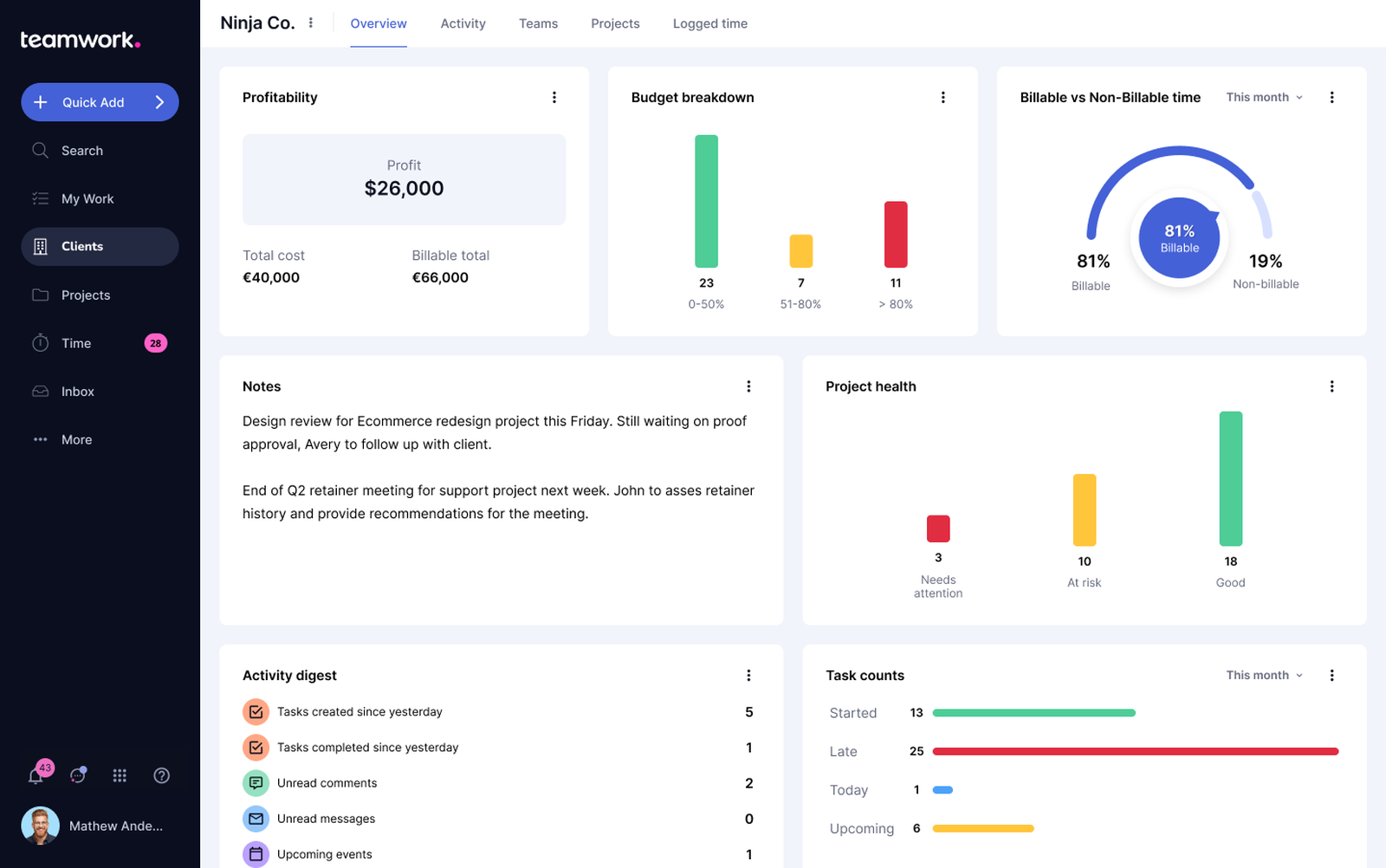
Teamwork is a project and resource management platform focused on client projects, time tracking, billing workflows, and profitability management. It emphasizes templates, time tracking, and project profitability insights.

While it handles operational agency tasks (projects, deadlines, resource planning, client communication), it does not provide marketing automation, lead generation, or performance reporting.

Key Features

  • Project templates, time tracking, and resource planning.
  • TeamworkAI features: List, table, Kanban & Gantt views.
  • Task dependencies & milestones (Define relationships and critical path)

Benefits of Teamwork

  • Keep client deliverables on schedule and measure project margins.
  • Turn recurring delivery into repeatable templates to scale.
  • Visual capacity planning balances workload.
  • Portals reduce status inquiries.

Pricing

Teamwork offers a Free plan. 

  • Deliver: $13.99/user/month
  • Grow: $25.99/user/month

There is custom pricing available as well. There are discounts available when choosing to bill annually.

Pros

✅Strong project templates and customer support; effective for client work.

✅Client portals without exposing internal chatter

✅Excellent time tracking; Highly rated among alternatives.

Cons

🚫Some users note complexity for simple task lists or occasional usability quirks.

🚫Dated UI compared to some other tools

🚫Becomes expensive as you unlock advanced features

🚫No sales, marketing, or reporting stack

What Customers Say

“Teamwork is a good place to handle client communications and to save relevant documentation without involving the internal team. The task dependencies, time tracking, and workload management features are especially helpful for resource planning.

The mobile app's performance could use some improvement, as it sometimes lags when handling large projects. Additionally, the pricing may become a bit costly for expanding teams, particularly when there is a need for advanced features.” 

- Review collected by and hosted on G2.com.
Keap

Category: SMB-focused CRM & marketing automation

What Keap Does

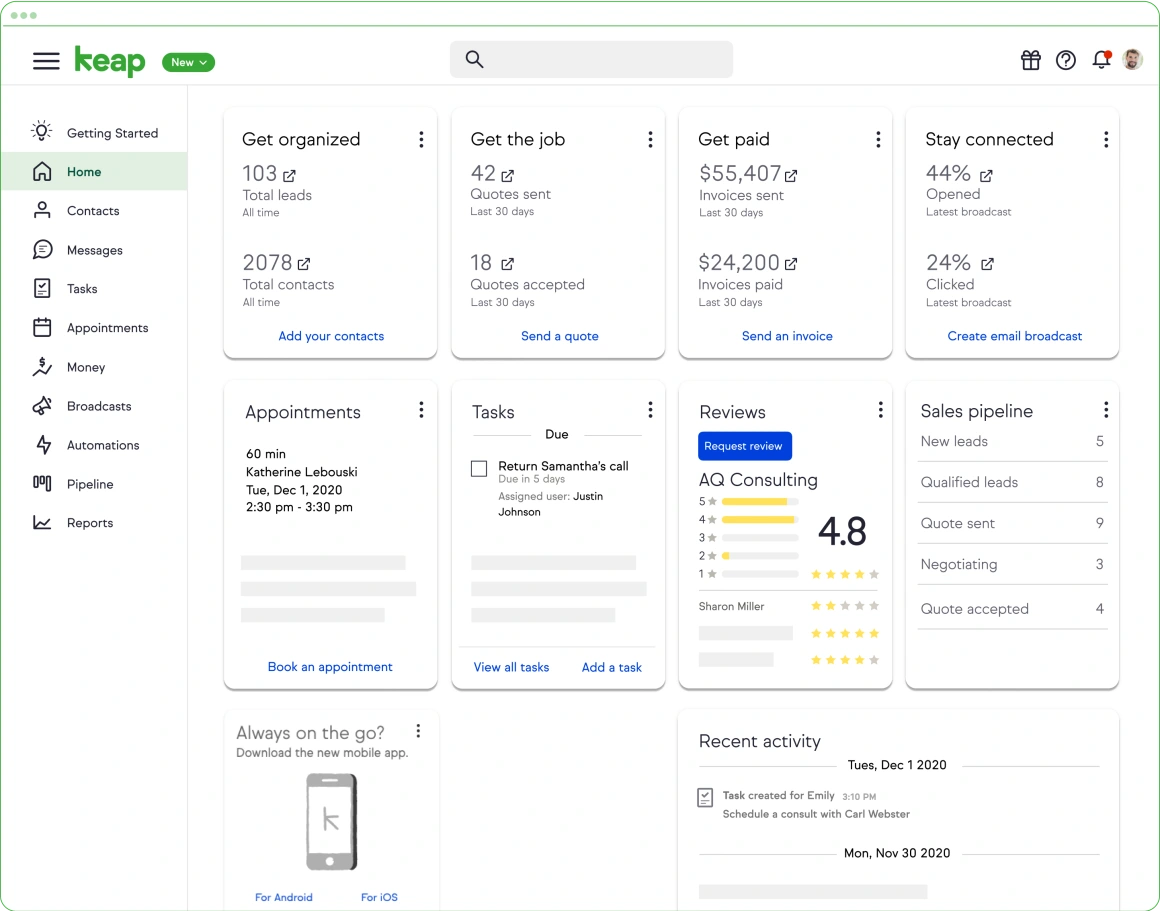
Keap (formerly Infusionsoft) is a CRM and automation suite aimed at small businesses: contact management, email/SMS automation, appointment scheduling, invoicing, and payments. It’s heavily focused on marketing automation and sales workflows.

Keap excels at lead capture, automated sequences, and pipeline management, particularly for consultative sales processes.

Keap does not provide project management, client delivery, or reporting features. It focuses purely on sales and relationship management.

Key Features

  • Lead capture forms & landing pages – Branded opt-ins with templates.
  • Contact management & automations (drag-and-drop builder). 
  • Invoicing & payments (billing workflow).
  • Sales pipeline management (deal stages, automated triggers, follow-ups).
  • Appointment scheduling (calendar with confirmations and reminders).

Benefits of Keap

  • Good for small businesses that need CRM and automation in one tool.
  • Strong onboarding and training resources (Keap has dedicated success support).
  • Automated Lead Nurturing (Set once, run continuously).
  • Improved follow-up consistency: Automated reminders reduce missed leads.

Pricing

Keap pricing varies by contacts/users. Plans start from $299+/month for 2 users and 1500 contacts.

Pros

✅Powerful automation builder for SMB use cases and combined billing

✅All-in-one for small agencies (CRM, marketing, appointments, billing)

✅Excellent for consultative or high-ticket sales

Cons

🚫Mixed support/billing experiences reported by some users. 

🚫Higher-end pricing for sizable contact lists.

🚫No project, reporting, or client delivery features.

What Customers Say

“I really appreciate Keap's workflows; in my opinion, they are the best available in the industry. I also enjoy using their new SMS marketing features. Additionally, their email deliverability is excellent.

Keap is quite expensive, which is my main issue with the software. Additionally, it can be complicated for new users. While it is a robust platform, this sometimes makes it difficult to use.” 

- Review collected by and hosted on G2.com.
Vendasta

Category: White-label reseller & operations platform for agencies

What Vendasta Does

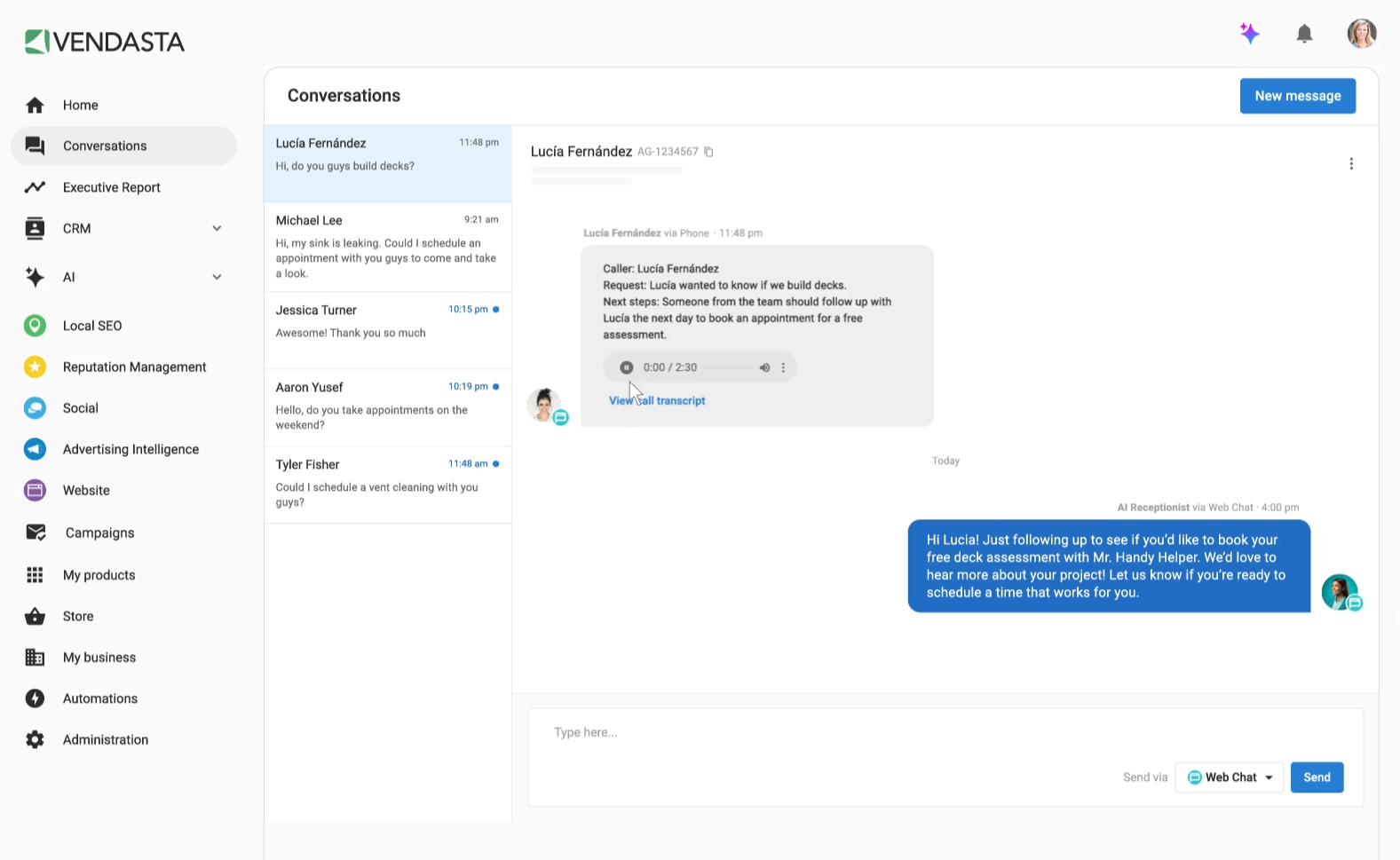
Vendasta is an AI-powered, all-in-one reseller platform that combines white-label CRM, automation, and an AI workforce with a marketplace of rebrandable digital marketing products. It lets agencies sell, manage, bill, and fulfill customer acquisition and engagement solutions for local businesses. It’s very directly targeted at agencies, media groups, and Managed Service Providers (MSPs) that want a commerce plus fulfillment engine.

You sell your own offerings or third-party solutions from its Marketplace. AI employees automate marketing, sales, and operations, and vendors fulfill services behind the scenes. And everything is white-labeled under your brand.

Key Features

  • Rebrandable product catalog for resale. 
  • AI Employees assist with lead capture, communication, and content.
  • Billing, fulfillment & agency partner tools. 
  • AI insights & reseller analytics.
  • Sales CRM & pipeline with deal tracking and forecasting.
  • Invoicing, billing, and subscription management.

Benefits of Vendasta

  • Quickly launch a productized services catalog without building every tool.
  • Centralized billing & fulfillment for many SMB clients.
  • Single-branded interface for clients with a comprehensive portal.
  • Avoid hiring specialists and reduce overheads.

Pricing

  • Starter: $99/month
  • Professional: $499/month
  • Premium: $999/month

Vendasta also offers custom Enterprise pricing. Discounts ara available when choosing to bill annually.

Pros

✅Broad product catalog and reseller commerce engine

✅Good for scaling fulfillment

✅Strong sales support (Attentive partner success focus)

Cons

🚫Learning curve and dependency on vendor product catalog.

🚫Some users note transactional complexity.

🚫Confusing navigation (Multiple interfaces create a disjointed experience)

🚫Offshore vendors may be inconsistent.

🚫Direct vendor prices sometimes undercut margins.

What Customers Say

“Vendasta has helped our radio network become now just a 1-trick pony, but a comprehensive source for marketing and advertising to better serve our partners in today's digital economy. The products and services have been fantastic! The customer service has been very prompt and professional. I love using the all-in-one dashboard and now helping our partners to do the same.

Since they offer so many various services, it can take a little while to get familiar with all of the options for your agency.” 

- Review collected by and hosted on G2.com.
GoHighLevel (HighLevel)

Category: All-in-one agency CRM, automation, and client fulfillment platform

What GoHighLevel Does

GoHighLevel is a comprehensive platform built specifically for marketing agencies and consultants. It combines CRM, marketing automation, funnels, SMS/email campaigns, white-labeled client portals, and workflow automation into a single system that agencies can both run their own operations on and sell to clients under their own brand.

Where Dashclicks struggles at scale, especially with deep automation, multi-tenant agency operations, and white-label control, GoHighLevel does this by enabling agencies to manage leads, follow-ups, campaigns, appointments, and revenue process end-to-end without stitching together many different tools.

Key Features

  • CRM with multi-client accounts and custom objects.
  • Multi-channel automation: SMS, email, voicemail, Facebook Messenger, AI-assisted campaigns.
  • Funnel, landing page, and website builder (drag-and-drop).
  • Online appointment booking & calendar automation.
  • White-labeled desktop app, portals, and sub-accounts for clients.
  • Payment collection & invoicing integrated.
  • Reporting & analytics with funnel and campaign performance dashboards.

Benefits of GoHighLevel

  • Replace multiple marketing, CRM, and automation tools with one platform.
  • Automate client communication and pipeline management at scale.
  • White-label client portals and apps (fully branded experience for clients).
  • Offer the platform to clients as a service or upsell automation solutions.

Pricing

GoHighLevel offers a free trial. 

  • Starter: $97/month
  • Unlimited: $297/month
  • Pro: $497/month

Pros

✅Comprehensive automation and CRM for agencies

✅White-label client portals and full branding control

✅Multi-channel follow-ups including SMS, email, voicemail, Messenger

✅Membership/course management for agency or client use

Cons

🚫Can be complex for agencies not focused on marketing automation.

🚫Pricing can be steep for smaller agencies or when advanced features are needed.

🚫Can feel overwhelming initially due to its wide feature set and less intuitive interface

🚫Some users cite variability in response quality and occasional delays.

What Customers Say

“What I appreciate most is the all-in-one platform design, along with its robust automation features and the white-label options that are especially useful for agencies.

The steep learning curve and complicated interface can be challenging, and I have found the inconsistent customer support to be frustrating. There are also potential hidden costs, particularly when it comes to third-party integrations. Additionally, the CRM features feel clunky, such as having to use multiple screens for simple tasks, and there are missing advanced functionalities that larger clients might expect, which is disappointing given its "all-in-one" promise.” 

- Review collected by and hosted on G2.com.

Summing Up…

The agencies that scale cleanly in 2026 aren’t adding more tools. They’re removing friction, owning delivery, and predicting churn before it happens. 

Choosing the right agency management platform depends on your agency's size, services, and growth stage. 

When evaluating Dashclicks alternatives for agencies, prioritize (in this order):

  1. Does it run your client lifecycle (sales, delivery, billing & retention)? If yes, lower onboarding friction.
  2. Is white-labeling real and deep (client portal, app suite, source-level branding)? Many claim it; few offer full rebrandable apps.
  3. Is billing native to the platform (proposals, e-sign & payments)? This reduces DSO and reconciliation work.
  4. Does it include local SEO and reputation if your agency sells local services? (Listings and review management drive client outcomes).
  5. How many 3rd-party connectors exist, and are they stable? (Reporting accuracy matters.)
  6. Support, onboarding, and agency success resources: Real onboarding speeds time-to-value.

That’s why, for agencies that want to consolidate operations, billing, delivery, and retention, Synup OS offers the most complete alternative.

Get Started with Synup

Synup’s agency OS is built to combine local SEO, reputation, delivery workflows, and finance (proposals/invoices) under one white-label roof, which directly reduces tool sprawl and increases predictability for agencies.

It offers agencies wanting to consolidate their tech stack with:

  • AI-driven client retention health scoring
  • Free marketing apps for unlimited clients
  • Complete sales-to-service lifecycle
  • No per-client or per-user fees
  • Full white-label portals, reports, and notifications

Best Dashclicks Alternative: FAQs

  1. What is the best Dashclicks alternative for small agencies?

For scaling small agencies, Synup OS offers better long-term value with no per-client fees and bundled marketing apps. AgencyAnalytics can also be good for those with less than 10 clients ($59/month) for reporting. Teamwork also supports up to 5 users on its free tier. 

  1. Can Synup replace Dashclicks completely?

It depends on the features you use in Dashclicks. If you need an agency OS with listings, reviews, social, CRM, tasks and native proposals/invoicing/e-sign under one white-label platform, yes, Synup can easily replace Dashclicks. For purely advanced PPC reporting or creative agency execution, you may still use specialized partners.

  1. Do Dashclicks alternatives include fulfillment services?

Synup OS provides marketing apps for in-house or selective outsourcing, giving margin and quality control. Vendasta offers marketplace-style fulfillment. 

Arbeiten Sie noch heute mit Synup zusammen!

Vereinbaren Sie einen Anruf mit unserem Partnerschaftsmanager, um maßgeschneiderte Wachstumslösungen für Ihre Agentur zu finden.