
Google-Unternehmensprofil gesperrt? Hier sind einige mögliche Ursachen und Lösungen
Find out why your Google Business Profile might be suspended and how to fix it. Get straightforward tips to resolve the issue and get reinstated quickly
A suspended Google Business Profile (GBP) can feel like a brick wall between your client and their customers. And, if you’re the end customer, It just gets to you. It’s also a frustrating situation for agency owners, especially those managing multiple profiles, who cannot afford to ignore it. A suspended GBP can impact your client’s visibility, hurt their reputation, and create unnecessary headaches for your agency or your small business.
In this guide, we’ll look into why suspensions happen, the steps you can take to resolve them, and how to prevent future issues. Whether you’re handling one suspension or many, this can act as your go-to resource for handling suspension issues, both big and small.
Let’s continue.
What are GBP suspensions and why do they happen?
A Google Business Profile (GBP) suspension happens when Google either restricts or removes a business profile from showing up in search results or on Google Maps. It usually means Google has flagged the profile for breaking its rules or has noticed something suspicious. Google does this to protect users from wrong or misleading information.
For businesses, this can be a huge problem. It makes it harder for them to get found online and can even hurt their revenue.
For agency owners, it’s more than just fixing a single issue, it’s about showing your clients that they can trust you as the expert here and rely on you.
Suspensions are either soft, where the profile is still visible but the owner loses access. Or hard, where the profile disappears entirely. While they can feel frustrating or even unfair, suspensions are Google’s way of keeping its platform trustworthy.
Types of GBP suspensions

Soft Suspensions
In a soft suspension, the Google Business Profile (GBP) that has been put under suspension remains visible to the public, allowing customers to find the business in search results and on Google Maps. However, the owner or manager loses administrative access to the profile. This type of suspension often arises from minor violations, such as discrepancies in the business name or unauthorized changes. While not as severe as a hard suspension, it still restricts the business owner’s ability to update or manage the profile.
💡How to fix a soft suspension?
✅Make sure the name, address, and phone number (NAP) on your Google profile match exactly with what's on your website and other platforms (like social media or directories).
✅Look for issues flagged by Google, like wrong categories or incorrect edits. Update anything inaccurate or out of place.
✅Go to Google’s support page and explain what you fixed. Attach proof of your business, like a utility bill or lease, to show you’re legit.
If you follow these basic steps, your profile should be out of suspension soon.
Hard Suspension
A hard suspension is far more serious, as the business profile is completely removed from Google Search and Maps. This means the business cannot be found by customers searching for it online, leading to a significant loss in visibility and revenue. Hard suspensions often result from severe violations, such as fraudulent activity, guideline breaches, or attempts to manipulate Google’s algorithms.
💡How to fix a hard suspension?
✅Look through your Google Business Profile (GBP) for anything that might break the rules such as - wrong categories, fake reviews, or incorrect details.
✅Collect documents that prove your business is real, like licenses, utility bills, or registration papers.
✅Go to the Google Business Profile Help page and file a request to get your profile back. Explain what went wrong and share the documents you’ve gathered.
✅If you’ve done things like fake reviews or used a virtual address, stop immediately and fix these issues so it doesn’t happen again.
Some common reasons for your GBP being suspended
1. Violating Google’s guidelines
Google enforces strict policies to maintain the integrity of its platform. Violating these guidelines often results in suspension.
Some of these common violations include:
- Adding irrelevant or excessive keywords to the business name to improve search rankings, e.g., “Joe’s Pizza Best Pizza in New York” instead of “Joe’s Pizza.”
- Selecting business categories that do not accurately describe the services offered by the business
- Listing service areas or locations where the business doesn’t operate.
To avoid these mishaps, make sure to regularly review Google’s guidelines and make use of accurate and correct information that reflects your core business areas.
2. Incomplete information does not look good
Google relies on accurate data to connect users with businesses. Even small errors in NAP details or discrepancies across platforms can raise red flags.
These issues include:
- Listing an address or phone number that’s no longer valid.
- Having mismatched details between your GBP, website, or social media profiles.
How to avoid this? Make it a habit to audit your business details regularly. Make use of tools like Synup to keep your listings consistent across platforms.
3. Duplicate Listings
Creating multiple GBPs for the same location might seem like a good idea to get more visibility, but Google sees it as spammy behavior and might penalize you for it.
To avoid this, if you have any duplicate listings, merge them using Google’s support tools. Also, make sure that you stick to one well-managed profile for each business location. So that it doesn’t look spammy and you’re clean.
4. Unauthorized Changes
Frequent edits, unverified user changes, or login attempts from random locations can trigger Google’s red flags. This might result in a temporary suspension of your profile.
To make sure that this doesn’t happen you can limit access to your GBP to only trusted team members. You can also secure your account with strong passwords and enable two-factor authentication to ensure that this doesn’t happen.
5. Use of Virtual Offices or PO Boxes
Google requires businesses to have a real, physical location. Using virtual offices, PO boxes, or coworking spaces without permanent staff can get your profile flagged or suspended.
You can use the address of a legitimate, staffed location where customers can reach you. If needed, provide photos of your business premises to verify its legitimacy.
6. Review Manipulation
Buying fake reviews, swapping reviews with others, or offering rewards for reviews violates Google’s policies. Their systems are designed to catch this and will penalize your profile.
To make sure that this doesn’t happen, focus on getting organic and honest reviews from your actual customers. Make use of reputation management tools such as Synup that can help you stay on track with your reviews and respond to them regularly. Skip shady tactics like buying reviews or offering incentives for them, it’s not worth the risk.
Impact of GBP Suspensions

- Loss of Visibility
A suspended GBP removes the business from Google Maps and local search results, significantly reducing its visibility to potential customers. For businesses that rely on walk-ins or local searches, this can mean fewer leads and opportunities.
- Customer Trust
A missing or unverified GBP can make customers question a business’s legitimacy. For many, Google is the first stop for checking reviews, location, and contact details. If the profile is unavailable, customers might assume the business is closed or unreliable.
- Revenue Loss
Without a GBP, local businesses lose vital leads from search traffic. Service-based businesses, such as salons or repair services, may experience cancellations or booking declines.
- Reputational Risk
Agencies managing multiple GBPs for clients face reputational risks when suspensions occur. Prolonged resolution times can erode client trust, especially if the suspension leads to revenue losses.
- Confused Customers
Customers can't find key details like your hours or contact information without an active profile. They may get frustrated and turn to a competitor.
- Recovery takes time
Getting your GBP back online isn't instant. You have to follow Google's reinstatement process, which can take time. During this period, you're missing out on crucial visibility.
Recovering your Google Business Profile
Let’s break down the process of appealing a GBP suspension in a way that’s simple and easy to understand. I’ll walk you through each step, so you’ll know exactly how to reinstate your profile.
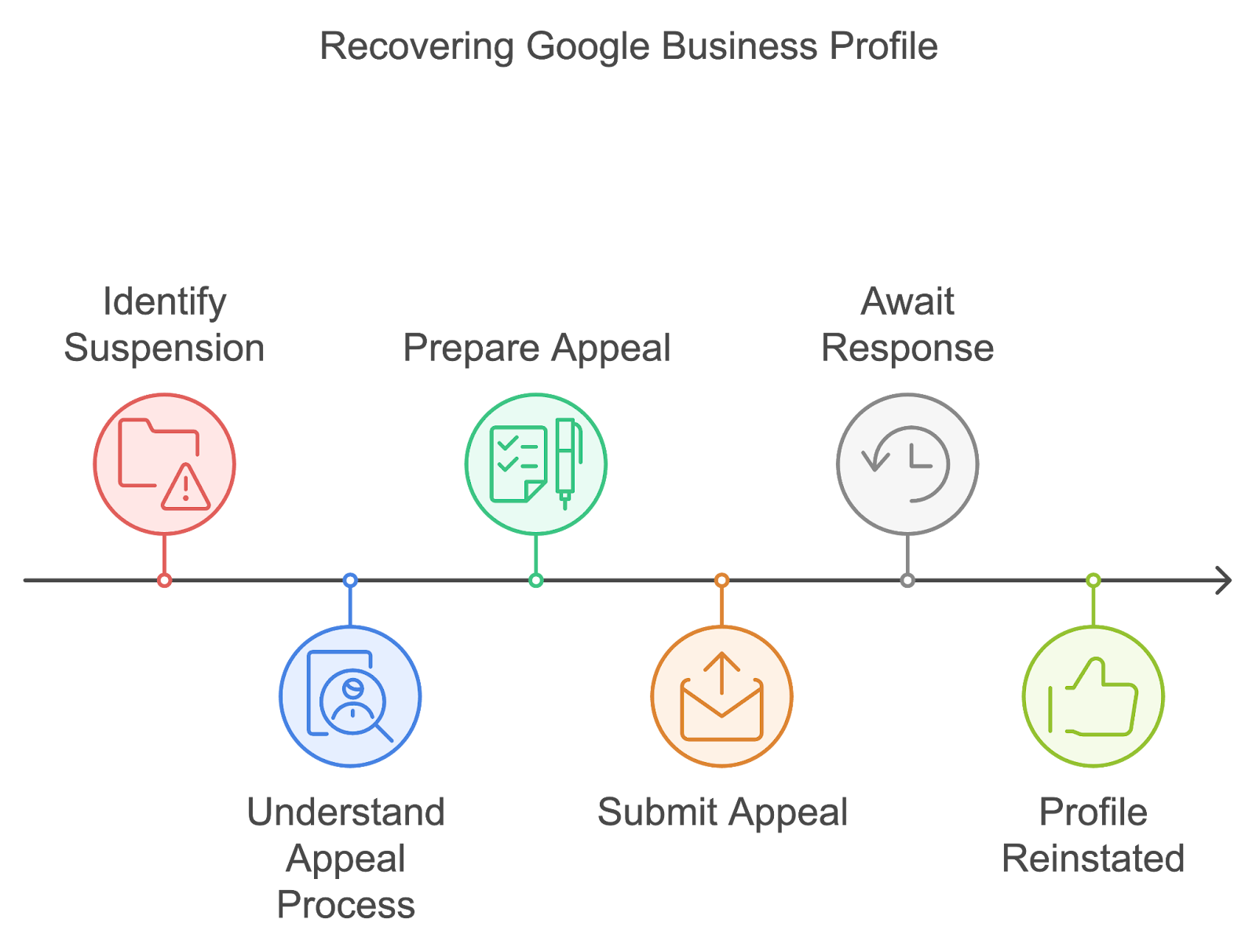
1. Know Why Your GBP Was Suspended
Before you can appeal the suspension, you must figure out why it happened. Google doesn’t always tell you exactly what went wrong.
Here are some common reasons why:
❌Wrong or inconsistent business details: For example, if your business name, address, or phone number isn’t consistent across all platforms, Google might suspend your profile.
❌Violating Google’s rules: This could be anything from using keywords in your business name to uploading inappropriate content.
❌Misrepresenting your business: If you’ve listed a P.O. box instead of a physical address or claimed to serve a location where you don’t actually operate, your profile might get suspended.
❌Not completing the verification process properly: If you haven’t verified your business or did it incorrectly, Google might suspend your profile.
❌Fraudulent activity: For example, if someone is trying to trick Google by using fake information, your business might be flagged and suspended.
To get your GBP back, it’s important to first figure out which of these reasons (or other issues) caused your suspension.
2. Review Google’s Guidelines
Google has a set of guidelines for Business Profiles that all businesses need to follow. If you don’t follow these guidelines, you risk having your profile suspended.
Here’s a quick rundown of the most important rules:
➡️Your business name: It needs to be the real name of your business extra keywords or phrases. For example, “Joe’s Pizza” is fine, but “Joe’s Pizza - Best Pizza in Town” would not be.
➡️Address: Your address must match the one where you actually do business. If you’re a home-based business, you can hide your address but still list the area you serve.
➡️Categories: Make sure your business is listed under the most relevant categories. Don’t stuff your profile with unnecessary ones.
➡️Photos and content: Don’t upload fake or irrelevant photos. Make sure everything on your profile accurately represents your business.
Once you’re familiar with these rules, take a look at your profile and check if anything is off. If you spot any issues, fix them before moving forward with the appeal.
3. Fix Issues Before You Appeal
Google is much more likely to reinstate your profile if you show them that you’ve fixed whatever caused the suspension. Here’s what you should do:
✅Correct your business details: Double-check that your business name, address, phone number, and website URL are accurate and consistent across all platforms.
✅ Aktualisiere deine Unternehmenskategorie: Stellen Sie sicher, dass Ihr Unternehmen in der richtigen Kategorie aufgeführt ist. Beispielsweise sollte eine Bäckerei als „Bäckerei“ und nicht als „Restaurant“ aufgeführt werden.
✅ Vollständige Überprüfung: Wenn die Sperrung auf Probleme bei der Überprüfung zurückzuführen ist, stellen Sie sicher, dass Sie den Überprüfungsprozess abschließen (in der Regel, indem Sie einen Code an Ihrer Geschäftsadresse erhalten).
✅ Überprüfe deine Fotos und andere Inhalte: Entferne alle Fotos oder Inhalte, die gegen die Google-Regeln verstoßen, z. B. irreführende Bilder oder anstößiges Material.
✅ Sei ehrlich: Wenn Sie einen Fehler gemacht oder gegen eine Regel verstoßen haben, korrigieren Sie ihn und erklären Sie in Ihrem Einspruch, dass Sie sich darum gekümmert haben.
Wenn Sie diese Schritte unternehmen, zeigen Sie Google, dass Sie die Richtlinien ernst nehmen, und erhöhen Ihre Chancen, wieder eingestellt zu werden.
4. Reichen Sie einen Antrag auf Sperrung des GBP ein
Sobald Sie die erforderlichen Korrekturen vorgenommen haben, ist es an der Zeit, bei Google Berufung einzulegen. So geht's:
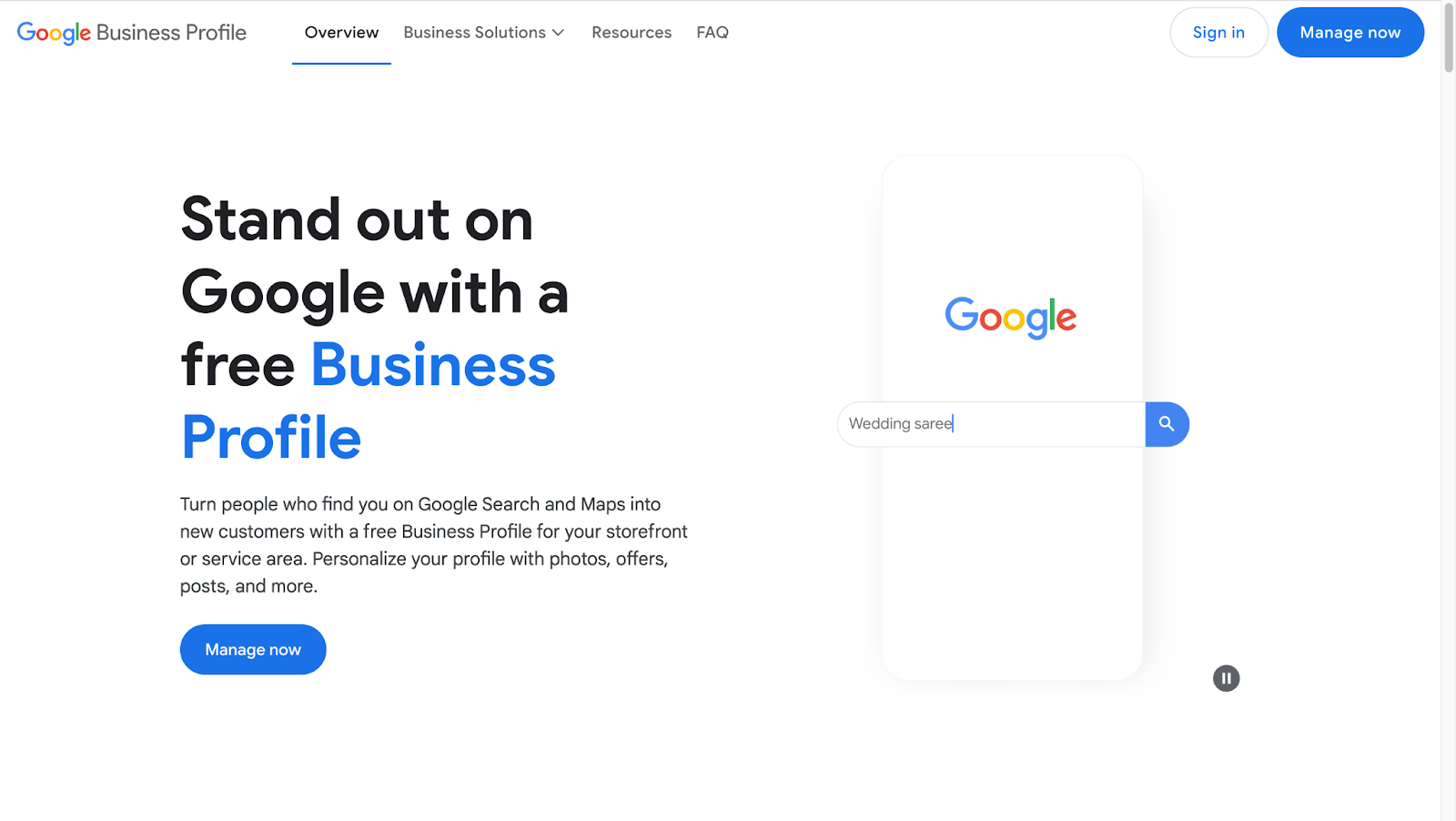
Schritt 1: Loggen Sie sich in Google My Business ein
Gehen Sie rüber zum Google Mein Unternehmen Website und melde dich bei dem Konto an, das mit deinem gesperrten Profil verknüpft ist.
Schritt 2: Finden Sie Ihr gesperrtes Profil
Wenn Ihr Profil gesperrt ist, sollten Sie eine Meldung über die Sperrung sehen. Google bietet Ihnen möglicherweise die Möglichkeit, eine Überprüfung der Sperrung zu beantragen. Wenn Sie diese Option nicht sehen, finden Sie im Abschnitt „Support“ weitere Optionen.
Schritt 3: Wählen Sie die richtige Berufungsoption
Google bietet Ihnen in der Regel mehrere Möglichkeiten, Berufung einzulegen:

- Eine Bewertung anfordern: Wenn Sie der Meinung sind, dass die Sperrung ein Fehler war, können Sie Google bitten, Ihren Fall zu überprüfen.
- Füllen Sie ein Formular aus: Google gibt Ihnen möglicherweise ein Formular, das Sie mit weiteren Informationen zu Ihrem Unternehmen und dem Problem ausfüllen müssen. Hier können Sie erklären, warum Sie der Meinung sind, dass die Sperrung nicht hätte erfolgen sollen.
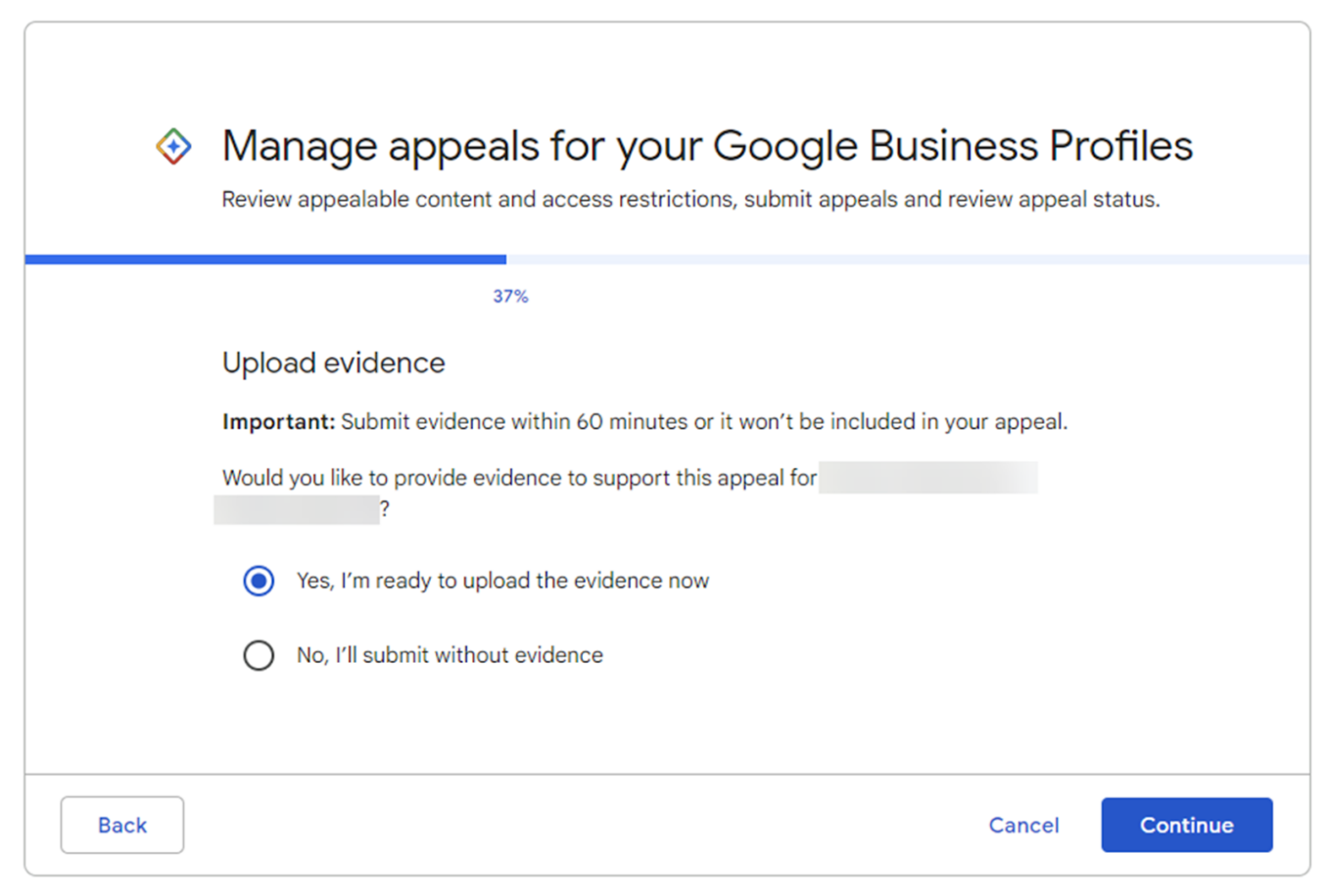
Schritt 4: Unterstützende Informationen bereitstellen
Wenn Sie Ihr Profil aktualisiert haben (z. B. Ihre Unternehmensdaten korrigiert oder eine neue Bestätigung hochgeladen haben), erwähnen Sie dies in Ihrem Einspruch und fügen Sie alle für Ihren Fall erforderlichen Dokumente bei. Dies zeigt Google, dass Sie sich bemüht haben, die Probleme zu beheben.
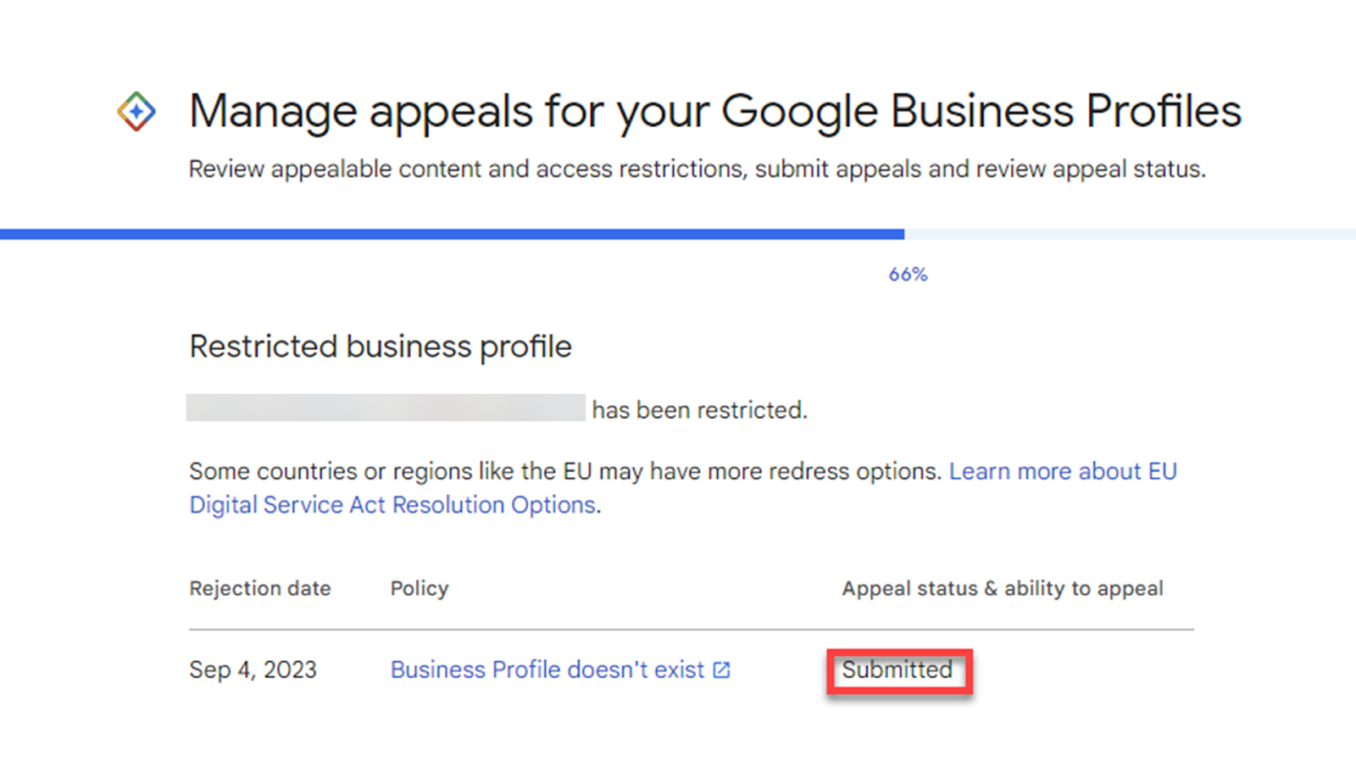
Schritt 5: Warten Sie auf die Antwort von Google
Nachdem Sie Ihre Beschwerde eingereicht haben, kann es einige Tage oder sogar Wochen dauern, bis Google sich bei Ihnen meldet. Seien Sie geduldig, da sie Ihr Profil und die von Ihnen vorgenommenen Änderungen überprüfen müssen. Vermeiden Sie es, während dieser Zeit mehrere Einsprüche einzureichen, da dies den Prozess verlangsamen kann.
Wenn Google beschließt, Ihr Profil wiederherzustellen, erhalten Sie eine Benachrichtigung und können erneut mit der Verwaltung beginnen. Wenn Ihr Einspruch abgelehnt wird, gibt Ihnen Google möglicherweise weitere Informationen dazu, warum, und Sie können weitere Korrekturen vornehmen, bevor Sie erneut Berufung einlegen.
Dinge, die zu tun sind, wenn Ihr Einspruch abgelehnt wird
Wenn Google Ihre Berufung ablehnt, geraten Sie nicht in Panik. Folgendes ist zu tun:
➡️ Lesen Sie die Ablehnungsnachricht: Google liefert normalerweise eine Erklärung für die Ablehnung. Achte auf alle spezifischen Richtlinien, gegen die du verstoßen hast.
➡️ Beheben Sie alle verbleibenden Probleme: Wenn es noch etwas gibt, das repariert werden muss, aktualisieren Sie es und reichen Sie dann einen neuen Einspruch ein.
➡️ Wenden Sie sich an den Google-Support: Wenn Sie sich immer noch nicht sicher sind, warum Ihr Einspruch abgelehnt wurde, wenden Sie sich an den Google-Support, um weitere Informationen zu erhalten.
Sobald Ihr Profil wiederhergestellt ist, ergreifen Sie Maßnahmen, um zukünftige Sperrungen zu verhindern:
- Überprüfen Sie regelmäßig Ihre Geschäftsdaten, um sicherzustellen, dass alles korrekt ist.
- Bleiben Sie über die neuesten Regeln für Google-Unternehmensprofile auf dem Laufenden, um sicherzustellen, dass Ihr Eintrag den Vorschriften entspricht.
- Wenn du merkwürdige Änderungen an deinem Profil feststellst, untersuche es sofort, um Probleme zu vermeiden.
Indem Sie Ihr Profil an die Richtlinien von Google anpassen und über Updates auf dem Laufenden bleiben, verringern Sie die Wahrscheinlichkeit, erneut gesperrt zu werden.
Abschließend
Der Umgang mit Sperrungen von Google Unternehmensprofilen mag mühsam erscheinen, aber sobald Sie wissen, um welche Art von Sperrung es sich handelt und was sie verursacht hat, ist es viel einfacher, sie zu beheben. Egal, ob es sich um eine sanfte Sperrung handelt, die Sie aussperrt, oder um eine harte Sperrung, die Ihr Profil offline nimmt, das Ziel ist einfach: Identifizieren Sie das Problem, beheben Sie es und halten Sie sich an die Regeln von Google.
Sorgen Sie dafür, dass Ihre Unternehmensinformationen korrekt sind, vermeiden Sie Fehler wie gefälschte Bewertungen oder doppelte Angebote und beheben Sie Probleme schnell, um sowohl Sichtbarkeit als auch Vertrauen zu wahren. Für Agenturen trägt eine klare Kommunikation mit den Kunden während dieser Probleme wesentlich zur Aufrechterhaltung der Glaubwürdigkeit bei.
Letzten Endes ist Ihr Google-Unternehmensprofil mehr als nur ein Tool. Es ist die Art und Weise, wie Menschen Ihr Unternehmen finden und Ihrem Unternehmen vertrauen. Halten Sie es sauber, konsistent und legitim, um zukünftige Sperren zu vermeiden.
Häufig gestellte Fragen
Wie repariere ich mein gesperrtes Google-Unternehmensprofil?
Identifizieren Sie zunächst den Grund für die Sperrung, überprüfen Sie Ihre E-Mails oder die Richtlinien von Google. Beheben Sie dann das Problem (z. B. die Aktualisierung falscher Daten oder die Überprüfung der Inhaberschaft) und reichen Sie über den Unternehmensprofilmanager eine Anfrage zur Wiedereinstellung ein.
Warum sperrt Google mein Geschäftskonto immer wieder?
Google sperrt Ihr Konto möglicherweise, wenn gegen die Richtlinien verstoßen wird, z. B. falsche Informationen, verbotene Inhalte oder verdächtige Aktivitäten. Manchmal können sogar technische Probleme oder mehrere Konten für dasselbe Unternehmen dies auslösen.
Wie lange dauert es, die Sperrung eines Google Business-Kontos aufzuheben?
In der Regel dauert es 3—7 Arbeitstage, nachdem der Antrag auf Wiederherstellung eingereicht wurde. Der Zeitplan kann jedoch je nach Komplexität Ihres Falls und dem Überprüfungsprozess von Google variieren.
