
How to Onboard New Clients Faster & Eliminate Onboarding Chaos
Learn how to simplify client onboarding for your marketing agency. See how to use Synup OS to get clients set up and give clients their own branded portal.

A lot of agencies lose time, energy, and margins on onboarding, especially when growth hits harder than expected.
Let's say you’re a 10-person agency that's running lean. Then an organization suddenly asks you to take on reputation management for 20 of its clients at once.
How do you even begin?
Who sets up the accounts?
How do you get the branding files?
Who handles access requests?
Who ensures each of the 40 businesses has clean data, correct logins, and the right services switched on?
Who manages the KPIs, client expectations, and reporting?
The onboarding journey is indeed a marathon, not a sprint. And if you try to run it manually with 20 clients, by mile one, the account manager or your spreadsheets will definitely start a revolt.
An automated tool like Synup OS solves this by giving you a single platform to manage the entire client lifecycle, regardless of the number of clients.
By the time you finish reading this, you’ll know exactly how to onboard clients using Synup step-by-step, plus a few practical habits that help agencies speed up onboarding without losing the human touch.
TL;DR: How to Onboard New Clients Faster With Synup OS
- Manual onboarding is fine for one client, but a nightmare for agencies when onboarding tens of clients with low human resources. Trying to scale without an onboarding system often leads to lost files, wrong logins, endless email threads, and eventual team burnout.
- Adding Clients With Synup (Bulk vs. Manual):
- Stop adding clients one by one. Use the CSV Bulk Upload to add 10, 20, or 50 clients instantly.
- Enrich the profile immediately with key details (phone, industry, key contacts), so your team isn't working blind.
- Assign services (such as listings or SEO) right away so the client’s account is configured correctly from the start.
- The Questionnaire (Data Collection):
- Use the Onboarding Questionnaire with Custom Fields to get specific info (e.g., "competitor list," "social tone," "branch addresses").
- Make fields mandatory, so you get clean, structured data before you start working.
- Docs & Contracts:
- Centralize files: Upload proposals and agreements to the Document Hub so they don't get lost in inboxes.
- Use Templates: Don't write every proposal from scratch. Use pre-built templates to speed up the admin work.
- Share securely: Give clients access to these docs directly in their portal.
- Automating Onboarding:
- Email Sequences: Set up "Welcome" emails and "Next Steps" reminders that go out automatically. This keeps the project moving even when you are offline.
- Internal Alerts: Get notified when a client signs a doc or uploads a file, so nothing slips through.
- The Client Dashboard:
- White-label it: Add your logo, brand colors, and custom domain so the software looks like yours, not a third-party tool.
- Self-Serve: Give clients a login so they can check their own performance stats and open tasks without constantly asking you for updates.
Adding Clients to Synup OS
The foundational step to scaling any agency operation (especially one tasked with onboarding clients at medium to large scale) is establishing client profiles efficiently within a centralized operating system. Synup OS is designed to add clients individually and at scale with ease.
Step 1: Log in and Head to the Clients Section
Once you log into Synup OS, click on “Clients” from the left menu.
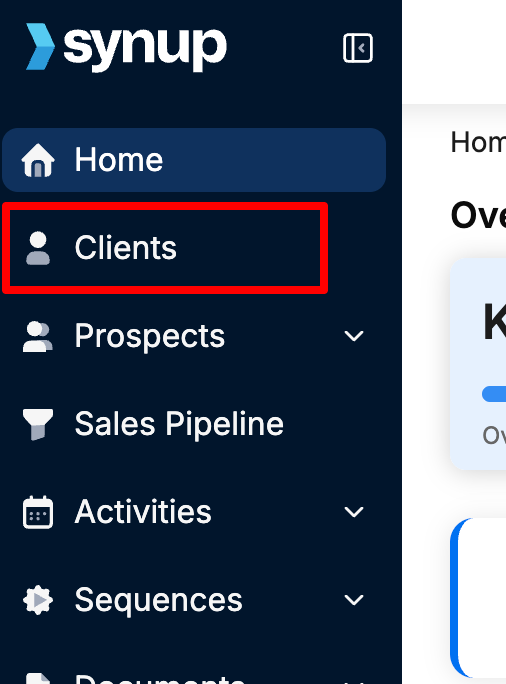
This is your command center for all new and existing accounts.
Step 2: Add the Client (Manually or in Bulk)
You’ll see “Add Client” at the top.
You’ve got two options:
Manual Add (for one-off onboarding)
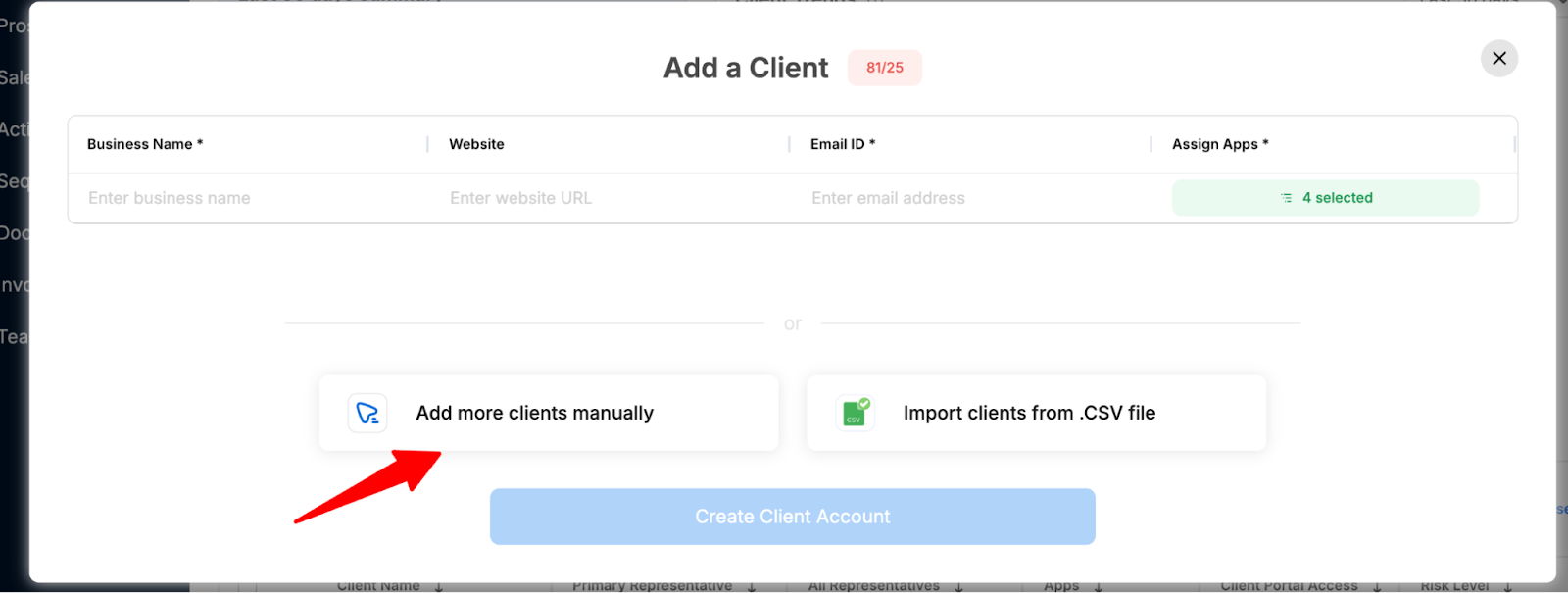
Enter:
- Business name
- Website
- Primary contact email
That’s enough to create the profile.
Bulk Upload (for agencies onboarding several clients weekly)
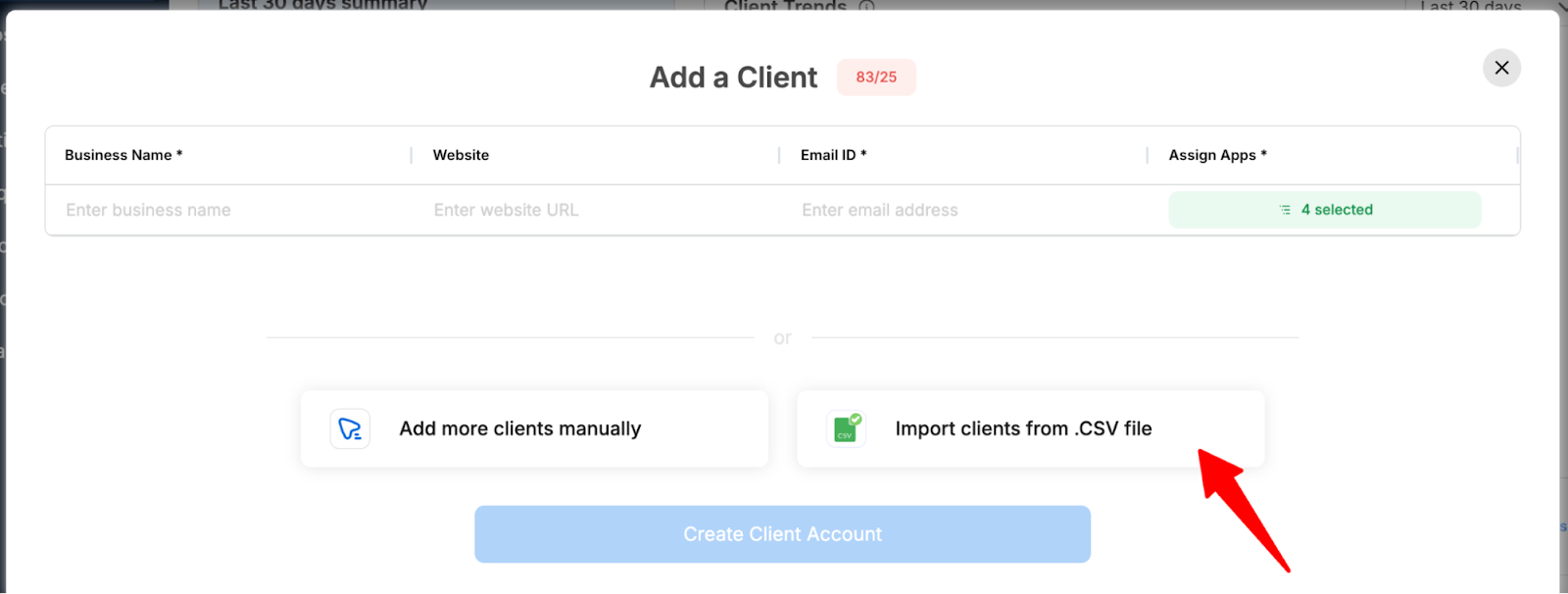
Import a CSV and add 10, 20, or even 50 clients in one move.
A lot of agencies underestimate how much time this saves. CSV upload compresses hours into minutes.
Step 3: Fill Out Optional Profile Fields
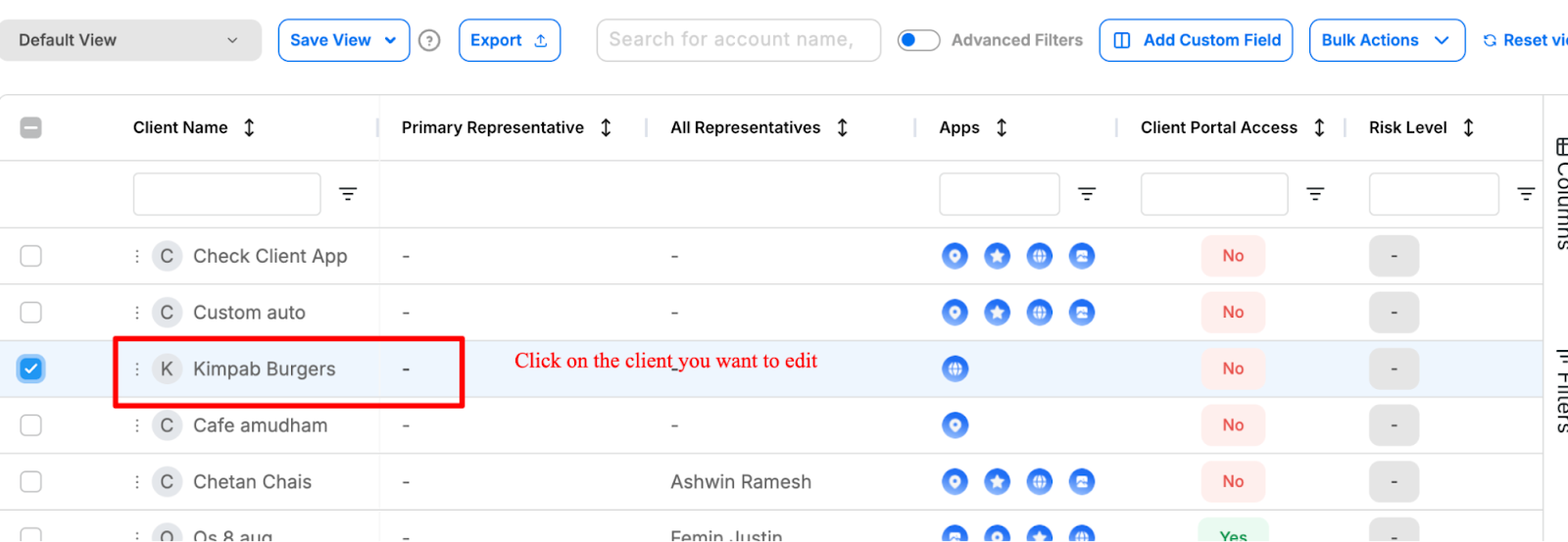
Synup lets you enrich the profile so your team never starts a project blind. Some information you can add:
- Phone number
- Business address(es)
- Industry
- Key contacts (marketing manager, owner, social approver, etc.)
- Assigned account manager
- Internal notes
What this fixes: Later, when your SEO lead logs in or your social team begins asset creation, they’re not pinging the account manager for basic info. Everything sits where it should.
Step 4: Assign the Client’s Services Inside Synup OS
Before you leave the page, assign what the client is paying for:
- Listings
- Reviews
- Social
- SEO
- CX analytics
- Any other Synup OS modules you’ve activated
This automatically builds the client’s dashboard. The client sees only what relates to their service plan.
Example: Local Agency Onboarding 10 Businesses
Let's say you sign up 10 different local restaurants for listing management.
Traditionally:
- You add each client manually
- You set them up on each tool one by one
- You toggle permission settings manually
- You check their listings individually
That’s easily 3 to 4 hours per client.
With Synup OS:
- Upload one CSV
- Hit “Activate Listings” for all 10 clients at once
Total time spent? Around 10 minutes. That’s the difference between “busy work” and “actual billable work.”
Also Read: Mastering Marketing Agency Operations: Run Your Agency More Efficiently
Filling Out the Onboarding Questionnaire
Most agencies lose days here. The client forgot to send something. You take the time to create the questionnaires and send them to clients. But someone internally misses context. You request access, but the client sends incomplete login credentials. Rinse, repeat.
Synup OS removes that slow drip of back-and-forth, providing a way to store business information provided by clients:
- Custom Fields and Columns: You can create custom fields specific to your service scope (e.g., "GMB Access Status," "Preferred Posting Frequency," "List of Key Competitors").
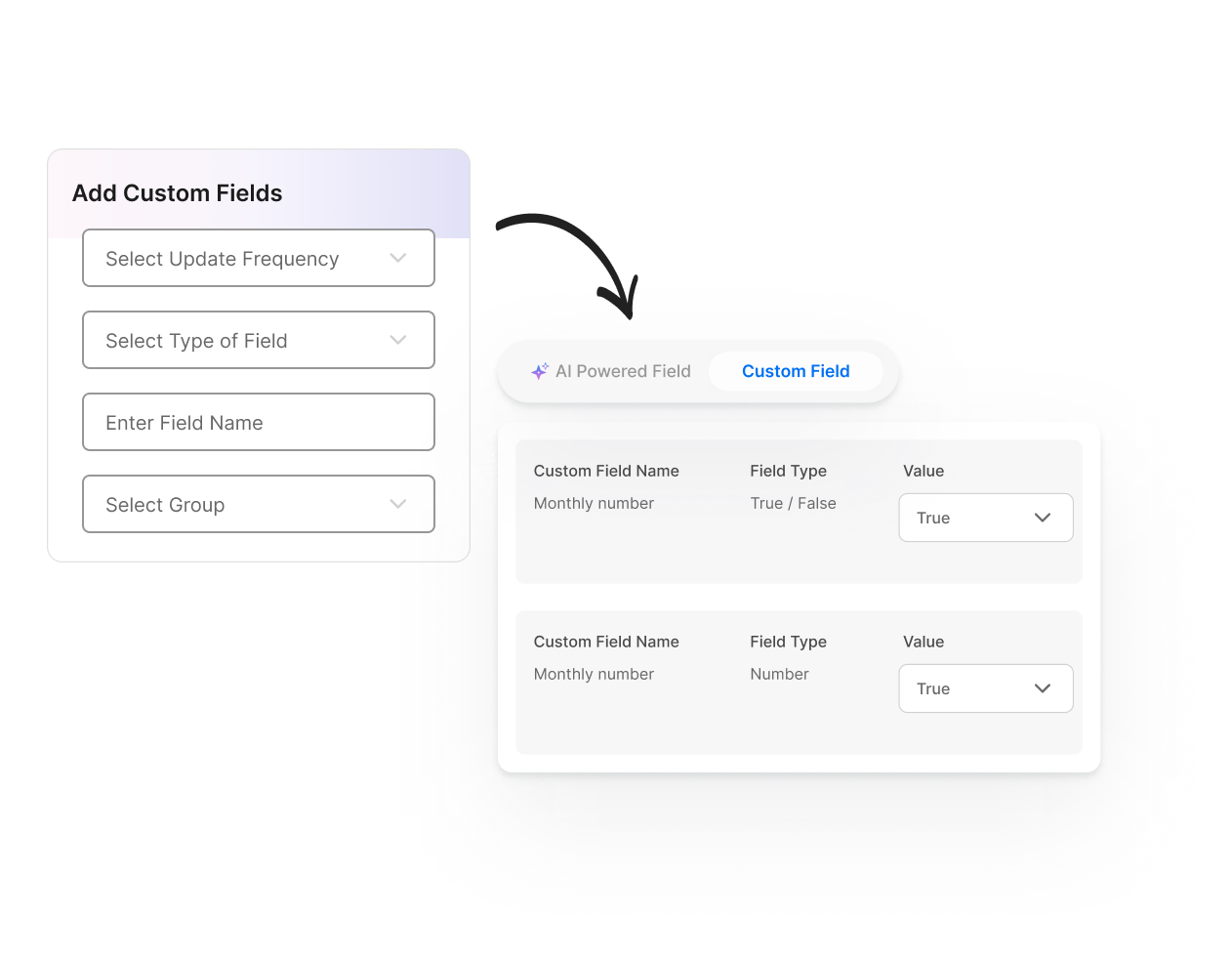
This is vital for managing different requirements across various distinct businesses.
- Targeted Data Collection: By tailoring the form, you ensure that every piece of information collected is relevant and actionable, avoiding "data bloat."
Example of How to Scale Data Collection During Onboarding With Synup
Now imagine this for a moment: you’re running a small, tight team like most small- to medium-sized agencies.
Then, like the agency owner below, one morning, you get an email from a large organization asking if you can take over digital marketing for all 40 of their small-business clients. They’ll cover every cost (tools, ads, extra hires, subscriptions), but the responsibility of pulling everything together still lands on your desk.

It’s a dream opportunity, but also the kind of deal that exposes every crack in your onboarding process.
Let’s start breaking it down:
- 40 different businesses, each with its own brand assets, logins, address details, tones, and KPIs.
- 40 different onboarding checklists.
- 40 sets of content calendars, reporting expectations, and communication preferences.
- New hires you’ll bring in who need everything documented and structured from day one.
- Timelines you can’t afford to slip because you’re trying to manage all of this manually.
Manual onboarding cannot keep up with this level of work volume. That’s why setting up systems is important.
Scaling Data Collection for Mixed Industries with Synup: An Example
Let’s say this batch of 40 clients isn’t all in the same industry.
- Some are restaurants.
- Some are healthcare clinics.
- Some are automotive stores with multiple locations.
Each one needs local SEO, social media, and review management, but the inputs are different for every category.
A traditional Google Form or email thread is useless here.
Inside Synup OS, you can create a structured onboarding questionnaire with custom fields that fit your workflow:
- Main Branch Address
- All Secondary Locations
- Primary Target Audience
- Preferred Social Voice/Tone
- Login Credentials for Meta, Google, TikTok, Yelp, etc.
- Current Review Platforms Used
- Existing Issues We Should Know About (suspended listings, bad reviews, missing logins…)
- Expected Start Date or Launch Window
Because the form is standardized and mandatory, every client (whether they’re a restaurant or a physiotherapy clinic) submits complete, correct, structured data.
This way, your team (and any new hires) can start service delivery without going back and forth for missing details.
Read more on filling out a questionnaire in this 8-Step Client Onboarding Guide for Marketing Agencies (+ Checklist).
Share Documents & Contracts Automatically
Handling tens of separate contracts, proposals, and brand guidelines via email is a recipe for disaster. Documents will be lost, permissions will be confusing, and version control will be impossible. Synup OS offers a centralized document hub that is critical for managing this kind of volume.
- Upload Once, Distribute Widely: After creating documents, you upload master documents (standard contracts, proposal templates, onboarding checklists, and service level agreements) to the hub.
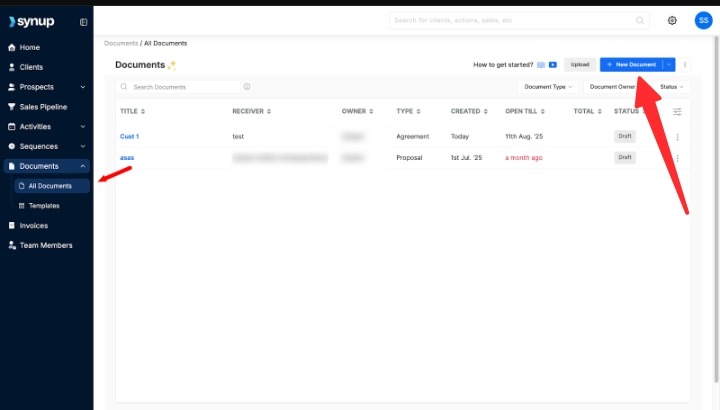
- Client-Facing Portal Access: These documents are shared directly with the respective clients through their dedicated, secure portal. You can set granular permissions so that only the relevant client contacts or internal team members can view, download, or sign specific files. This eradicates the need for email attachments and repeated follow-ups. You are also provided a timeline, including when the document was sent, opened, and viewed.
- Templates for Consistency: The document hub allows your growing team (new hires dedicated to each client) to use ready-made templates for proposals, contracts, and reports. This ensures consistent communication and branding across all clients, maintaining quality control as you scale.
Here is a step-by-step guide for managing all your documents in one place using Synup OS.
Creating a Customized Client Dashboard (White-Label)
This is where your agency starts looking like you’ve got your act together. The white-labeled client dashboard in Synup OS helps clients log into a dashboard that feels like your product, not a stitched-together Frankenstein of third-party tools.
Branding and Professionalism
You can fully customize the portal to reflect your agency's brand identity:
- Upload your logo and favicon.
- Select your color schemes (brand color, primary color, background color, etc.)
- Set up a custom domain (e.g., reports.youragency.com).
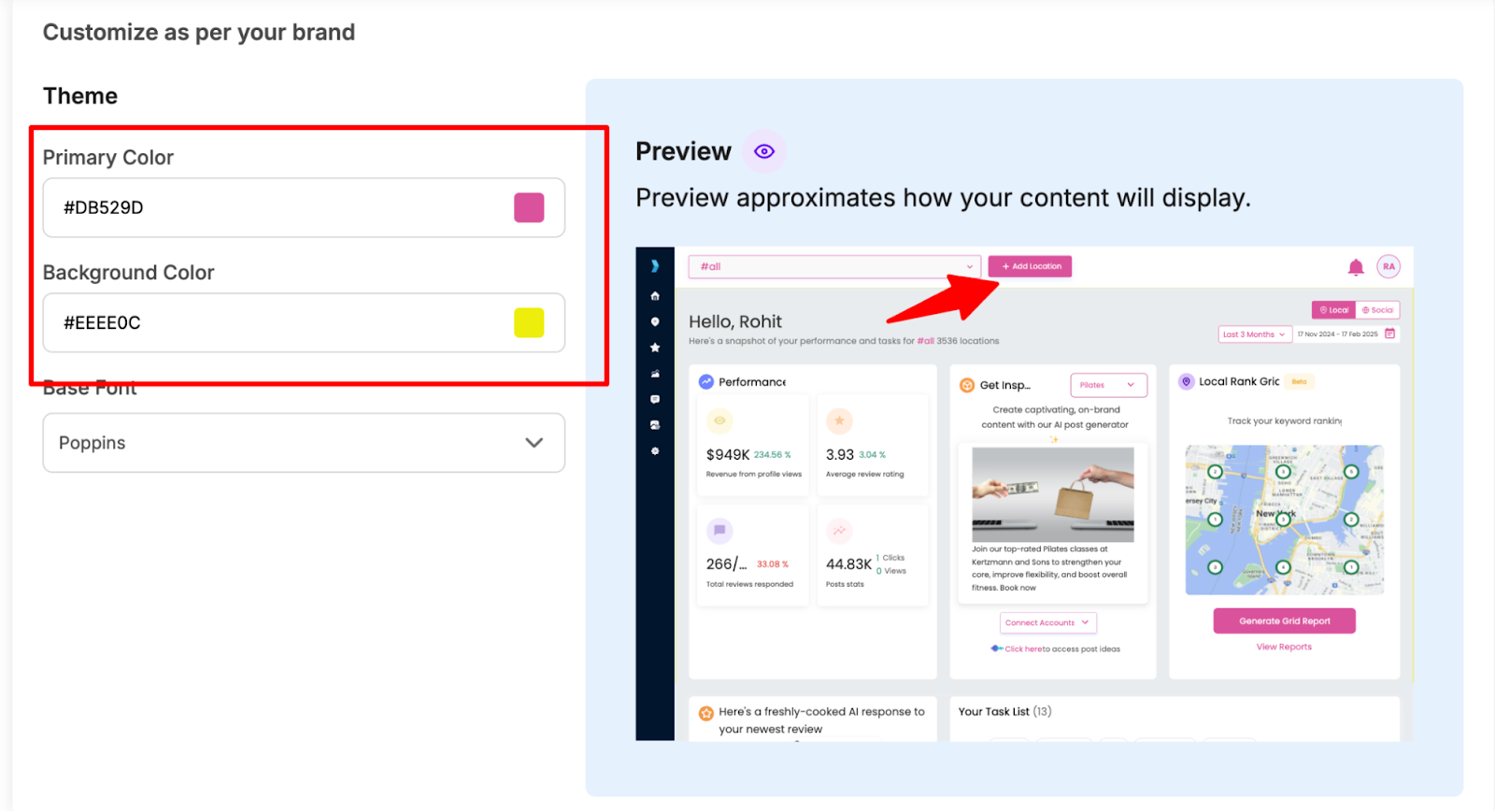
Clients logging in see a polished, cohesive experience branded by you, not a generic software provider.
Modular Access and Self-Serve
The dashboard is intelligent. Based on the services assigned to each of your clients, their dashboard only displays relevant apps:
- Listings performance
- Review sentiment
- Social scheduling tools.
This keeps the UI simple and highly relevant. By giving clients a dedicated, branded login, you offer a valuable "self-serve" experience. They can check performance metrics, view open tasks, and review invoices without needing to constantly interrupt your team.
Read More: Branding and Domain Setup
Set Up Onboarding Email Automation & Notifications
Speed is a competitive advantage in onboarding. Synup OS allows you to configure automated email sequences under “Automations.” You can trigger messages based on events or status changes:
- Welcome & Next Steps: Automated emails can immediately send the client the link to their portal, their login credentials, and the onboarding questionnaire upon contract signing.
- Reminders: Set up automated reminders for clients who haven't completed the questionnaire or submitted key documents (like logos or access credentials).
- Internal Notifications: Crucially, you can set up notifications for your team (including new hires) for key events, such as when:
- a client uploads a document,
- a client signs a contract,
- or an invoice is due.
This ensures critical steps are not missed across the large client base.
How Synup Helps
Let's say a new client signs on a Friday night. Instead of letting the momentum die until Monday:
- The dashboard login email goes out instantly
- The questionnaire arrives in minutes
- Docs and next steps are visible in their portal
Synup OS makes you look active and organized even when the office lights are off.
Conclusion & Next Steps
Most agencies don’t realize that onboarding can be the silent profit leak once they cross 20–30 active clients. Every missing document, unclear brief, or scattered thread adds minutes… which compound into dozens of hours every month. Synup OS plugs those gaps by systemizing how you collect data, track tasks, and communicate. If you want onboarding that scales cleanly, start with Synup OS today with a demo.
FAQs
- How does the platform help with client questions during onboarding?
Synup OS kills the back-and-forth by giving each client a unified Synup OS client portal where tasks, deadlines, files, and messages sit together. Instead of switching between email, WhatsApp, and phone calls, your team answers questions with full context and no guesses. On average, agencies using structured portals cut support noise by about half.
- How do we set up a new client account in Synup OS?
You pull in the client’s business details, assign the services they purchased, and turn on the required apps: Listings, Reviews, Social, or Analytics. Synup then auto-generates a dashboard with the right modules and checklists. A setup that usually takes a coordinator 45 minutes (naming conventions, folder structure, milestones, permissions) becomes a guided 5-minute flow. Once ready, you invite the client into their branded portal to start the data-collection step immediately.
- Does Synup OS integrate with our existing project management tools?
Yes. Agencies rarely want to rebuild their stack from scratch. Synup OS sits at the center and syncs with the tools you’re already married to: Google Drive, OneDrive, calendars, and essential productivity tools. It becomes the “operational home base,” while your external tools remain exactly where they are. This keeps your structure intact while giving you a single reliable source of truth for every client.
