
5 Best White Label Rank Trackers for Marketing Agencies

Click to Compare

Clients can get more than a little obsessed about ~rankings. They want weekly proof that their SEO budget (expansive or not) is paying off. The problem is, you have to juggle multiple dashboards, spreadsheets, and screenshots, all while trying to sound confident on your Monday calls. There’s an obvious middleman to cut out, and shockingly, it’s you.

A white label rank tracker changes that game entirely. It simplifies your job by automating ranking reports, showing clients their progress in real time, and letting you brand everything like it’s your own. 

Since 2014, Synup has helped thousands of businesses and agencies win more customers. We’ve taken everything we’ve learned and poured it all into this straight-up, unbiased list of the best white-label rank trackers for agencies that mean business.

TLDR: The Best White Label Rank Trackers in a Nutshell 

Here’s what to watch out for when choosing white-label rank trackers:

  • Time savings
  • Accurate data
  • Brand consistency
  • Scalability
  • Client retention
  • Integrations

Top picks from our in-depth review include:

  • Synup: Best for mid-sized agencies needing grid tracking, multi-location dashboards, and an all-in-one agency OS (listings, reviews, CRM).
  • SE Ranking: Best affordable all-round SEO toolkit with keyword research, competitor monitoring, and white-label reporting.
  • BrightLocal: Best for multi-location brands needing regional ranking and franchise-level reporting.
  • GMB Radar: Best budget GeoGrid visualization tool for small agencies or consultants.
  • Local Falcon: Best for advanced, AI-powered geo-tracking insights and Share of Local Voice metrics.

What Is a White‑Label Rank Tracker?

A white‑label rank tracker is a local SEO ranking tool that monitors where specific keywords rank in search results before packaging that data in a branded report for your clients. 

To your clients, it looks just like your own proprietary software, not a third-party tool.

For you, this direct access for the clients means you waste less time pulling together info and making it presentable. You just focus on defending the results, good or bad.

Benefits of Using a White‑Label Rank Checker

Using a white‑label rank tracker can deliver concrete business benefits:

  • Time savings: Let's say your SEO agency works with about 25 clients. Before switching to a white label rank tracker, each account manager likely spends about 4 hours a week gathering keyword reports, taking screenshots, and preparing presentations. After automating reports through a rank tracker, that number could drop to under 45 minutes per client. Multiply that across 25 clients, and you’re saving nearly 75 staff hours a month.
  • Accurate data: Reliable rank trackers monitor both Google Maps and organic SERPs. 46% of Google searches have local intent, so local ranking data is as important as traditional organic rankings.
  • Brand consistency: Your logo, colors, and domain reinforce professionalism across every client touchpoint. Clients never see a third‑party tool; they experience everything under your agency’s banner.
  • Scalability: Modern rank trackers handle thousands of keywords across hundreds of locations. Agencies no longer need to manually collect data. This automation frees you to focus on strategy.
  • Improved client retention: Professional, easy‑to‑understand reports help clients visualize their progress. Keyword position growth, SERP visibility score, CTR, competitor ranking gap… When clients see tangible improvements, they are more likely to stick with your services.

How to Choose the Right White‑Label Rank Tracker for Your Agency

Selecting the right tool should never come down to running with what you see on the pricing page. Consider the following factors:

  1. Coverage and accuracy: Make sure the tool tracks rankings across Google Maps, organic search, and multiple devices. Accuracy is non‑negotiable since your strategy decisions will depend on reliable data.
  2. Scalability: Agencies serving many clients need bulk keyword uploads and multi‑location reporting. Without scale, you’ll spend time duplicating data entry.
  3. Reporting & customization: Look for customizable dashboards, scheduled report emails, and exportable PDF or CSV files. White‑label portals that clients can actually log into are a bonus.
  4. Integrations: Does it sync with your CRM, dashboard, or analytics tool? Integrations reduce manual data transfer and keep your tech stack streamlined.
  5. User reviews: Don’t rely solely on marketing copy. Check recent user feedback on review platforms. By perusing marketing forums and checking peer feedback, you can actually find what works.

Insights like that give you a sense of real‑world experience.

Below are five white‑label rank trackers we researched in depth. Each section highlights what the tool does well, its limitations, pricing, and what customers say. 

Synup

Best for: Mid‑sized marketing & advertising agencies

What Synup Does

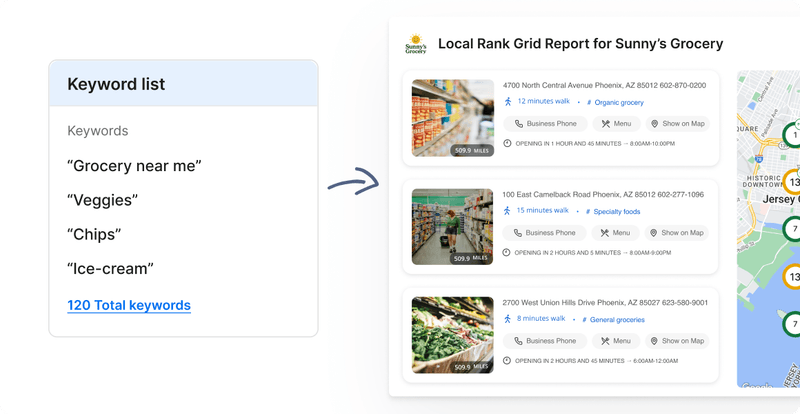
Synup offers a comprehensive local SEO solution with grid rank tracking and keyword rank tracking. Agencies can visualize how a client’s business appears across different neighbourhoods using customizable grid sizes. The tool monitors rankings on Google Maps and traditional organic search, supports bulk keyword uploads, and exports client‑ready reports.

Key features

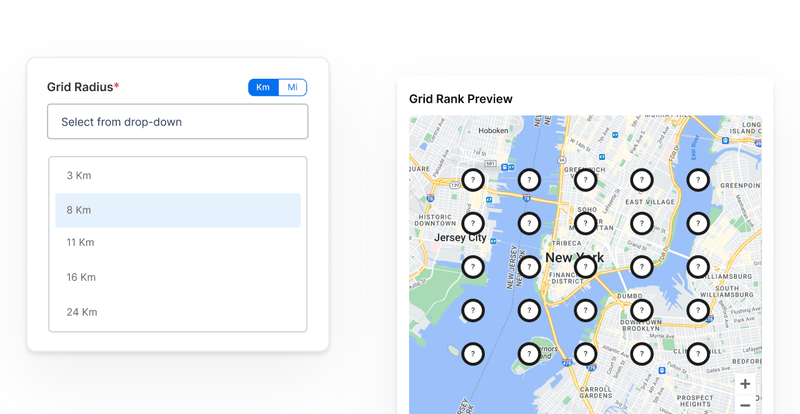
  • Grid Rank Tracker: Create geo‑grid maps that show how clients rank block‑by‑block. Choose different radii (3x3, 5x5, and 7x7) to uncover hyper‑local visibility gaps. You can check rankings up to 50 miles from your elected location.
  • Multi‑platform rank tracking: Track keyword visibility across Google Maps and organic search simultaneously.
  • Target the right keywords: Start monitoring your search rankings by entering one or several locally-focused keywords that are relevant to your business. The OS also supplies AI-powered recommendations to this effect.
  • Shareable & exportable reports: Generate branded PDF reports or share interactive dashboards directly with clients.
  • White‑label client portal: Provide clients access to their data using your domain, logo, and colors (this extends across Synup’s ecosystem, from listings to reviews, social media, and CRM).
  • Agency OS & marketing apps: You can also manage tasks, proposals, payments, and customer relationships within a unified platform. This reduces tool sprawl and increases operational efficiency.
Benefits of Synup

  • Grid maps reveal exactly where a client’s rankings drop off, so you can refine on‑page and off‑page SEO.
  • Bulk keyword uploads and multi‑location dashboards let agencies handle hundreds or thousands of keywords. 
  • Exportable reports and client portals ensure your agency’s brand stays front and center. 
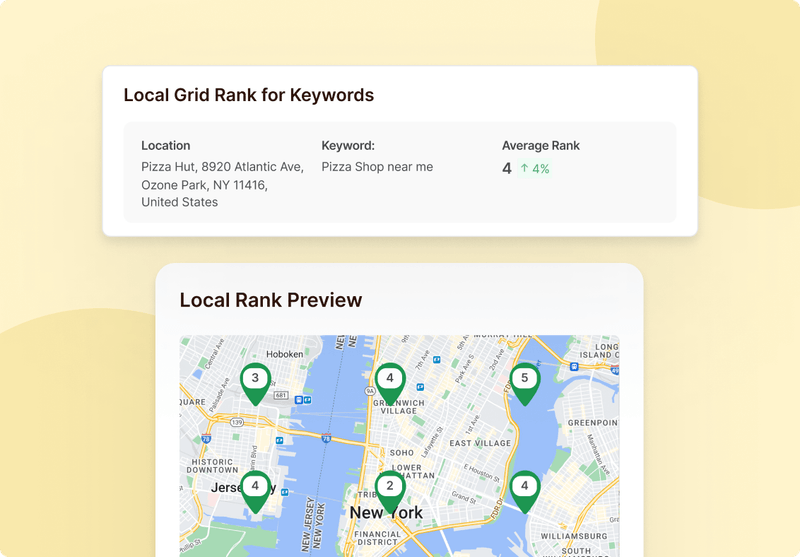
  • Quickly view your search rankings for every grid point. Synup provides details like your average position, the top 3 performers, and the top 10 rankers.
  • By combining rank tracking with listings management, reputation management, and CRM capabilities, Synup reduces subscription costs and eliminates data silos.

Pros

  • Hyper‑local grid tracking and ranking insights across Maps and search.
  • Target keyword management and multi‑location dashboards.
  • White‑label client portal and report customization.

Cons

  • Best suited for medium-sized agencies; advanced features may introduce an initial learning curve for smaller agencies with limited SEO experience.

How to Get Started

Agencies can start by requesting a demo on Synup’s website. After a brief onboarding, you’ll receive login credentials and can import your clients, upload keywords, and configure geo‑grid scans (in the top navigation bar, open Analytics, choose Keyword Rankings to begin).

Synup provides documentation and support to help you build your first white‑label dashboard.

What Customers Say

“We are a digital marketing company and handle 100+ clients. Synup helps us a lot to easily manage their local business listings and citations from one place. Which saves us a lot of time because we don’t need to update information manually on each citation site.”

— Review collected by and hosted on G2.com
SE Ranking

Category: Affordable all‑round SEO suite

What SE Ranking Does

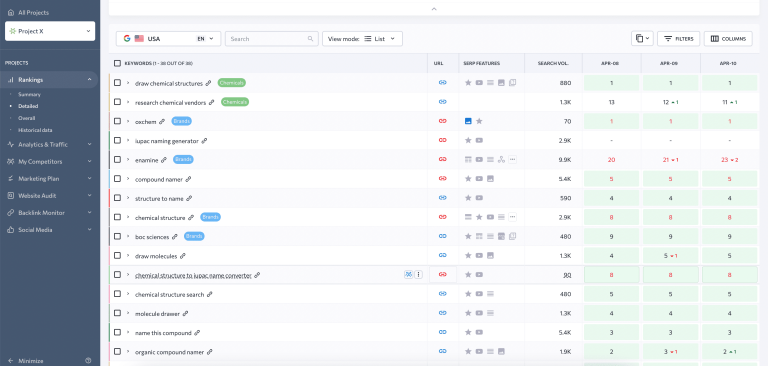
SE Ranking is an all‑in‑one SEO platform that includes a keyword rank tracker alongside tools for keyword research, competitor analysis, site audit, and backlink monitoring. The rank tracker monitors keyword positions in any location, search engine, and device, and promises 100% accuracy. This versatility makes SE Ranking appealing for agencies that want an affordable toolkit.

Key Features

  • Accurate rank tracking across Google, Bing, Yahoo, and YouTube. 
  • Intuitive competitor monitoring with visibility ranking and share of voice insights.
  • SERP analysis of the top 100 search results for any keyword.
  • Easy on‑page SEO audits.
  • Backlink & keyword research.
  • AI results tracker functionality to analyze brand visibility across AI search engines.

Benefits of SE Ranking

  • SE Ranking offers lower entry pricing than many enterprise tools.
  • All-in-one features reduce integration overhead and subscription sprawl.
  • Track keywords across multiple search engines and devices to ensure that your strategy accounts for varied user behaviors.
  • Combines rank tracking with SERP analysis and on‑page audits.

Pricing

  • Essential plan: ~$65/month (includes rank tracking for a smaller number of keywords).
  • Pro plan: ~$119/month (adds more keywords, competitor monitoring, and project limits).
  • Business plan: ~$259/month (scaled limits and API access). 

Discounts are available with annual subscriptions, and you can choose to upgrade with Agency, Content Marketing, and Local Marketing add-ons.

Pros

  • Precise keyword tracking for multiple search engines and devices.
  • Robust competitor and SERP analysis features.
  • Integrated SEO tools (site audit, backlink checker, keyword research).

Cons

  • Some users have reported occasional bugs and slow support response. Some reviews mention that account changes can be difficult.
  • Interface can feel cluttered when working with many tools; new users may need time to navigate all features.

What Customers Say

“We at Honey Whale have been using SE Ranking daily, and it's been nothing short of fantastic. As an agency, finding a tool that balances cost-effectiveness with high functionality is crucial, and SE Ranking does just that. It stands toe-to-toe with more expensive options like SEMrush and Ahrefs, offering almost identical features at a more accessible price point.”

— Review collected by and hosted on G2.com
BrightLocal

Category: Best for multi‑location brands & agencies

What BrightLocal Does

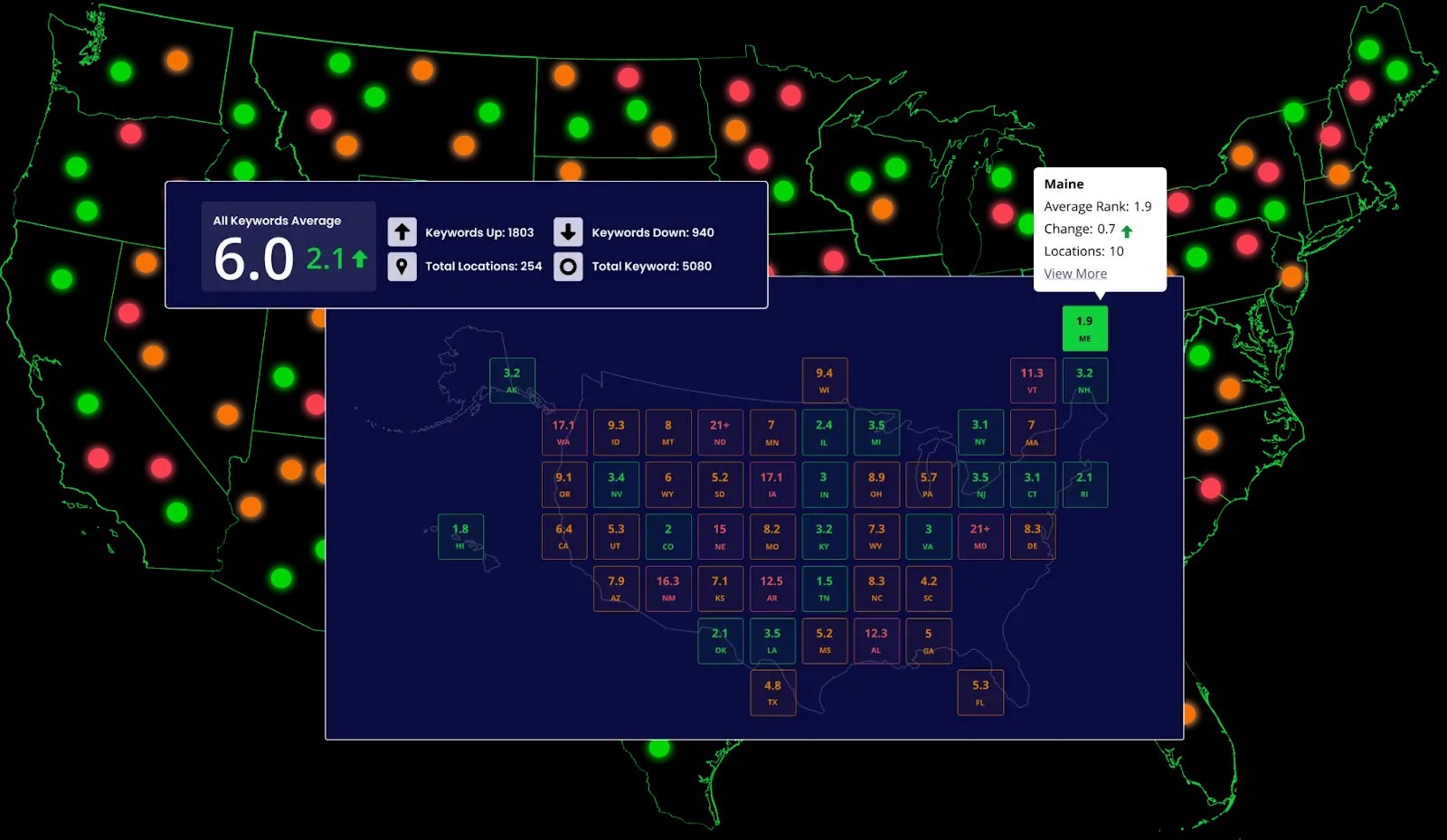
BrightLocal’s Horizon platform provides scalable location analytics and reporting for agencies managing hundreds of locations. The tool aggregates rankings across thousands of keywords. It offers national and state‑level snapshots and displays insights in easy‑to‑read dashboards.

Key Features

  • Key insights about search prominence that let you monitor which keywords are performing the best and which ones are struggling.
  • Granular analysis that compares performance across branches or franchises.
  • A centralized dashboard and visual reports that clearly communicate relevant data for all stakeholders. 
  • Easily conduct competitor analysis on key local ranking factors.

Benefits of BrightLocal

  • Agencies can quickly see how each location performs relative to regional averages.
  • Prioritization features show the locations that need attention first.
  • Reports can be tailored to executives or location managers, ensuring everyone understands the impact of local SEO.
  • Detailed analysis helps agencies identify citation gaps or competitor threats at each location.

Pricing

BrightLocal offers multiple plans starting at $39/month, with costs increasing for more locations and features. Additional services like citation clean‑up or review generation may carry separate fees.

Pros

  • Robust multi‑location ranking dashboards and granular analysis.
  • Strong data visualizations and stakeholder‑friendly reporting.
  • Proactive customer support and educational resources.

Cons

  • Pricing can be confusing due to add‑ons and location tiers.
  • Some users complain that the tool sometimes suggests irrelevant competitors or misclassifies industries.

What Customers Say

“Simple and effective. Use this if you want to figure out why your business isn't gaining the traction you believe it should. It takes the mystery out of it. The learning curve seems pretty low. I'd say that they worked on creating a few features well...and those features lead into each other, so watch the demo and you'll understand 80% of it.”

— Review collected by and hosted on G2.com
GMB Radar

Category: Budget‑friendly GeoGrid visualization

What GMB Radar Does

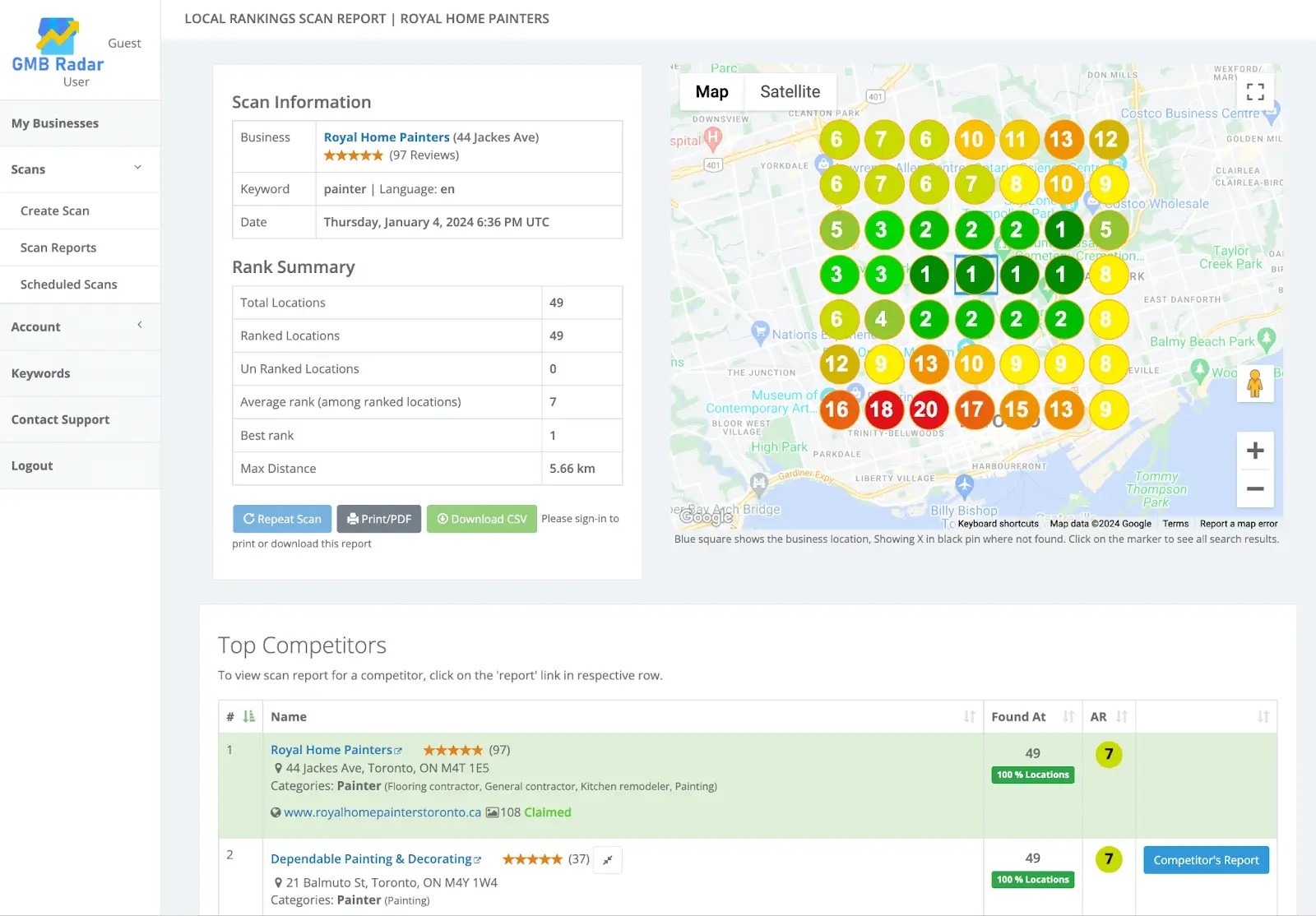
GMB Radar focuses on providing GeoGrid local ranking visualizations at an affordable price. Users enter a business location and set a grid radius; the tool displays ranking positions across different grid points and compares them against nearby competitors. White‑label reports and customizable scan schedules make it appealing for consultants or small agencies looking for a low‑cost entry into rank tracking.

Key Features

  • Easy-to-understand GeoGrid with customizable distance and size.
  • Easily schedule daily, weekly, or monthly scans to set your own cadence.
  • Easily conduct competitor monitoring within the same grid view.
  • Generate white-label local SEO reports with your own branding.

Benefits of GMB Radar

  • Helps you understand exactly where your client’s rankings drop off and how far competitors dominate.
  • The tool can scan unlimited locations across different campaigns.
  • Automated scheduled scans save time and provide regular performance overviews.
  • GMB Radar offers one of the lowest price points in the market.

Pricing

  • Standard: $15/month
  • Professional: $30/month 
  • Premium: $100/month 

This price includes unlimited locations and white‑label reports (from Professional upwards), making it attractive for solo consultants or small agencies.

Pros

  • Affordable pricing with transparent costs.
  • Customizable grids and scheduling options.
  • White‑label report downloads.

Cons

  • User interface feels dated compared with modern competitors and does not provide organic ranking or device‑level data. 
  • The user base is very small; GMB Radar has no published user insights on trusted review sites like G2 or GetApp.

Local Falcon

Category: AI‑assisted multi‑location insights

What Local Falcon does

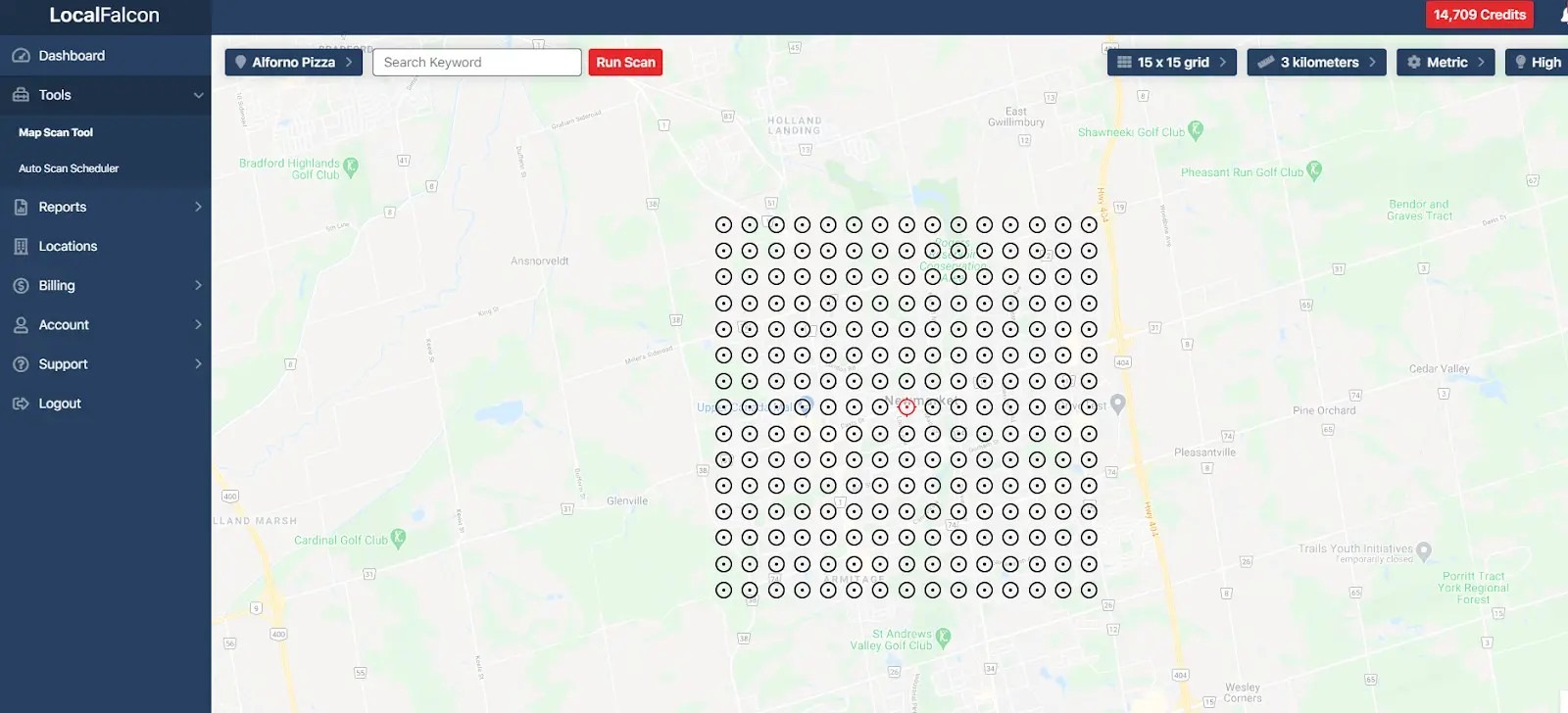
Local Falcon pioneered grid‑style rank tracking in 2018 and now offers advanced AI‑driven analysis. The platform introduces the Share of Local Voice (SoLV) metric, which measures how often a business appears in Google’s map pack across different radii. It includes multiple grid sizes, AI analysis with recommendations, customizable grid point density, and support for both Google and Apple Maps.

Key Features

  • Customizable geo‑grid tracking for multiple keywords and locations.
  • SoLV metric shows how frequently your listings show up in the Map Pack.
  • Falcon AI analysis & recommendations
  • AI visibility tracking across AI search engines
  • Google & Apple Maps support
  • Integrates with Looker Studio and Zapier.

Benefits of Local Falcon

  • The SoLV metric reframes success around map‑pack visibility rather than absolute ranking.
  • Multiple grid sizes and customizable densities provide granular control over where to look for ranking gaps.
  • Visualizations make it easier to demonstrate local ranking gaps to potential clients and justify your services. 
  • Support for Google and Apple Maps ensures that your client’s presence is monitored across both major local platforms.
  • Falcon AI analyzes local search data to provide tailored recommendations, and Falcon Assist offers conversational guidance and answers local SEO questions.
  • AI visibility tracking helps you track presence across all major AI search platforms; you can use it for generative engine optimization (GEO).

Pricing

Local Falcon offers several packages using a credit system. Plans start at $24.99/month (Starter, 90,000 credits), with Basic ($49.99), Pro ($99.99), and Premium ($199.99) options for higher credit allowances. 

A free trial with 100 credits is available.

Pros

  • Innovative SoLV metric and AI‑powered recommendations.
  • Multiple grid sizes and densities for granular analysis.
  • White‑label reporting that includes multi-point map grids.
  • Integrations with Looker Studio and Zapier for data visualization and automation.

Cons

  • Pricing can go up if you need a lot of credits; heavy users may find it more expensive than expected. 
  • Occasional API lags may lead to rare misinformation in reports.
  • Limited features beyond rank tracking (no listings management or reputation tools).

“I like the trend report that shows the progress that my clients are making for their target keywords in Google Maps. As the SoLV increases, so does the number of impressions, website clicks, phone calls, and leads. I also appreciate how the tool is expanding to include ChatGPT / Google Gemini, as that is at the top of my mind for 2025.”

— Review collected by and hosted on G2.com
Summing Up…

White‑label rank trackers allow agencies to present professional, branded reporting while accessing accurate data behind the scenes. When choosing a tool, evaluate the balance between features, scalability, and price. 

Synup stands out for agencies needing hyper‑local grid tracking alongside a full agency operating system. SE Ranking offers a cost‑effective all‑rounder for agencies that also need keyword research, site audits, and backlink monitoring, while BrightLocal is ideal for multi‑location brands with large sets of locations and stakeholders.

Get Started with Synup

If you need a rank tracker that does more than plot points on a map, take Synup into consideration. You get grid and keyword rank tracking, automated reporting, and a white‑label client portal within a broader agency OS. The ability to manage listings, reviews, social posts, and CRM tasks from one dashboard means fewer subscriptions and less context switching.

FAQs

  1. How often should I check keyword rankings? 

It depends on campaign goals. Most agencies schedule daily or weekly scans to catch sudden ranking changes and monitor ongoing SEO efforts. Tools like Synup and GMB Radar offer automated scheduling so you can essentially set it and forget it.

  1. Is white‑labeling necessary for small agencies? 

White‑labeling adds professionalism and trust, but it’s not mandatory. If you work with a few clients and communicate results personally, a standard rank tracker may suffice. However, as your agency grows, white‑label dashboards reduce repetitive reporting and keep your brand front‑of‑mind.

¡Asóciese con Synup hoy mismo!

Reserve una llamada con nuestro gerente de asociaciones para explorar soluciones de crecimiento personalizadas para su agencia.
