
Prevent Suggested Edits & Unauthorized Changes on Your Google Business Profile
Learn how suggested edits work on Google Business Profile, why unauthorized changes happen, and how agencies can reduce risk across multi-location listings.
Here’s a scenario that’s more common than it should be: a client calls you on a Monday morning asking why their restaurant showed up as “permanently closed” over the weekend. When you log in, nothing looks wrong in the dashboard. But they show up as “Closed” on Maps. Those are their busiest revenue days, now gone.
You didn’t make that change, and neither did they.
Almost scarily, someone else did. And Google let it through.
This is the operational risk that agencies managing multiple GBP locations deal with every single week. Suggested edits (changes made by third parties that can go live without owner confirmation) are one of the least discussed but most disruptive threats to local search performance. And at scale, across dozens or hundreds of client locations, the exposure is enormous.
TL;DR
- Suggested edits on GBP can change key listing data without approval.
- Incorrect updates can impact visibility and customer activity.
- Multi-location businesses face a higher risk due to data inconsistencies
- Consistent data and active monitoring reduce risk.
What Are Suggested Edits on Google Business Profile?
Google Business Profile operates on a crowdsourced model. Accuracy is the goal, and to achieve it, Google allows anyone to propose changes to any business listing. Any user on Google Maps can click “Suggest an edit” and propose modifications to a business’s name, hours, address, phone number, website URL, categories, or even its open/closed status.
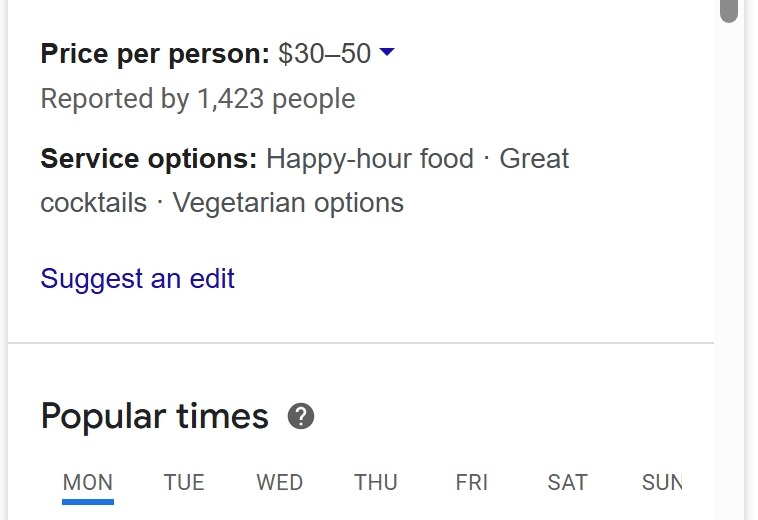
There are two fundamentally different types of edits:
- Owner edits are changes made by a verified profile manager or owner. These are reviewed and typically applied within 10 minutes, though Google states they can take up to 30 days in some cases (Google Business Profile Help).
- Third-party edits come from users, Local Guides, connected apps, Google’s own data scrapers, or AI-driven inference systems. These are evaluated differently. And here’s the part most people don’t fully appreciate: they can go live before the owner is even notified.
The fields most commonly affected are business hours, business name, address, and map pin location, primary category, website URL, and whether a business shows as open, temporarily closed, or permanently closed. These are the core signals Google uses to rank and display your listing.
Also Read: Analytics & Reporting for Google Business Profile
Who Can Make These Edits (and How They Get Approved)
Understanding the approval mechanism is where things get interesting and a little unsettling.
Google’s algorithm weighs several factors when deciding whether to approve or auto-apply a suggested edit: the Local Guide level of the person submitting it, the number of people who have suggested the same change, and the activity level of the listing itself. A dormant, infrequently updated listing is far more vulnerable than one with regular posts, recent photos, and consistent NAP data across the web.
The sources of edits generally fall into four categories:
- Public Users: anyone with a Google account can suggest edits
- Local Guides: Google’s power contributors whose edits carry significantly more algorithmic weight
- Third-Party Apps: tools that previously had API access to a profile can continue pushing updates
- Google Itself: its crawlers and AI systems actively infer business data from websites, social profiles, competitor listings, and even image analysis
Google’s AI can look at images, user behavior, or competitor data to make updates. For example, it may misinterpret a temporary holiday closure and mark a business as permanently closed.
The key thing to understand: being a verified owner does not give you automatic veto power. If Google receives reports that a business’s info isn’t accurate, it may update the profile. And if this happens, you’ll receive a notification and find an alert in the “Edit profile” section of your Business Profile. The notification comes after the change, not before.
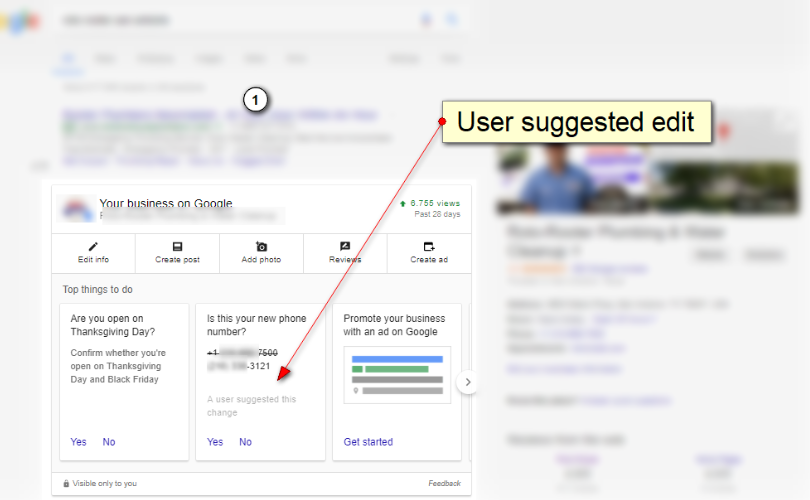
Courtesy: Sterling Sky
Did You Know? Google highlights third-party suggested edits in orange inside the GBP dashboard and in the Local Finder on Maps. This is the fastest way to spot pending or applied changes, but only if someone is actively looking.
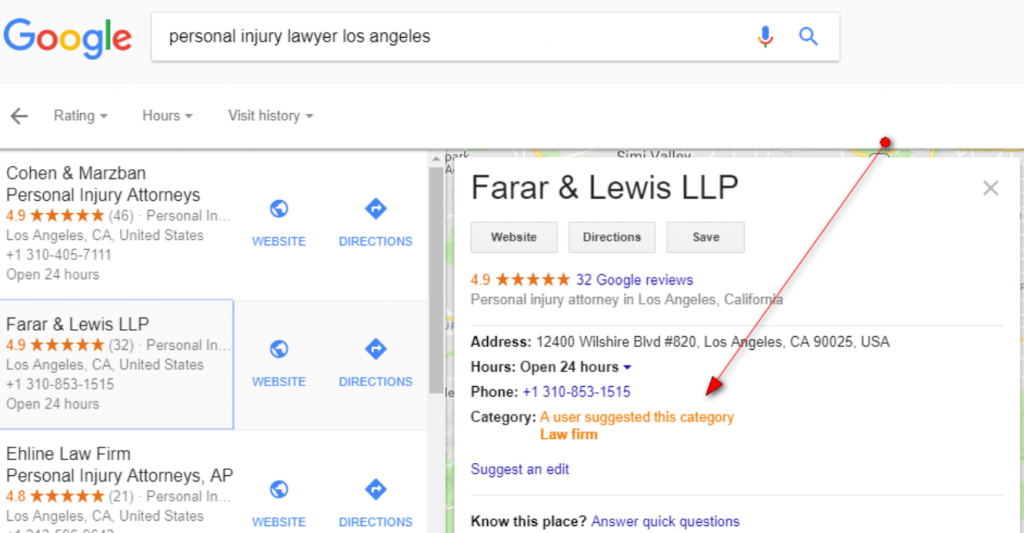
Courtesy: Sterling Sky
Common Scenarios Where Unauthorized Changes to Your GBP Happen
Here are the scenarios agencies most commonly encounter:
- Incorrect hours or false closures: One restaurant owner reported losing sales during lunch hours because Google automatically updated business hours based on an online food delivery platform. For a multi-location food and beverage client, one bad edit can cascade into a pattern that appears inconsistent to Google across all locations.
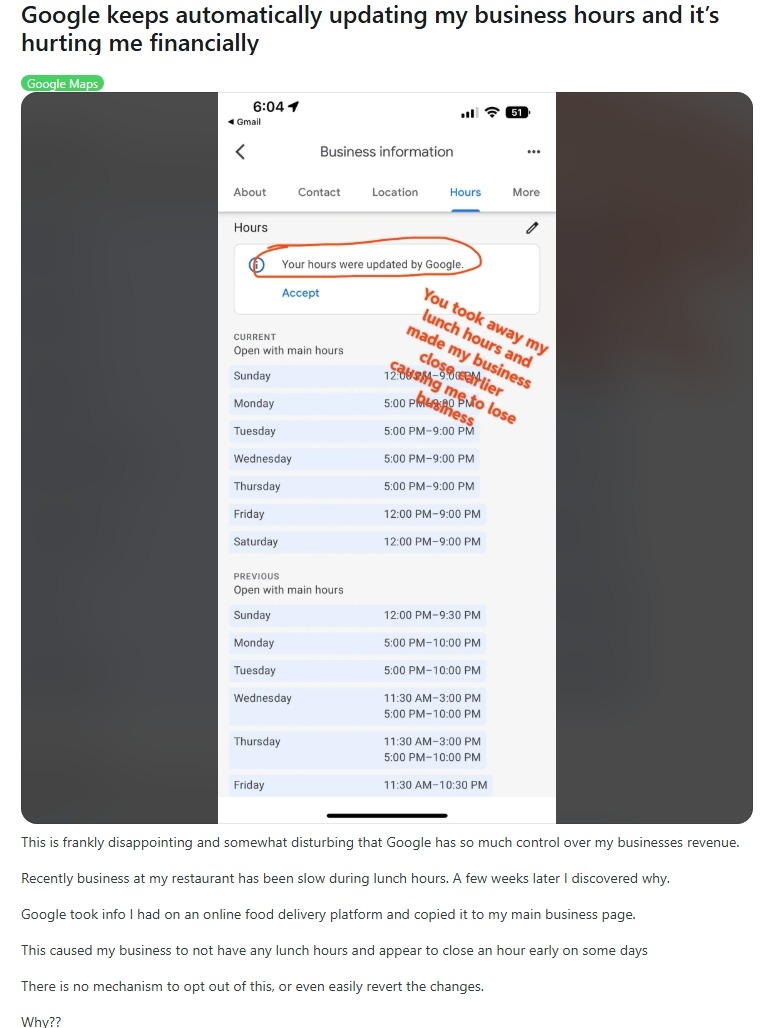
Source: Reddit
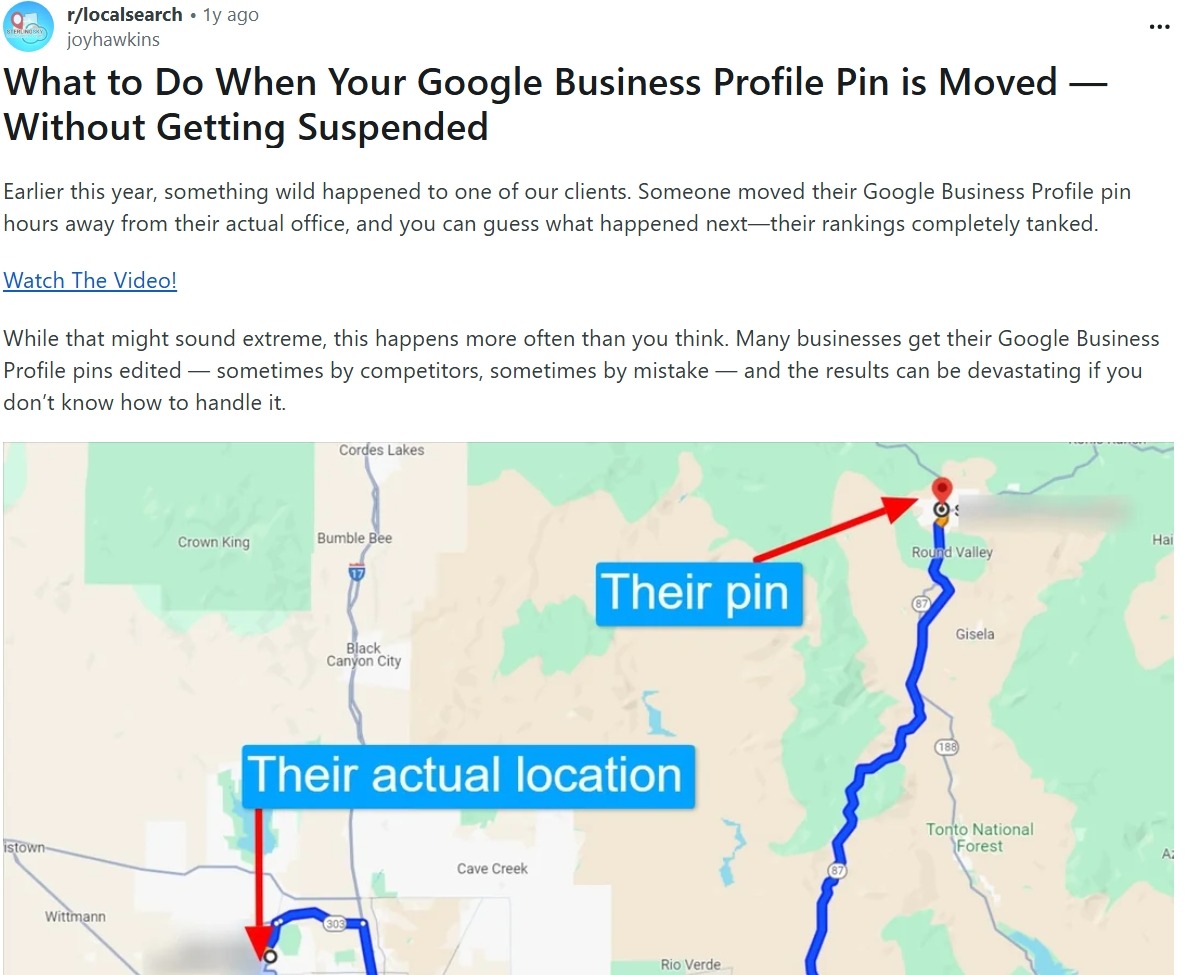
- Address or map pin drift: Sterling Sky and LocalU’s Joy Hawkins reported that a competitor maliciously changed their client’s physical address, causing them to completely drop out of the map pack and devastating their local rankings. A moved map pin is particularly insidious. The listing still exists, the phone number still works, but proximity signals break entirely.
Source: Reddit
- Competitor or malicious edits: Competitors sometimes suggest harmful edits, trying to change hours, add incorrect information, or suggest a business is permanently closed. It sounds extreme. But it happens more than anyone wants to admit.
- Category swaps: These are perhaps the most ranking-destructive changes of all. The primary category is consistently cited as one of the top three ranking factors for local search. A category change triggered by a third-party suggestion can shift a business’s relevance signals almost overnight, and in some cases, the change triggers Google to request re-verification of the entire listing.
Why Google Sometimes Overrides Correct Information
This is the part that frustrates even experienced local SEOs: you make the right change, and Google reverses it anyway.
This happens because Google doesn’t treat you as the single source of truth. It cross-references your GBP data against every signal it can find: your website, Yelp, Facebook, data aggregators, business registration records, and even user-uploaded photos. If your hours do not match across platforms, Google may decide to overwrite your listing.
Being a verified owner gives you priority, not monopoly. If five separate sources across the web disagree with what you’ve entered in GBP, Google’s systems may weight that aggregated external signal over your individual owner edit, especially if your listing is inactive or sparsely updated.
This is also why NAP (name, address, phone) inconsistencies across directories create a compounding risk. An outdated listing on a mid-tier directory isn’t just a citation problem; it can actively feed Google data that contradicts your GBP, making it easier for suggested edits to override your correct information.
Risks of Ignoring Suggested Edits
Let’s be direct about what’s at stake.
Nearly 90% of consumers use Google Maps, and 46% of all Google searches have local intent. For local businesses, a GBP listing is often the primary discovery channel. Any disruption to the accuracy of that listing directly affects how, when, and whether customers find the business.
The ranking implications are concrete. Business hours are a ranking factor. GBP rankings often change drastically depending on whether businesses are open or closed at the time of a search. A false “permanently closed” flag doesn’t just lose that day’s traffic; it can tank a listing’s standing for weeks until it’s identified and corrected.
For agencies, the reputational risk is layered. A client whose GBP silently shows wrong hours for two weeks before anyone notices becomes a case study on why they’re reconsidering their agency relationship. When you manage 30, 50, or 100 locations, the odds that at least one is experiencing an unauthorized change at any given moment are not trivial.
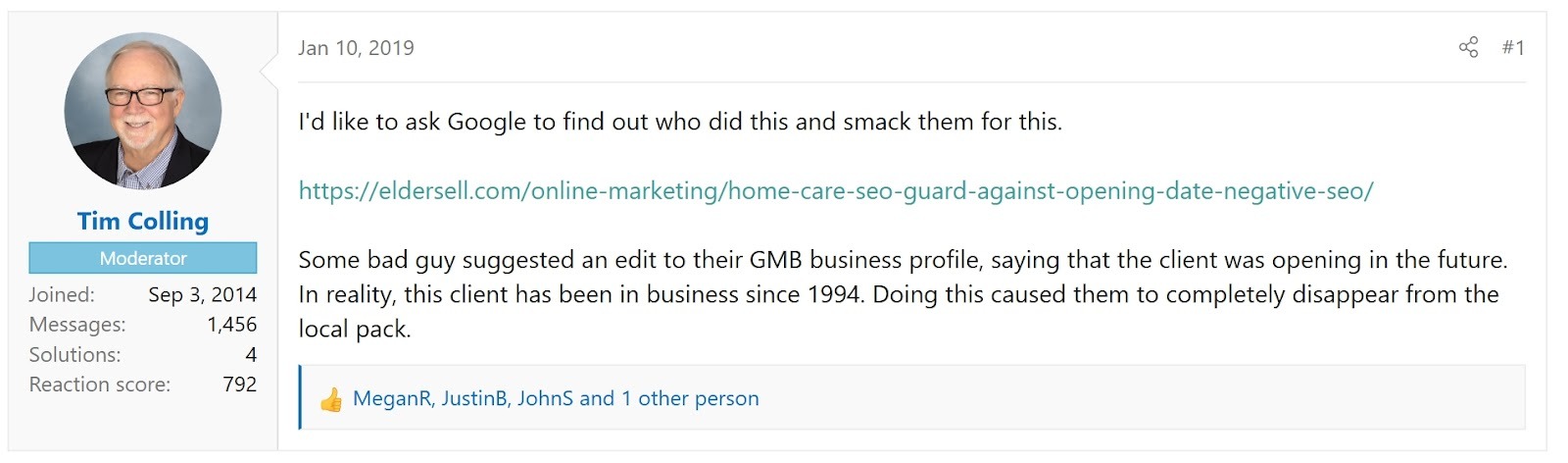
One business’s opening date was changed to show “Opens January,” even though it had been running for years. That’s months of lost revenue from a single field change that no one caught.
Source: Local Search Forum
How to Reduce Suggested Edits Proactively
You can’t turn off the suggested edit system. No matter how hard you try, you can only limit the risk of unwanted edits; you cannot eliminate them altogether. But you can make your listings significantly harder to change against your will.
The core principle: Google trusts listings that look authoritative and consistent. An active, well-maintained profile filled with fresh content, accurate information, and consistent data across the web is far less susceptible to third-party edits getting approved.
Here’s what that looks like in practice:
- Listing completeness matters more than most agencies think. A very active listing with consistent information and an engaged owner is less likely to have suggested edits approved by the algorithm. Fill out every applicable field. Add photos regularly. Use Google Posts. Respond to reviews. These send signals that the listing has an active, attentive owner.
- Cross-web NAP consistency is your first line of defense. The more your business information appears consistently across authoritative directories (Google, Yelp, Apple Maps, Bing, data aggregators), the less ammunition there is for conflicting suggested edits. Inconsistent citations are essentially an invitation for Google to decide what’s “correct.”
- Maintain permission hygiene. Audit who has manager or owner access to every client profile. Old employees, former agencies, and abandoned third-party tools with API access are common sources of unwanted edits. Revoke access from any third-party app that’s no longer actively needed.
- Document the baseline. Maintain a record of the correct information for every field of every client listing. When something changes, you need to know what it changed from, especially if you need to dispute or escalate.
Also Read: Google Business Profile Optimization For Dummies in 2026
Monitoring & Managing Changes at Scale
Manual monitoring is simply not a realistic strategy for agencies managing multiple locations. Checking each listing individually, on a schedule, and across dozens of clients, is both time-consuming and reactive. By the time you notice the change, the damage is already done.
Google does send notifications when changes are made to a profile. Alerts are typically sent via email informing you when edits have been suggested or made by third parties. That said, not all users get these alerts at all times, so it’s important to check on them regularly and act quickly when you see any changes.
What agencies actually need from a monitoring standpoint:
- Automated change detection: alerts the moment a field value changes on any managed listing
- Audit trails: a timestamped log of who changed what and when, across all locations
- Bulk visibility: a dashboard view that surfaces any profile with pending or recently applied edits, without having to drill into each listing individually
- Consistent data as a baseline: any deviation from the “source of truth” triggers a flag, not just a visual review
This is precisely where a platform like Synup changes the operational equation for agencies. Synup’s listings management layer centralizes monitoring and data consistency across 200+ directories with GBP as the anchor.
Also Read: Top 20 Google Business Profile Management Tools for Agencies
When to Escalate or Take Action
Some suggested edits can be legitimate corrections from customers who noticed a real error. Others may require a review or dispute.
The situations where you should act immediately:
- Any change to the primary category, business name, or physical address
- A listing showing as “temporarily closed” or “permanently closed” when it isn’t
- Phone number or website URL changes you didn’t make
- Repeated edits from the same source suggest an organized attempt to disrupt the listing
When you catch an edit that’s already gone live, revert it as quickly as possible. Screenshot the incorrect state first. This creates an evidence record. Then make the correction directly in the profile. If your corrections are not accepted, resubmit with supporting proof such as photos of signage, screenshots from the website, or copies of official documents.
For persistent issues (edits that keep reverting), the path is Google Business Profile support rather than repeated self-correction. And document everything before you contact support.
Agency Tip: If you find yourself unable to make corrections at all, or if the listing appears to be controlled by an external source pushing repeated changes, audit third-party app access first. In many cases, business listings are connected to external tools such as listing management platforms, marketing dashboards, or other integrations that automatically sync business information. If the data stored in those tools is outdated, they may repeatedly overwrite the edits you make directly in Google Business Profile.
The Bottom Line
Suggested edits on GBP can change critical business information without warning.
For agencies and multi-location brands, the takeaway is simple: consistent data, active listing management, and reliable monitoring are essential. The faster changes are detected, the smaller their impact on rankings, traffic, and revenue.
Also Read: Top 8 White Label Local Listing Management Software
FAQs
- How often should agencies monitor listings for suggested edits?
For multi-location accounts, weekly checks are the minimum. High-volume or high-competition industries require automated daily monitoring to catch changes quickly.
- Do suggested edits affect rankings immediately?
They can. Changes to primary category, address (map pin), or open/closed status may impact local rankings as soon as the update is applied.
