Forecasting Client Churn for Your Agency With Synup OS
See how Synup OS helps your agency spot clients who might leave, track important signals, and take action early to keep them happy.
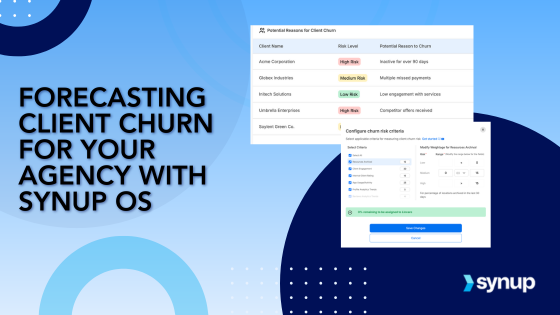
Synup OS makes forecasting client churn a breeze by helping agencies spot high-risk clients early. With customizable parameters based on client behavior and performance, you can take action before a client decides to leave.
Take Action Before It’s Too Late
Client churn is one of the biggest challenges for any agency. It’s tough to know which clients are at risk until it’s too late. That’s where Synup OS comes in. It helps agencies forecast churn by providing a clear picture of which clients need attention. By tracking key metrics like client engagement and performance, Synup OS helps you spot red flags early, so you can act quickly to retain your clients. Let’s dive into how you can use Synup OS to keep your client relationships strong and your retention rates high.
Why Forecasting Churn Matters: Benefits for Your Agency
Client churn can be a silent killer for agencies, often sneaking up when least expected. But with Synup OS, you get the tools you need to stay ahead of the curve. By forecasting churn, you’re not only able to react to problems but to prevent them from happening in the first place. Here’s why forecasting churn with Synup OS is a game-changer for your agency.
1. Stay Ahead of Churn
Instead of waiting for clients to leave, Synup OS lets you identify clients at risk early on. With this foresight, you can take steps to address their concerns and improve retention before it’s too late.
2. Make Data-Backed Decisions
Gone are the days of guessing which clients might churn. Synup OS provides data-driven insights into client behavior and performance, giving you a much clearer picture of who needs attention.
3. Customize Your Risk Parameters
Every client is different, and so is the way they might churn. Synup OS lets you define your own churn risk criteria based on what matters most to your agency, whether that’s engagement levels, app usage, or internal ratings.
4. Prioritize Client Needs
With a clear view of which clients are at risk, you can focus your efforts where they’re most needed. Whether it’s a quick check-in or a deeper intervention, you’ll know exactly which clients require your attention.
5. Strengthen Client Relationships
When clients feel like you’re on top of their needs, they’re more likely to stick around. By identifying at-risk clients early, you can show them that you care, which goes a long way in building long-term loyalty.
How to Forecast Client Churn with Synup OS
Now that you know why forecasting churn is essential, let’s walk through how to actually do it using Synup OS. The platform makes it easy to define and visualize churn risk by setting custom criteria that suit your agency’s needs. Whether you’re focused on client engagement, app usage, or internal team assessments, Synup OS allows you to tailor the churn parameters to get the most accurate predictions. Let’s explore how you can configure these settings for your agency and start forecasting churn for every client.
1. Set Up Your Churn Criteria
The first step to forecasting churn is defining what it means for a client to be at risk. Synup OS lets you do this by customizing churn criteria based on key parameters. You can configure these criteria for each individual client. If not configured, Synup uses default agency data to define churn for all clients.
Go to the Clients tab in Synup OS > Click on any individual client to go to the client summary > Click the settings icon next to the churn risk metric on the client summary page.


Here's what you can configure:

Resources Archival (Listings or Reputation Management Clients)
If you manage listings clients, you might notice that clients who archive a large number of locations within a short period tend to disengage. For example, if more than 30% of their locations were archived in the past 30 days, you could flag these clients as "high risk." You can configure the risk range, so if a client has archived 25%-30% of their locations in the past month, they fall into the "medium risk" category, while anything above 30% automatically classifies them as "high risk."
Client Engagement
Client interactions are a great indicator of potential churn. For example, if a client has had fewer than 3 touchpoints with your agency (meetings, calls, or emails) in the past 30 days, you may consider them high risk. As an example, you can set the threshold as follows: clients with less than 2 interactions are classified as "high risk," while clients with 3-5 interactions are classified as "medium risk." This helps you identify clients who may be slipping away due to reduced engagement.
App Usage/Activity
For clients using your marketing apps, app usage is a strong predictor of engagement. For example, if a client only logs into their dashboard 3 times in the past month, you may flag them as high risk. You can set the churn risk parameters so that clients with fewer than 5 logins in 30 days are classified as "high risk," while those who log in 5-10 times are classified as "medium risk," and anything above 10 logins is considered "low risk." This parameter allows you to easily monitor clients who aren’t making full use of your service.
Profile Analytics Trends (Listings Clients)
If you manage listings clients, their local profile performance—such as direction requests, website visits, and profile views—can be an indicator of potential churn. For example, if a client’s profile views have dropped by 50% in the last 30 days, that might signal disengagement. You can set a churn threshold so that clients with a 30% decrease in profile views in the past month are considered "high risk," while a 15%-29% drop falls under "medium risk."
Reviews Analytics Trends (Reputation Management Clients)
For reputation management clients, a decline in the number of reviews or a drop in average rating can signal trouble. For example, if a client’s review score has fallen below 3.0 stars or if they’ve received fewer than 5 reviews in the past month, they might be at risk of churning. You could define high-risk clients as those with fewer than 2 reviews in the past month or a rating drop of more than 0.5 stars. This ensures you keep an eye on clients whose online reputation is slipping.
Ranking Analytics Trends (Local Marketing or SEO Clients)
SEO performance, especially local rankings, is a key indicator for clients in the marketing space. For instance, if a local client’s ranking has dropped by 20 positions in the past 30 days, this might be a warning sign. You can configure the churn criteria so that clients whose rankings have decreased by more than 15 positions are considered "high risk," while clients with a smaller drop (5-15 positions) are classified as "medium risk." This allows you to identify clients who may need more attention to improve their online visibility.
Social Analytics Trends (Social Media Clients)
Social media engagement can be a good predictor of churn for social media clients. For example, if a client’s engagement score has dropped by more than 30% in the past 30 days, this could suggest disengagement. You can set a parameter to consider clients with a 30% decrease in engagement or a drop in followers by 10% as "high risk," while a smaller drop (10%-20%) is classified as "medium risk." This ensures you’re catching clients who might not be seeing the social media results they expect.
Internal Client Rating
The internal client rating is a subjective but powerful tool in assessing churn risk. For example, if your customer success manager has rated a client below 15 on a scale from 1-30, this could indicate that the client is unhappy or disengaged. As an example, you can configure Synup OS to classify clients with an internal rating of less than 15 as "high risk," between 15-22 as "medium risk," and those with ratings above 22 as "low risk." This internal scoring system gives your team an extra layer of insight to identify potential churn based on qualitative factors.
Synup OS automatically pulls all this data from client activity, so you don’t have to worry about manual input. It’s all right there, ready to be analyzed.
2. Visualize Churn Risk on Your Dashboard
Once your churn criteria are set up, Synup OS shows you the data on a sleek Home Dashboard. Here’s what you’ll see:
Risk Breakdown: A pie chart breaks down your clients into three categories: High, Medium, and Low risk. This gives you a quick overview of where things stand.
Churn Trends Over Time: You can also see how the number of high-risk clients changes over time, helping you track if your retention efforts are working.
For example, if you’ve defined high-risk clients as those with less than 3 interactions in the last month and less than 5 app logins, the dashboard will display those clients in the "High Risk" section. Over time, you’ll also see how this number fluctuates, giving you insights into whether your efforts to engage at-risk clients are successful.
3. Dive Deeper Into High-Risk Clients
When you spot a high-risk client on the dashboard, you can click directly on the High Risk section to filter and view only these clients. This takes you to the Clients Overview Page, where you can see detailed metrics for each at-risk client, such as:
- Their specific engagement numbers (meetings, calls, emails).
- App usage patterns (how many times they’ve logged in).
- Internal ratings (whether the account manager has flagged them as a concern).
From here, you can take action, whether that’s setting up a meeting, offering a discount, or finding another way to re-engage the client and prevent them from churning.
Retain More Clients with Synup OS
Churn is inevitable, but it doesn’t have to be a surprise. Synup OS gives you the tools to predict which clients are at risk and take action before they leave. With customizable risk parameters, a clear visual dashboard, and the ability to dive deep into individual client data, Synup OS empowers you to proactively manage client retention.
Want to keep your clients happy and loyal? Give Synup OS a try today and take control of your client retention strategy.
Stop reading about it. Have Sydekick do it.
Every workflow on this page is something Sydekick runs on its own.