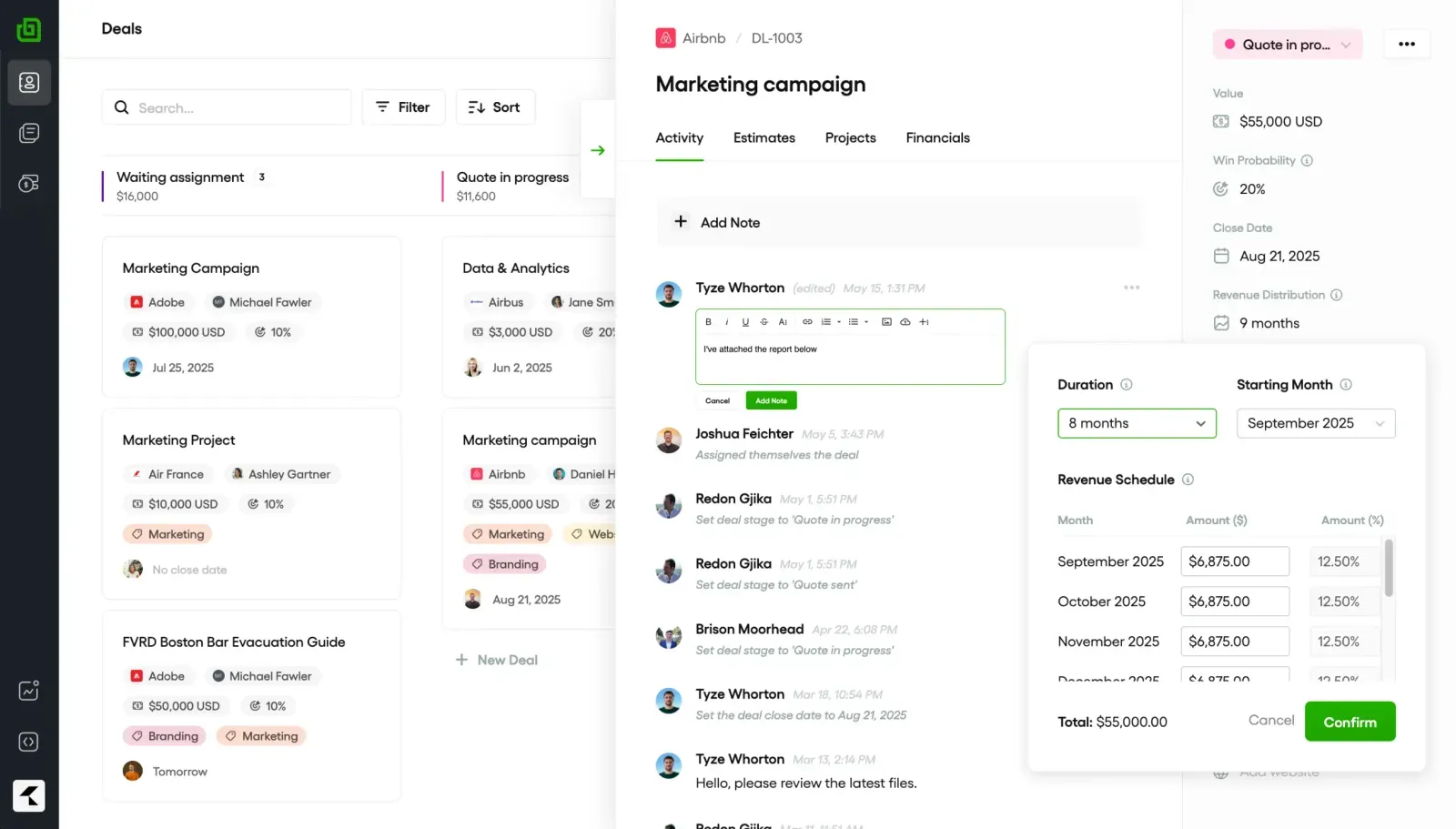
Der Betrieb einer Marketingagentur endet nicht mit dem Start großartiger Kampagnen. Sie sorgen auch dafür, dass 10, 20, manchmal 50 Kunden zufrieden sind, und verfolgen gleichzeitig die Ergebnisse in den Bereichen SEO, Werbung, soziale Netzwerke und E-Mail. Das sind eine Menge Dinge, die Sie im Auge behalten sollten.
Die Kunden wünschen sich außerdem wöchentliche Updates, klare Leistungsberichte, schnelle Antworten auf Fragen und den Nachweis, dass sie sich amortisieren, insbesondere bei Vorzugsverträgen. Die Liste der Erwartungen Ihrer Kunden ist endlos, aber Ihre Fähigkeiten... nicht so sehr.
Wenn Sie versucht haben, zu verwalten das alles Mit Google Sheets, E-Mail-Threads und einigen alltäglichen Software-Logins können Dinge leicht übersehen werden. Dann werden die Kunden unruhig. Nicht lange danach stehen Sie kurz davor, das Konto zu verlieren.
Die Lösung ist einfach: Verwenden Sie ein Kundenverwaltungstool, das für Agenturen entwickelt wurde. Sie werden herausfinden, wie eine Plattform Kampagnenverfolgung, Berichterstattung, Kommunikation und Abrechnung in einem einzigen Bereich integrieren kann, wodurch der Prozess automatisiert wird und die Verwaltungszeit oft um die Hälfte reduziert wird.
Wir haben im Laufe der Jahre mit Tausenden von Kundenkonten gearbeitet und aus erster Hand gesehen, wie die besten Kundenmanagement-Tools einer Agentur helfen. Es verkürzt die Berichtszyklen, hält Kunden länger, da es einen messbaren Mehrwert bietet, und gibt Ihrem Team die Möglichkeit, zu wachsen und sich um andere betriebliche Aspekte zu kümmern.
TLDR: Die besten 9 Kundenmanagement-Tools für Marketingagenturen
Das richtige Kundenverwaltungstool kann Agenturen mit mehreren Kunden viel Verwaltungsarbeit ersparen.
Echtzeit-Dashboards bedeuten, dass Kunden den Kampagnenfortschritt sofort sehen, nicht Tage später in einer PDF-Datei.
Die Auswahl der richtigen Plattform hängt von Ihrer Teamgröße, Ihrem Budget und Ihren Integrationsanforderungen ab.
Synup ermöglicht es Ihnen, Bewertungen, Angebote und Kundenberichte für über 600.000 Unternehmen in einem Hub zu verwalten.
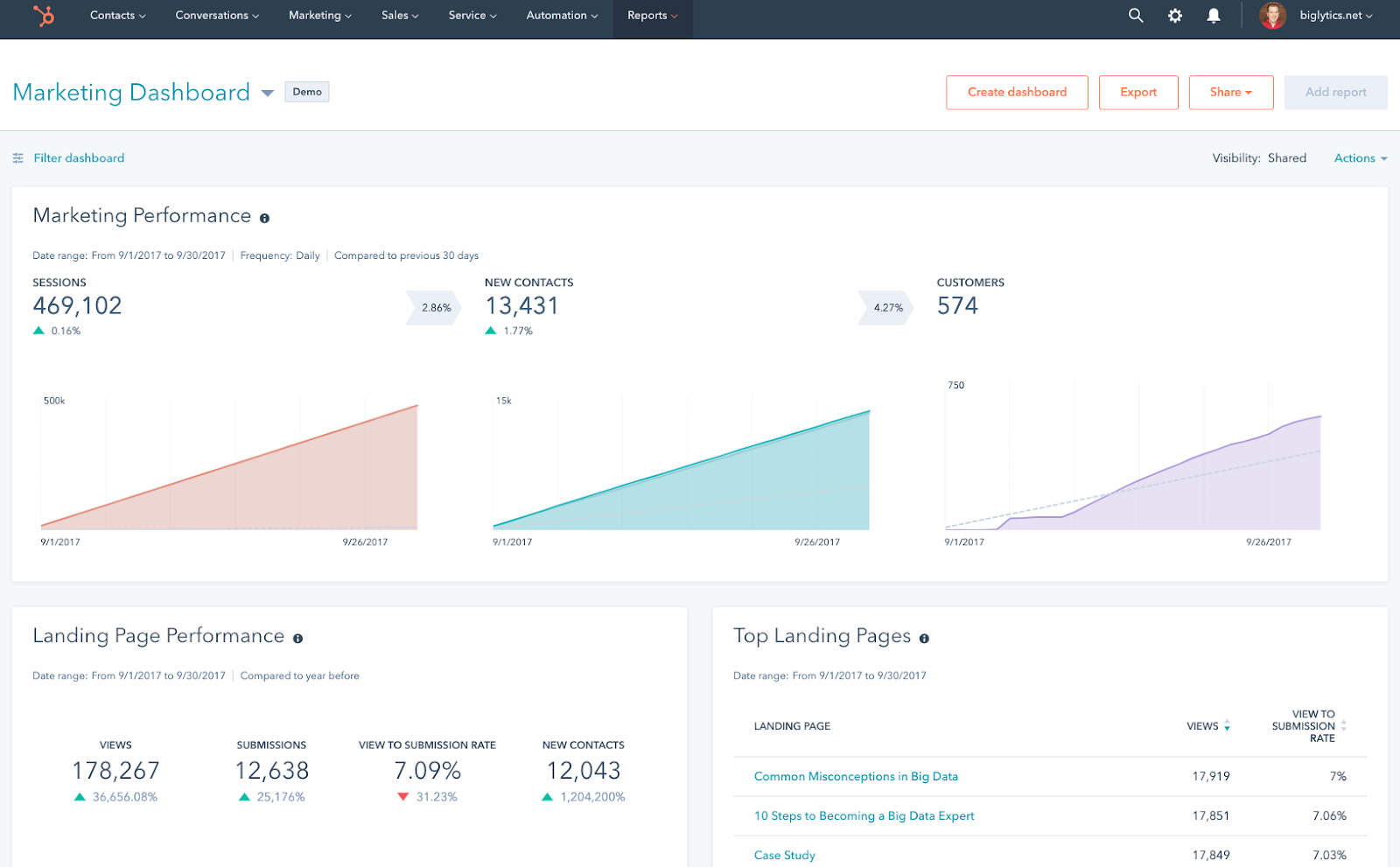
HubSpotDas CRM verfolgt jede E-Mail, jeden Anruf und jeden Lead-Touchpoint und synchronisiert gleichzeitig mit über 1.000 Apps.
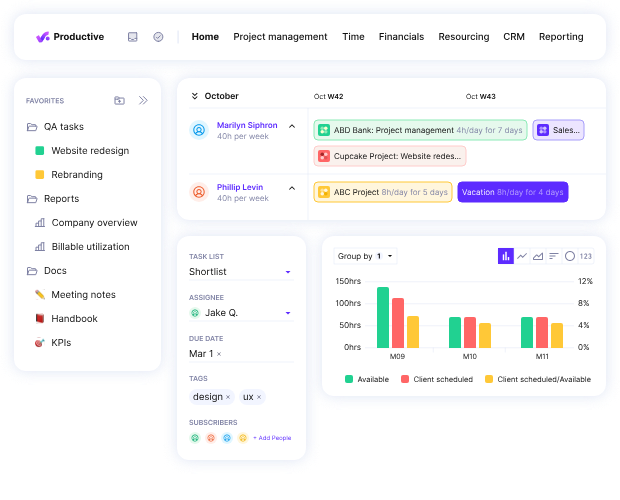
Produktiv hilft Agenturen dabei, die Gewinnmargen von Projekten bis zur letzten abrechnungsfähigen Stunde nachzuverfolgen.
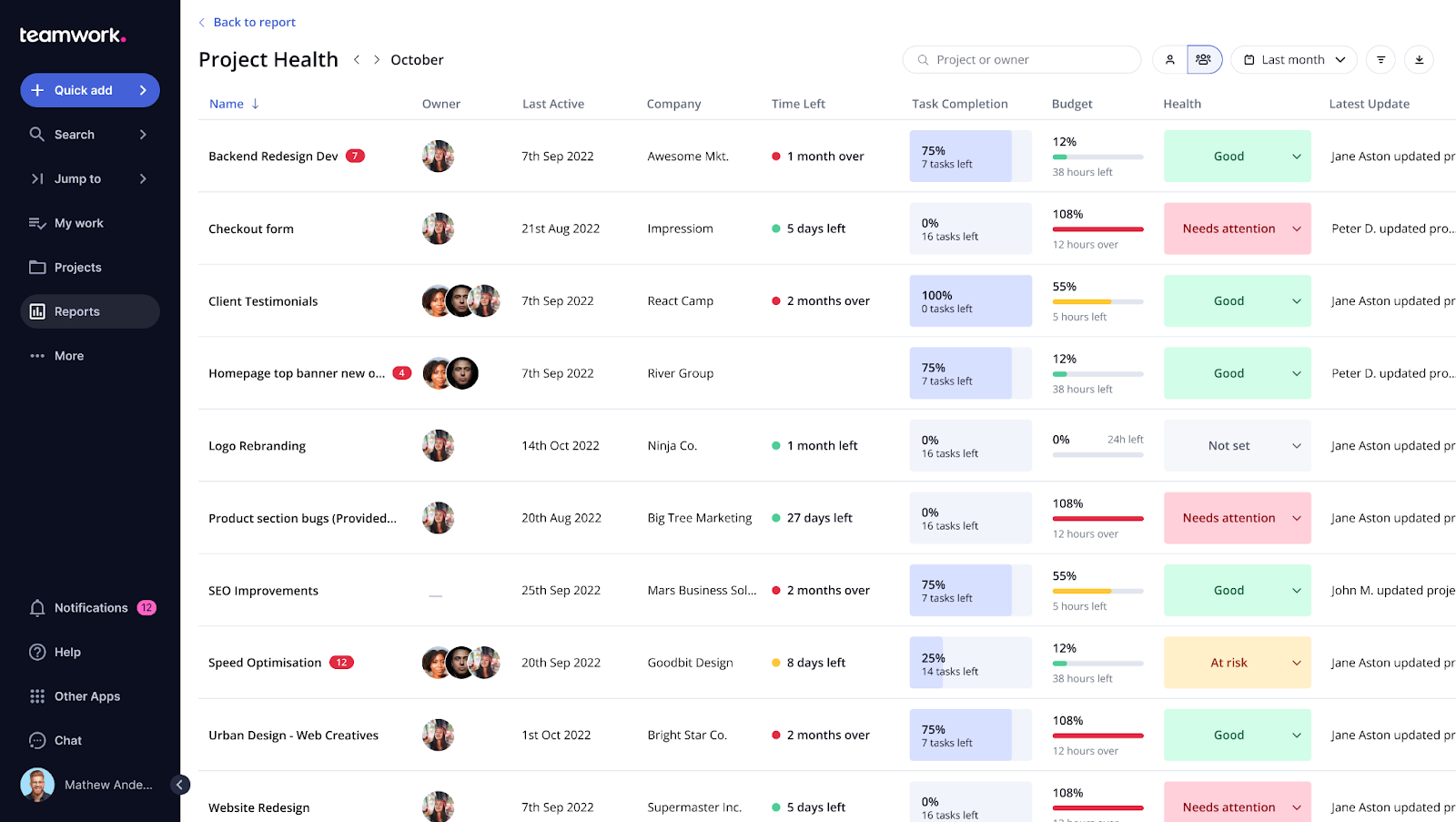
Teamarbeit macht Projektpläne sowohl für Ihre Crew als auch für den Kunden in einem gemeinsamen Raum klar.
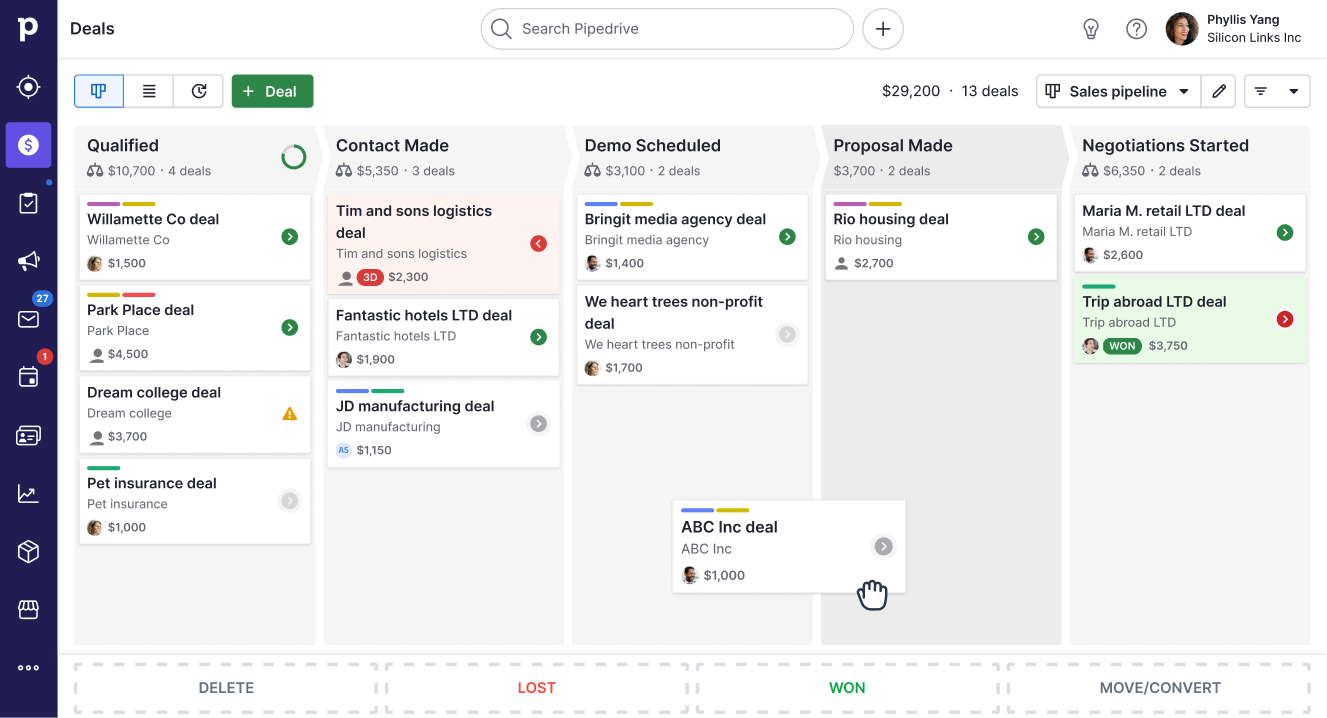
PipedriveDie Pipeline-Ansicht bedeutet, dass kein Lead „vergessen“ wird, selbst wenn Sie mehr als 500 offene Deals haben.
Zoho CRM kostet bereits ab 20$ pro Monat, bietet jedoch Vertriebsautomatisierung und KI-Prognosen.
Salesforce wickelt komplexe CRM-Setups für Unternehmen mit mehr als 500 Teammitgliedern und mehreren Regionen ab.
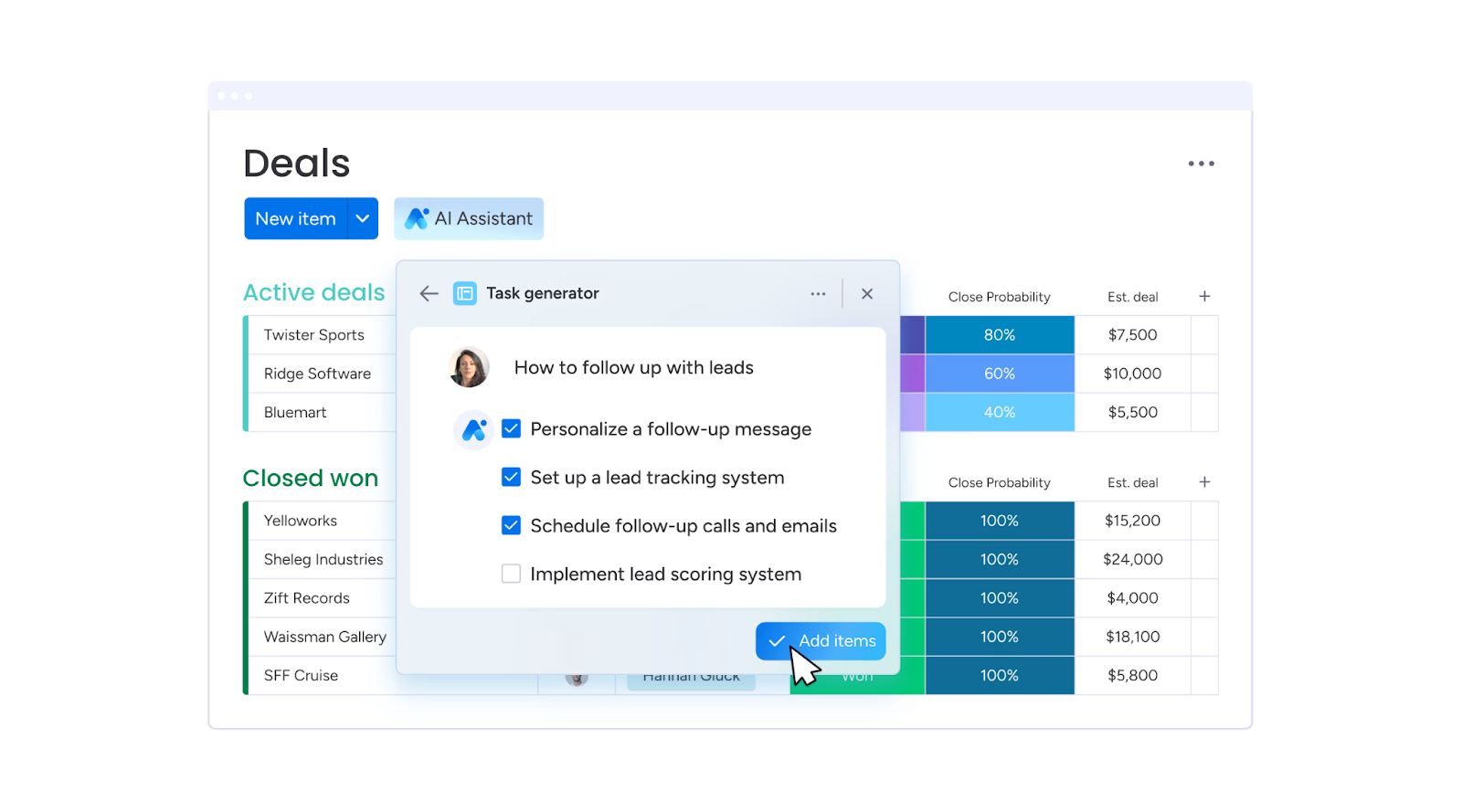
Montag.com hält jede Aufgabe, jeden Status und jede Frist sichtbar, sodass nichts verrutscht, wenn sich Pläne ändern.
Bonsai deckt Angebote, Verträge, Rechnungsstellung und Zeiterfassung ab und eignet sich perfekt für Alleinbetreiber oder kleine Agenturen unter 10 Personen.
Was ist ein Kundenmanagement-Tool für Agenturen?
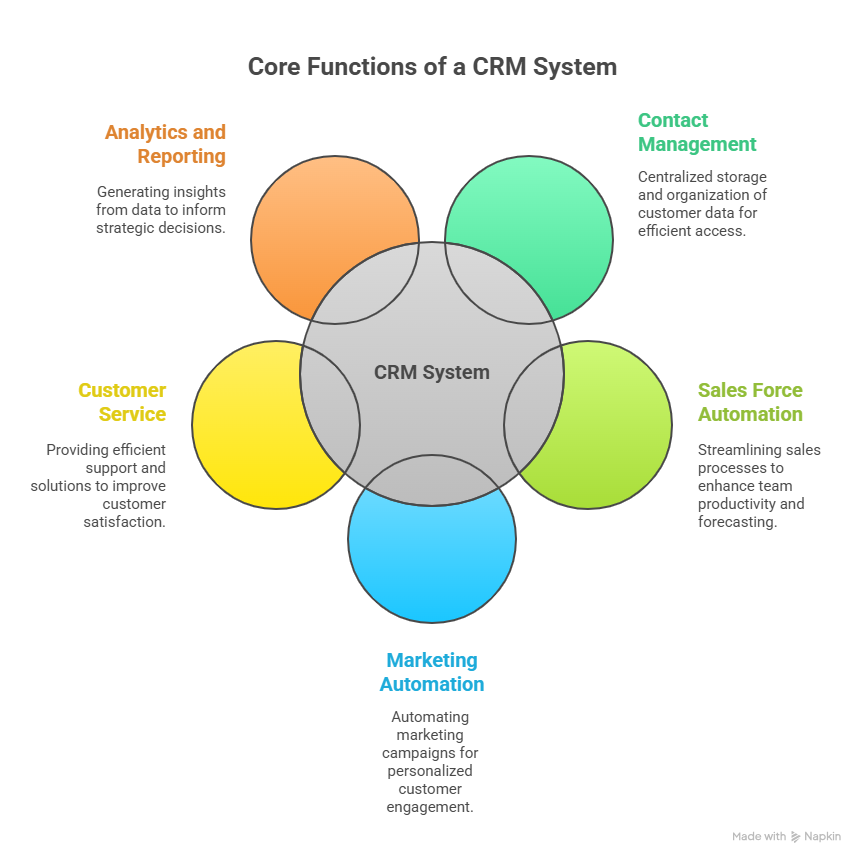
Ein Kundenmanagement-Tool ist eine Software, die jeden beweglichen Teil Ihrer Kundenbeziehung zentralisiert. Hier speichern Sie Kontaktdaten, verfolgen Aufgaben, teilen Berichte und verwalten die gesamte Kommunikation an einem Ort.
Anstatt separater Systeme für Projektmanagement, Berichterstattung und Abrechnung haben Sie ein einziges Login, mit dem Sie:
Sehen Sie sich die Kampagnenleistung in Echtzeit an.
Verfolge, woran dein Team gerade arbeitet.
Senden Sie Markenberichte ohne manuelle Formatierung.
Bewahren Sie jedes Kundengespräch an einem Ort auf.
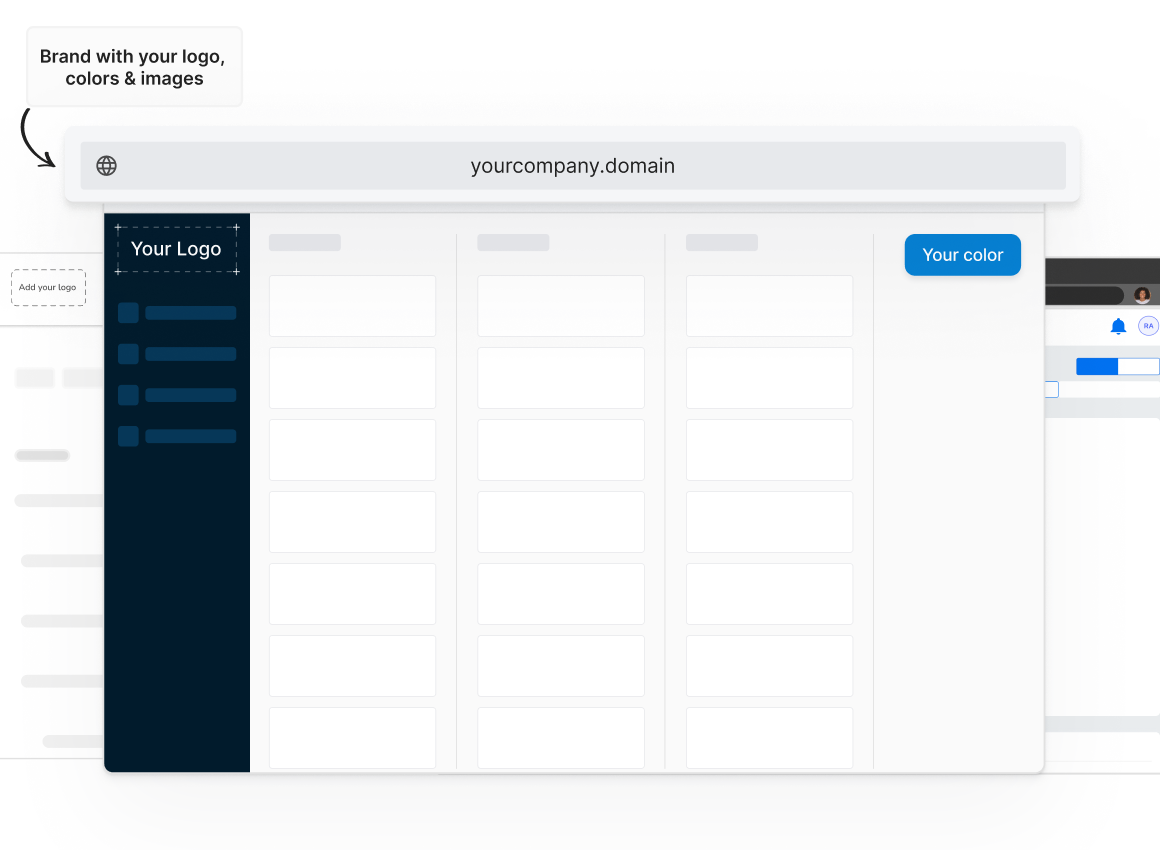
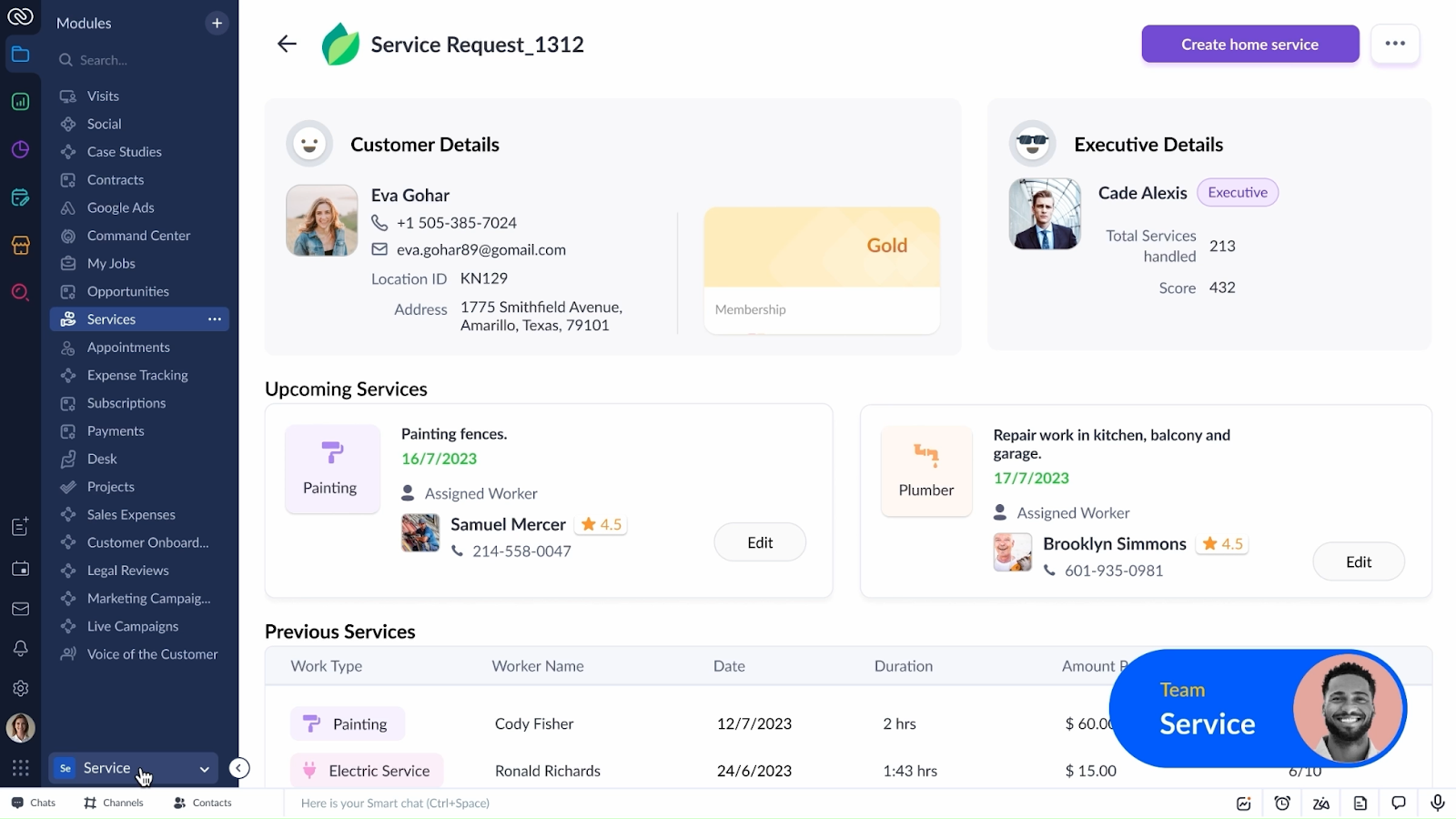
Viele gehen noch einen Schritt weiter mit Verwaltung lokaler White-Label-Angebote Optionen. Das bedeutet, dass sich Kunden über Ihre Domain anmelden, Ihr Logo sehen und mit Ihrer Marke interagieren, obwohl das Backend auf der Plattform eines Anbieters läuft.
Die Vorteile eines Kundenmanagement-Tools für Agenturen
Folgendes erhalten Sie, wenn Sie ein Kundenmanagement-Tool in Ihren Arbeitsablauf integrieren:
Reduziert Fehler: Weniger Fehler beim Kopieren und Einfügen, wenn sich alles an einem Ort befindet.
Lässt dich professionell aussehen: White-Label-Dashboards fühlen sich an wie maßgeschneiderte Software, die Sie für sie entwickelt haben.
Hält Kunden länger: Wenn Kunden genau sehen können, was passiert, entsteht Vertrauen. Und Vertrauen verhindert, dass Verträge aus der Tür gehen.
Gibt jede Woche Stunden zurück: Kein manuelles Erstellen von Berichten oder das Herumjagen von Kampagnenlinks mehr.
Treibt Upsells an: Ein einziges Login macht es einfach, Kunden zu zeigen, womit Sie sonst noch helfen können.
Daten aus der Branche zeigt, dass integrierte CRM-Setups wie diese die Produktivität um 34%, den Umsatz um 29% und die Genauigkeit bei der Umsatzprognose um 42% verbessern können. Agenturen spüren diesen Unterschied sowohl bei der Kundenbindung als auch beim Geschäftsergebnis.
So wählen Sie das beste Kundenmanagement-Tool für Ihre Agentur
Nicht alle Tools sind für den Agenturalltag konzipiert. Sie müssen über die Marketingseite hinausschauen und herausfinden, ob sie zu Ihrem tatsächlichen Alltag passt. So wählen Sie:
Funktionen der Plattform
Beginnen Sie mit einem genauen Blick auf Ihr Servicemenü. Wenn Sie SEO, PPC, soziale Netzwerke und Listings anbieten, wählen Sie kein Tool, das nur für Projektzeitpläne entwickelt wurde. Viele CRMs machen, was Sie wollen, aber hier ist eine bessere Sichtweise:
Eine gute Agenturplattform sollte:
Behandeln Sie verschiedene Servicetypen an einem Ort.
Sie können Module hinzufügen oder entfernen, wenn sich Ihre Agentur weiterentwickelt.
Ziehen Sie Daten aus Kampagnen in automatisierte, markenspezifische Berichte zusammen.
Wenn Sie sich jemals in drei verschiedene Tools einloggen mussten, nur um eine Kundenfrage zu beantworten, werden Sie verstehen, warum das wichtig ist.
Integrationen
Ihre Plattform sollte gut mit Ihren anderen Tools zusammenarbeiten.
Wenn die Ergebnisse Ihrer Facebook-Anzeigen in einem Tab, Google Analytics in einem anderen und Rechnungen in einem weiteren Tab angezeigt werden, verschwenden Sie Zeit. Suchen Sie nach einem Tool, das eine direkte Verbindung zu Ihren Anzeigenkonten, Analyseplattformen und E-Mail-Marketing-Tools herstellt, sodass Daten ohne manuelle Exporte einfließen.
Integrationslücken sind einer der Hauptgründe, warum Agenturen neue Tools innerhalb weniger Monate aufgeben.
White-Labeling
White-Labeling heißt nicht nur „füge dein Logo hinzu“. Ein echtes White-Labeling bedeutet, dass Kunden nie das ursprüngliche Branding der Plattform sehen, von der Anmeldeseite bis hin zu den Berichtsüberschriften. Wenn Sie möchten, dass Kunden das Erlebnis mit Ihnen in Verbindung bringen, stellen Sie sicher, dass der Anbieter es Ihnen ermöglicht, es vollständig zu brandmarken.
Noch besser ist es, wenn der Support des Anbieters hinter den Kulissen arbeitet. Das heißt, er hilft Ihnen bei der Lösung von Kundenproblemen, ohne sich jemals direkt an Ihre Kunden zu wenden. Es behält die Beziehung (und den Kredit!) in deinen Händen.
Wiederverkaufsunterstützung für Agenturen
Eine Plattform, die Ihnen beim Verkauf hilft, ist mehr wert als eine, die Ihnen nur hilft, zu liefern.
Suchen Sie nach Anbietern, die Verkaufsdecks, Angebotsvorlagen und sogar vorgefertigte Servicebeschreibungen anbieten, die Sie anpassen können. Einige bieten sogar Produktschulungen für Ihr Team an, damit Sie neue Services schneller abschließen können.
Das ist der Unterschied zwischen dem Kauf eines Tools und dem Kauf eines Geschäftspartners.
Flexibilität bei der Preisgestaltung
Sie sollten sich nicht auf einen Plan festlegen, der sich übertrieben anfühlt, wenn Sie Kunden langsam gewinnen, oder einen Plan, dessen Kosten in der Sekunde, in der Sie wachsen, in die Höhe schnellen.
Achten Sie auf Preise pro Kunde oder Modul, damit Sie nur für das bezahlen, was Sie tatsächlich nutzen. Starre Tarife können Sie dazu verleiten, zu viel auszugeben oder zu wenig zu liefern.
Synup
Am besten geeignet für: Agenturen, die mehrere Standorte betreuen
Was Synup macht
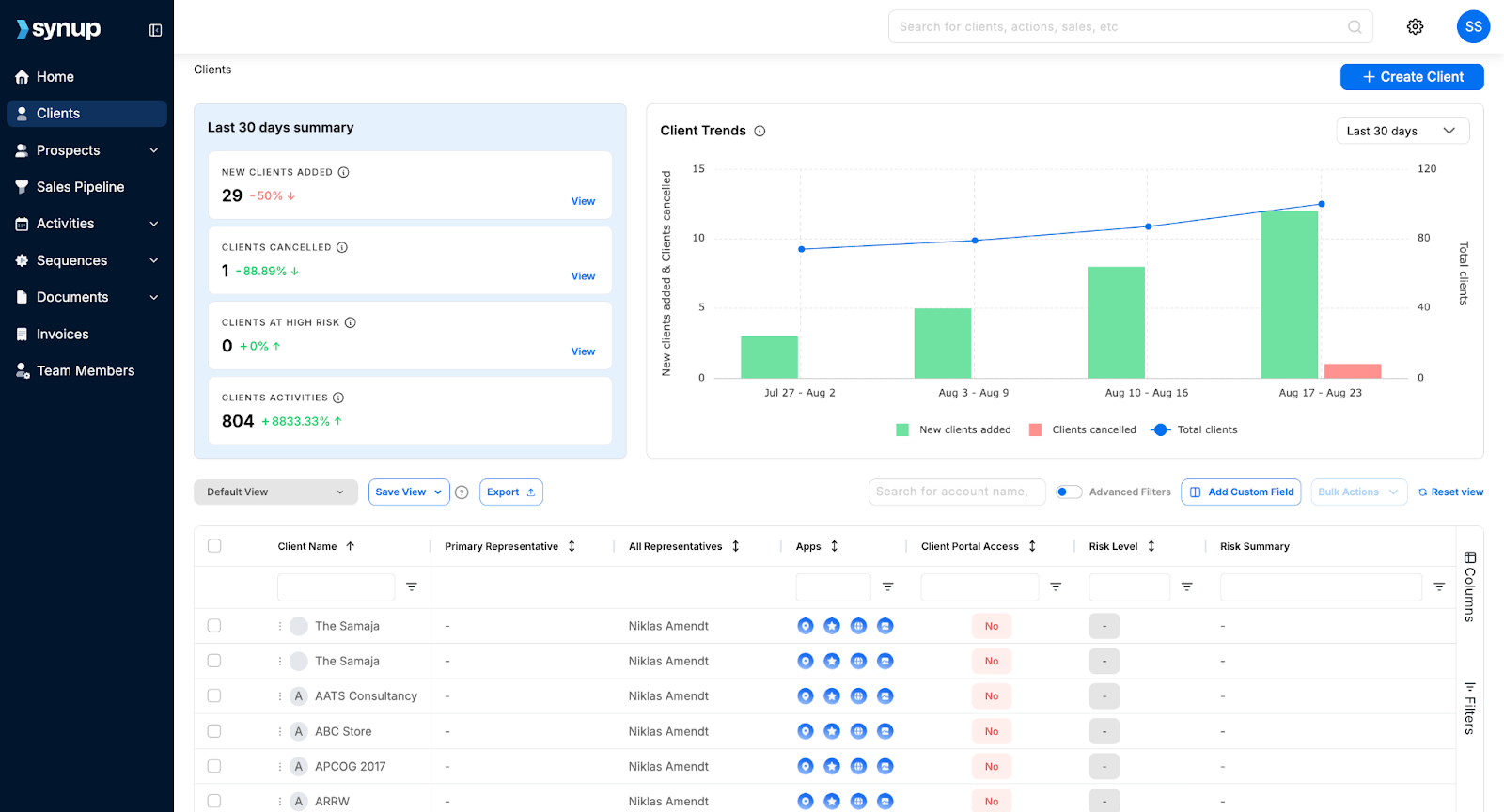
Wenn Sie eine Marketingagentur leiten, haben Sie wahrscheinlich den „Tool-Shuffle“ gemacht. Ein Tab für Inserate, ein anderer für Bewertungen, ein weiterer für soziale Netzwerke... plus eine Tabelle, um den Überblick zu behalten. Synup behebt das, indem es alle Arbeitsabläufe Ihrer Marketingagentur an einem Ort zusammenfasst. Seit der Einführung im Jahr 2014 hat es über 600.000 Unternehmen dabei geholfen, ihre Online-Präsenz konsistent zu halten.
Von der Akquise und Lead-Generierung bis hin zur Kundenverwaltung und Zahlungen hilft Ihnen Synup dabei, Ihre gesamte Agentur von einem einzigen Login aus zu verwalten.
Und ihr integriertes CRM, sodass Sie Leads ohne zusätzliches Abonnement verfolgen können.
Die wichtigsten Funktionen
🏆 Zentralisiertes Kunden-Dashboard: Verwalten Sie alle Kundenkonten, Daten und Vermögenswerte von einem Ort aus
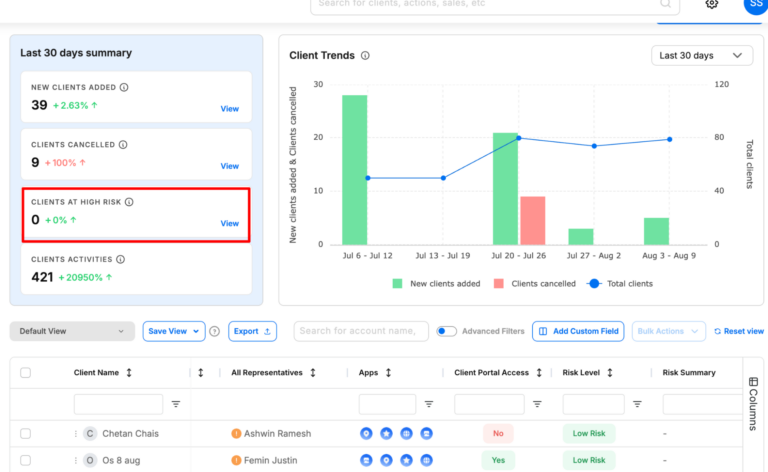
🏆 Prognose des Abwanderungsrisikos: Konfigurieren Sie benutzerdefinierte Abwanderungskriterien und prognostizieren Sie, welche Kunden im Begriff sind, abzuwandern, um Maßnahmen zu ergreifen.
🏆 Kundenakquise für KMU: Finden Sie neue KMU-Leads mit über 100 Datenpunkten zu ihren Geschäfts- und Marketinganforderungen.
🏆 Bieten Sie Ihren Kunden Marketing-Apps an: Ermöglichen Sie wichtige Marketing-Apps für Kunden wie Inserate, Reputationsmanagement, Social-Media-Tool und mehr ohne zusätzliche Kosten.
🏆 White-Label-Berichterstattung: Stellen Sie Ihren Kunden automatisch markenspezifische Leistungsberichte zur Verfügung.
🏆 Tools für das Onboarding von Kunden: Importieren Sie schnell Kundendaten und verbinden Sie Konten.
🏆 CRM und Lead-Tracking: Speichern Sie Kundendaten, verfolgen Sie Leads und überwachen Sie die Kampagnenergebnisse.
🏆 Zahlungen und Rechnungsstellung: Sie können Ihren Kunden Rechnungen stellen und alle Ihre Rechnungen von einem Ort aus verwalten.
Was zeichnet Synup aus
Die meisten CRM-Tools sind genau das — ein CRM, mit dem Sie Leads und Kunden verwalten können. Synup geht jedoch noch einen Schritt weiter und bietet Ihnen neue Umsatzmöglichkeiten und Funktionen zur Vermeidung von Kundenabwanderungen. Mit Synup erhalten Ihre Kunden auch Zugang zu kostenlosen Marketing-Apps, mit denen sie ihr Geschäft betreiben können - mehr Umsatz für Sie und bessere Leistung für Ihre Kunden.
Leistungen
Ein schnelleres Onboarding hilft dabei, die Informationen eines Kunden einmal zu importieren und überall zu veröffentlichen.
Bessere Kundenbindung, da Kunden saubere, konsistente Daten und Arbeitsnachweise erhalten.
Sie können mehr Upselling-Möglichkeiten schaffen, indem Sie Bewertungen, soziale Medien oder CRM hinzufügen, ohne zusätzliche Tools zu benötigen.
Profis
✅ Alles in einem, White-Label-tauglich für Agenturen
✅ Benutzerfreundliche Oberfläche und bemerkenswerte Benutzerfreundlichkeit ✅ KI-Unterstützung und Automatisierungen, die jede Woche wirklich Stunden sparen
✅ Besonders gut für die Verwaltung von Kunden mit mehreren Standorten
Nachteile
🚫 Benötigt im Vorfeld etwas Einrichtungszeit 🚫 Kann sich für kleinere Agenturen etwas überwältigend anfühlen
Synup war für mich ein totaler Wendepunkt. Ich verwende es für die Verwaltung von Brancheneinträgen, die Überwachung von Bewertungen, für lokale Landingpages und jetzt für das KI-gestützte Publizieren in sozialen Medien. Ich bin einfach überwältigt, wie viel ich an einem Ort erreichen kann. Ein Armaturenbrett.“
Zee D, Exekutivadministrator
- Bewertung gesammelt und auf G2.com gehostet.
Hubspot
Category: All-in-one CRM and marketing automation for client-focused marketing agencies
HubSpot is a CRM platform designed to manage every stage of the client journey. It's ideal for agencies that want a single space to handle lead capture, marketing campaigns, sales pipelines, and client communications without switching from multiple tools. It's best suited for medium to large marketing agencies ready to streamline processes and deliver measurable results. Start-ups also get a 90% discount for the first year.
Key Features
Contact, lead, and pipeline management
Email marketing and automation workflows
Customizable reporting dashboards and analytics
Social media scheduling and monitoring tools
Campaign budget tracking and expense permissions
Role-based access control for teams
Multi-language and geo-targeted page content
Integration with 1,000+ apps and tools
Benefits of HubSpot
Sophisticated CRM with marketing automation
Improves client reporting with real-time performance dashboards
Supports cross-department collaboration with role-based permissions
Enhances client experience with personalised, geo-targeted content
Pricing
HubSpot Marketing Hub starts at $15/month for basic features, with Professional plans starting at $890/month and Enterprise plans starting at $3,600/month (billed annually). Prices vary based on contacts, features, and team size.
Pros
✅ Comprehensive CRM and marketing suite in one platform ✅ Powerful automation for scaling agencies
✅ Effective API for lead capturing
✅ Good reporting capabilities and easy to measure sales effectiveness
Cons
🚫 Pricing increases steeply as you scale 🚫 Can be complex for small teams to learn fully
🚫 All-in-one platform that may not be necessary for teams with a specific requirement (for example, if you only need a CRM)
What Customers Say
“I really like how easy it is to keep track on users that show interest in our product and keep their interaction and activity. HubSpot also allow for department collaboration in planning marketing budget spending, track expenses and coordinating for a expense permission.”
Shahrul K.
- Review collected by and hosted on G2.com.
Productive
Category: All-in-one agency management platform for projects, budgets, and profitability tracking.
Productive is a purpose-built agency management tool that combines project management, budgeting, resourcing, and reporting into one platform. It's designed specifically for creative, marketing, and digital agencies that want full visibility over operations and profitability.
However, its broad feature set can feel excessive for very small teams that only need basic project tracking. It's best suited for mid-sized agencies that want a single source of truth for projects, finances, and resources.
Key Features
Project and task management
Recurring budget tracking for retainers
Resource planning and utilisation tracking
Built-in time tracking and invoicing
Financial forecasting and profitability reports
Integration with tools for accounting (like Xero and QuickBooks)
Customizable reporting for projects, budgets, and performance
Client portal for project updates and approvals
Benefits of Productive
Centralizes project, budget, and resourcing data in one place
Reduces manual admin with automation and integrated invoicing
Improves profitability tracking with accurate budget vs. actual reports
Increases visibility into team utilisation and capacity
Supports agency growth with scalable features and integrations
Pricing
Productive starts at $9/month per user for the Essential plan, $24/month per user for Professional, and $32/month for Ultimate, all billed annually, with custom pricing available for Enterprise. All plans include core project management features, with advanced reporting and financial tools in higher tiers.
Pros
✅ Built for agencies with end-to-end operations in mind
✅ Great pick for agencies looking for a simple, for-purpose tool ✅ Strong budget tracking and profitability insights
Cons
🚫 Overkill for teams that only need simple project tools 🚫 Requires onboarding to unlock advanced features fully
🚫 UI can be more dynamic and intuitive; can be frustrating to work with
What Customers Say
“The ability to set recurring budgets for monthly retainers was the deciding factor for us - something we rely on strongly as an agency. The tool is easy to use, with integrations with a large amount of other tools - including Xero.”
Jess T., Head of Delivery
- Review collected by and hosted on G2.com.
Teamwork
Category: Flexible project management platform built for client service teams and agencies
Teamwork is a project management platform crafted to help service-based teams manage client work from start to finish in one space.
It combines task tracking, time logging, billing, and resource management in a single interface, reducing the need for multiple tools. While it's rich in features, newer users may face a learning curve, and some advanced automation options are less robust compared to specialised tools.
Key Features
Task and project management with multiple view options
Time tracking and integrated billing
Resource scheduling and workload management
Client portal for project updates and collaboration
Customizable templates and workflows
Milestone tracking and dependency management
Detailed reporting and analytics
Integrations with tools like Slack, HubSpot, and Google Drive
Benefits of Teamwork
Centralizes all client work in one platform
Improves collaboration with real-time updates and file sharing
Saves time by linking time tracking directly to billing
Enhances client trust with transparent project progress
Flexible enough to adapt to different project styles and industries
Tools for budgeting, time and resource management and portfolio management
Pricing
Teamwork offers a Free Forever plan with basic features, a Deliver plan at $13/month per user, and a Grow plan at $25/month per user. Custom pricing is available for enterprise needs.
Pros
✅ Combines project management, billing, and resource tracking in one tool ✅ Highly customizable to fit different workflows and client needs
✅ Particularly helpful for client-facing work
Cons
🚫 Learning curve that can be hard for new users 🚫 Limited automation compared to some competitors
🚫 Users have reported some difficulties in adding and assigning tasks
What Customers Say
“Teamwork easily allows us to share the workload amongst colleagues with total visibility of progress so far. Jobs are assigned, tracked, and archived with complete simplicity, meaning our whole team has continuous awareness of 'the big picture'.”
Ian R., Managing Director
- Review collected by and hosted on G2.com.
Pipedrive
Category: Visual sales pipeline CRM for small‑to‑mid‑sized marketing and sales teams
Pipedrive is a sales‑focused CRM designed to help agencies and small businesses manage deals from first contact to closing. It revolves around a drag‑and‑drop pipeline view that lets you see exactly where each opportunity sits and what needs to happen next.
However, Pipedrive is firmly rooted in sales; there's no built‑in marketing automation, and advanced features such as email marketing are add‑ons. It's best suited for agencies that need a clear, visual way to manage sales pipelines rather than full‑blown marketing automation.
Key Features
Visual pipeline management with customizable stages
Email integration and activity reminders
Easy-to-set-up dashboards for easy reporting
Mobile app for iOS and Android
Lead and contact management with custom fields
Task automation and workflow automation
Calendar integration and meeting scheduler
Product catalog, goal setting, and data import/export
Benefits of Pipedrive
Keeps sales teams organized with a clear, visual pipeline that highlights deal progress and bottlenecks
Enhances productivity by automating repetitive tasks such as lead assignment and follow‑ups
Helps agencies make data‑driven decisions with customizable reporting and dashboards
Streamlines communication through built‑in email tracking, reminders, and mobile access
Integrates smoothly with email marketing, help desk, and accounting tools for a unified workflow
Offers great value-for-money; offers mostly all standard CRM features at a reasonable price
Pricing
Pipedrive offers tiered plans that can be paid month‑to‑month. Plans start at $24 per user/month for the Lite tier, $49 per user/month for Growth, $79 per user/month for Premium, and $99 per user/month for Ultimate. Add‑ons like LeadBooster or Campaigns cost extra.
Pros
✅ Intuitive visual pipeline with drag‑and‑drop stages and clear visibility on project stages ✅ Automations and integrations reduce manual work and sync data across tools
✅ Great tool to manage sales and track progress
Cons
🚫 Automation may not be as robust as its contemporaries, such as Hubspot 🚫 Pricing can increase quickly as you move up tiers or add extra functionality; flat fees for add-ons.
🚫 Simplifies things, but sometimes to a fault, especially when compared against competitors.
What Customers Say
“I like how user-friendly Pipedrive is, even for people who aren't tech experts. The visual sales pipeline helps me see exactly where each deal stands at a glance, and the customizable stages mean I can adapt it to fit different workflows.”
Vicente L., Consultant
- Review collected by and hosted on G2.com.
Zoho CRM
Category: Customizable CRM solution for small and mid‑sized marketing and sales teams.
Zoho CRM is a flexible, cloud‑based customer relationship management platform built to help agencies, marketing teams, and small businesses manage leads, automate sales processes, and deliver personalised customer experiences.
The built‑in Zia AI assistant provides intelligent sales insights and predictive deal‑closing recommendations. However, Zoho CRM focuses primarily on sales, not marketing automation, and its extensive customization options can feel complex if you just need a basic contact manager.
Key Features
Sales force automation automates contact maintenance, follow‑ups, and lead scoring.
Process management (Blueprints) visualizes and standardizes each step of your sales process.
Omnichannel communication captures email, social, phone, and live chat interactions in one customer record.
Dashboards and analytics for deep insights
Extensive integrations and customization options
AI and predictive sales (Zia) for anomaly detection and deal‑closing predictions.
Benefits of Zoho CRM
Simplifies sales operations by automating routine tasks and enforcing consistent processes.
Improves team collaboration with a unified view of customer interactions across multiple channels.
Enables data‑driven decisions through robust reporting and analytics.
Supports growth. You can start simple and expand functionality as your agency scales, thanks to deep customization and integration options.
AI assistant Zia provides predictive insights and suggestions, enhancing productivity and forecast accuracy.
Pricing
Zoho CRM offers several tiers with monthly per‑user pricing (billed annually):
Free Edition (up to 3 users).
Standard: $20 per user/month.
Professional: $35 per user/month.
Enterprise: $50 per user/month.
Ultimate: $65 per user/month.
Pros
✅ One of the most flexible and customizable CRM options that scales with your agency ✅ Affordable entry pricing with powerful automation and AI features
✅ Offers a comprehensive suite of services, especially beneficial for small agencies
Cons
🚫 Heavy emphasis on sales, marketing automation features require separate tools or extensions 🚫 The breadth of configuration options can be overwhelming for very small teams needing a simple contact manager
🚫 Users have reported UI/UX and navigation issues that can be harder to navigate with the learning curve
What Customers Say
“What I really like about Zoho CRM is how easy it is to use and how it helps keep everything in one place. It makes managing leads, follow‑ups and customer conversations feel more organised without being overwhelming. I especially appreciate how it helps build better relationships, everything's at your fingertips.”
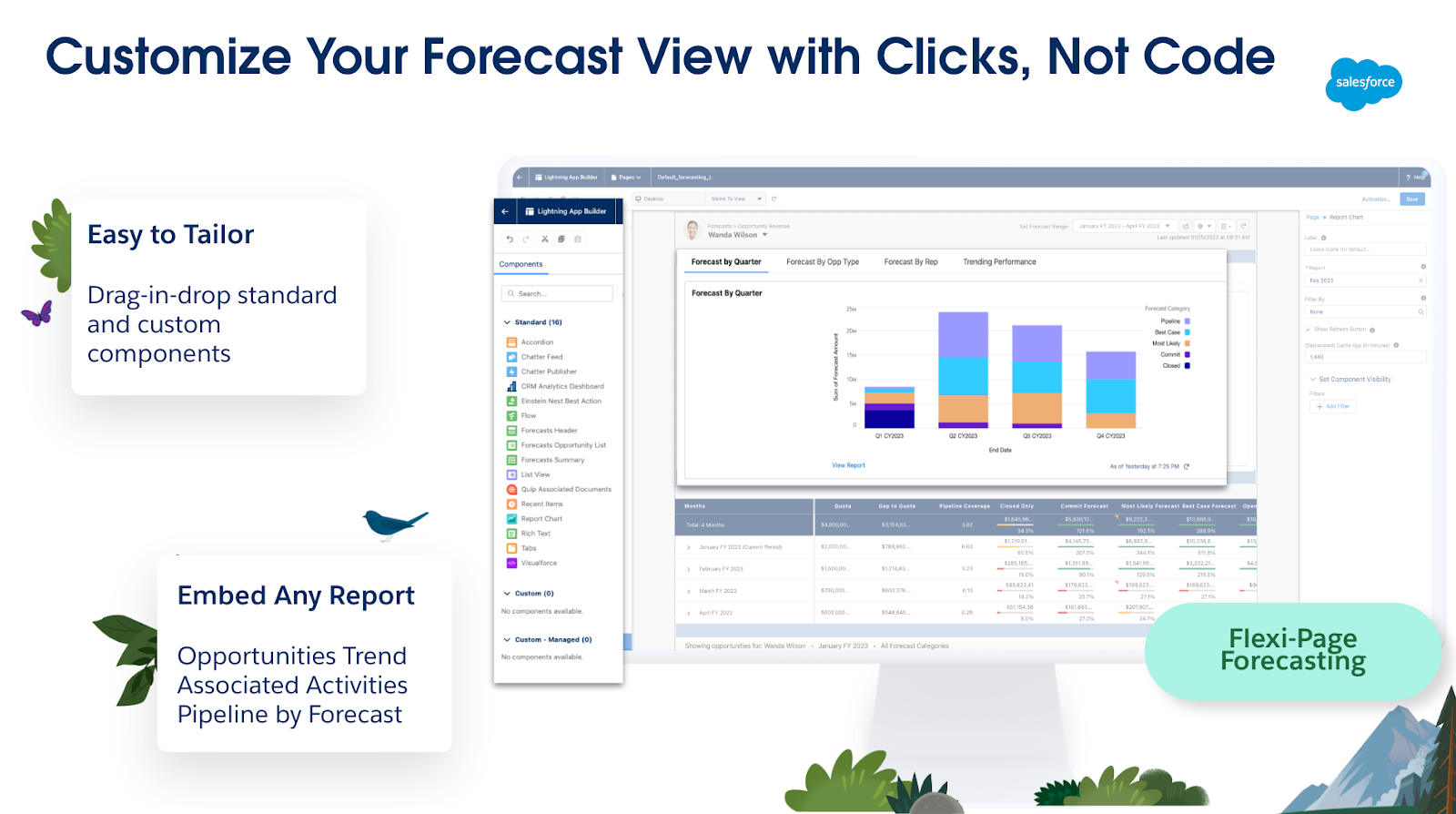
Salesforce is the market-leading cloud-based CRM platform that goes beyond contact tracking. It brings together sales, service, marketing, analytics, and commerce in one unified system. Salesforce is an exhaustive platform: you can customize UI elements, build workflows, design integrations, and even develop entire apps using its low-code tools.
AI capabilities, like Einstein and the newer Agentforce, automate predictions, generate smart recommendations, and drive proactive engagement. That said, there's a bit of a learning curve and implementation cost, so it's ideal for mid-sized to enterprise agencies ready for serious scaling, and not the best fit for solo freelancers or very small teams.
Key Features
Powerhouse tool with a unified Sales, Service, Marketing & Commerce suite
Visual dashboards with real-time pipeline insights
Advanced automation with workflows and AI agents (Einstein/Agentforce)
Highly customizable via low-code tools and AppExchange ecosystem
Contact, account, opportunity, and quote management with reporting
Built-in collaboration via Chatter and mobile access
Augmented analytics and AI-driven insights across departments
Benefits of Salesforce
Creates a single, real-time view of your customers across every department
Boosts sales velocity and precision with AI-powered forecasting and recommendations
Grows with your business: scale workflows, data, and users with enterprise-grade infrastructure
Enhances team collaboration and response via built-in communication tools like Chatter
Cross-platform access enables usage anywhere, anytime, mobile included
Pricing
Starter Suite: $25/user/month, for small teams with core CRM needs
Pro Suite: $100/user/month adds automation and customization features
Sales Enterprise: $165/user/month, deeper control and advanced AI tools
Agentforce 1 Sales: $550/user/month, includes full AI agent integration
Pros
✅ Enterprise-grade CRM with unmatched scalability, AI, and extensibility
✅ An incredibly powerful and versatile fit for a range of business needs and customer relationship management ✅ Comprehensive cross-department automation and real-time insights
Cons
🚫 High price point, especially at advanced tiers with AI and customization 🚫 Onboarding and implementation complexity can lead to lengthy deployments
🚫 Might be too much to handle, and the admin console may be a hard to get the hang of
What Customers Say
“What I like most is how centralized and customizable everything is. I can easily track customer cases, view interaction history, and log updates across multiple channels in one place.”
Lemuel P., Consumer Support Associate
- Review collected by and hosted on G2.com.
Monday.com
Category: Work management & project collaboration tool
Monday.com is a cloud-based work operating system (Work OS) designed to help teams plan, track, and deliver projects efficiently. It's built for marketing teams, agencies, software developers, and operations managers. While its project management abilities are its strength, the breadth of features can feel overwhelming for beginners. Teams that prefer simple, fixed templates might find Monday.com a bit heavy to configure at first.
Key Features
Customizable project boards and workflows
Automation for repetitive tasks
Real-time collaboration and file sharing
200+ pre-built templates for different industries
Time tracking and workload management
Analytics and reporting tools
Integrations with Slack, Zoom, Google Drive, Google Calendar and more
AI-powered project updates and insights
Benefits of Monday.com
Boosts productivity by automating repetitive tasks
Improves team transparency with centralized project tracking
Reduces time spent on status meetings
Allows scaling across multiple teams and departments
Enhances decision-making with visual dashboards and analytics
Pricing
Basic: From $10/seat/month (billed annually)
Standard: From $12/seat/month (billed annually)
Pro: From $19/seat/month (billed annually)
Enterprise: Custom pricing
Pros
✅ Highly customizable for different workflows ✅ Especially strong integration ecosystem
✅ Great features for team integration and collaboration
Cons
🚫 Steeper learning curve for new users 🚫 Can get expensive with larger teams or when setting up advanced features
🚫 Better as a project management board, not a CRM
What Customers Say
“Personally, I love everything about Monday.com, the automations, flexibility of the structure, sorting options, integrations, and now the AI capabilities. There's no way I could manage the volume of projects in our internal marketing department without it.”
Carrie F., Marketing Director
- Review collected by and hosted on G2.com.
Bonsai
Category: All-in-one business management platform for freelancers, agencies, and small businesses.
Bonsai is a streamlined business management tool designed to help freelancers, small agencies, and micro-businesses manage projects, contracts, invoicing, and payments in one place. Bonsai's automation features, like recurring invoices, proposal templates, and integrated time tracking, help cut admin time so you can focus on billable work.
Its biggest draw is its simplicity: setup is quick, and the interface is intuitive, even for non-technical users. However, its CRM functions are basic compared to dedicated CRM platforms, and advanced accounting features may require integration with external tools.
Key Features
Project and client management dashboard
Time tracking with start/stop timers
Customizable contracts and proposal templates
Invoicing with partial payments, recurring billing, and payment reminders
✅ Easy to set up and use, even for non-technical users ✅ Strong all-in-one toolkit for freelancers and micro-businesses
Cons
🚫 Limited CRM compared to dedicated platforms
🚫 Advanced accounting features require external tools
What Customers Say
“Professional looking easy to use and implement timer, project/client set up and invoicing/chasing etc. Ability to log a partial payment and email client with updates, disable routine reminders if required and to tweak/suspend accrued interest again as necessary when negotiating with clients (without the overheads of a full accounting app if you're only operating on a micro level). Basic CRM if paying for basic package.”
Anita Q., Associate
- Review collected by and hosted on G2.com.
Trying to manage 20+ client accounts using Google Sheets and email threads is a recipe for missed deadlines, lost files, and frustrated clients. A proper system puts everything in one place, from the first kickoff call to the final invoice, and makes your agency look more professional while doing it.
The tools above do exactly that. They cut down on admin time, keep clients in the loop without endless calls, and help you spot when a project's going off-track before it costs you money.
If you want all of that plus a way to build your client's brand and reputation while managing projects and reporting, Synup OS is one to watch. It's being built with agencies in mind, so you'll get onboarding, renewals, campaign tracking, and client comms, all under your own branding. Once it's in place, you'll wonder how you managed without it.
Synup is your agency's control room with one login for every moving part of client management. You get tools that keep campaigns, reporting, and brand-building under one roof, all fully white-labelled so your clients only see you, not the software.
With Synup, you can:
Manage all client campaigns, leads, and updates in one dashboard
Schedule posts, monitor reviews, and respond in real time
Generate branded reports that clients can access 24/7
Track performance across search, social, and reputation in one view
Scale from 10 to 200+ clients without drowning in admin
Book a demo, give it a try, and see how it saves your team, retains your clients, and offers their customer base better value.
Frequently Asked Questions
What is the best client management software?
Synup is great if you want one place to keep projects, reports, and client updates tidy. Over 5,000 agencies use it to manage more than 600,000 business profiles. You can stick your own logo on the dashboard, so clients feel it's yours, not a third-party tool. And if you need heavy-duty marketing automation and deep integration with over a thousand apps, HubSpot is built for that.
What is the best agency management system?
Productive nails the boring-but-critical stuff like tracking every billable hour, quoting jobs properly, and checking project profitability before it's too late. Agencies use it to run everything from team schedules to budget forecasts without needing ten different logins. If you'd rather keep client management, brand building, and lead generation under one roof, Synup's toolset gives you that without extra subscriptions.
What CRM do agencies use to manage multiple clients?
Zoho CRM is a favorite among agencies with 50 to 200+ accounts due to its affordability (approximately $20 per user per month) and flexibility to accommodate various workflows. Users can create custom pipelines, automate follow-ups, and consolidate everyone's contact history in one place. Synup is also a strong option, as its white-labeled dashboards allow clients to view live results without exposing the backend complexities.
Arbeiten Sie noch heute mit Synup zusammen!
Vereinbaren Sie einen Anruf mit unserem Partnerschaftsmanager, um maßgeschneiderte Wachstumslösungen für Ihre Agentur zu finden.