
The Perfect Sales-to-Delivery Handoff System for Your Agency
Learn a structured sales-to-delivery handoff system for agencies. Capture context, run internal syncs, automate onboarding, and reduce churn in the first 90 days.
Let’s say you’re the owner of a growing marketing agency and your sales team just closed a new client on a monthly retainer. (Nice work, pipeline’s looking healthy.)
The discovery calls went smoothly, and the proposal looked sharp. The client is excited. Then the deal moves from Sales to Delivery.
But when your account manager opens the CRM record to prepare, they don’t see much that helps. There are a few scattered notes, maybe. A basic service package. But nothing explaining why the client actually bought, or what was promised during the final sales calls. You’re stuck.
This is the “Sales Hero, Delivery Villain” dynamic. Most client churn happens in the first 90 days because the misalignment established in the first week creates a trust deficit.
The idea here isn’t just to “share more notes.” First and foremost, you want a structured sales-to-delivery handoff system that transfers commitments, context, and client expectations, not just files. Everything else (tools, templates, workflows) comes second.
TL;DR
- Capture entire context before closing: Record why the client bought, promises made, and risks, all standardized in your CRM.
- Run an internal handoff sync: Sales transfers full context to delivery before the kickoff.
- Lead the kickoff with clarity: Start with the client’s goals and plan, not repeated discovery.
- Automate onboarding: Trigger tasks, assets, and communications when the deal closes.
- Review after 30 days: Align Sales and Delivery using real onboarding gaps.
Phase 1: The Pre-Handoff (Sales Responsibility)
The foundational principle: The handoff begins before the contract is signed. Sales must curate data continuously, not frantically compile it afterward.
The “Clean Data” Mandate
Why memory and Slack messages fail:
Your sales rep closed the deal on Friday afternoon. By Monday morning, when the AM asks, “What should I know about this client?”, details have blurred. Was the founder anxious about ROI timelines, or was that the other prospect? Did you promise a custom dashboard, or was that just discussed as possible?
Human memory is unreliable for handoffs. According to research, critical context gets lost when handoff documentation happens after the sale rather than during the sales process.
The brain dump is too late. By the time Sales sits down to remember everything, they’ve forgotten:
- The emotional drivers behind the purchase (“The founder wants to sell the business in 2 years” – changes everything about strategy)
- Sensitive topics that came up casually (“They fired their last agency over missed deadlines”)
- Verbal commitments made to close the deal (“I told them we’d skip the audit phase and start building immediately”)
Data collection must happen during the sales process, not after.
The Handoff Brief (The Asset)
Create a standardized “Internal Handoff Brief” template that Sales must complete before marking a deal “Closed-Won.”
Must-Have Sections:
- The “Why They Bought” (Beyond Deliverables)
This isn’t “They need SEO services.” This is: “They’re launching a new product line in Q3 and need local visibility before competitors catch wind.”
Or: “The founder’s investor asked tough questions about digital presence. This purchase is about credibility, not just leads.”
Why this matters: When delivery understands the real motivation, they prioritize the work that actually moves the needle, not just what’s listed in the SOW.
- The “Landmines” (What Topics Are Sensitive)
Document what the prospect hated about previous experiences:
- “They left their last agency because reports were always 3 days late.”
- “The CMO hates being micromanaged and prefers monthly check-ins, not weekly.”
- “Don’t mention ‘best practices’; they want innovative approaches.”
Why this matters: Account managers avoid stepping on known triggers. One careless comment about “industry best practices” can undo weeks of relationship building if the client explicitly wants a custom strategy.
- The “Promises Made” (Specific Commitments)
This is the part most teams skip, and in fact, the part that causes the most problems later.
Document any timelines, deliverables, or outcomes discussed during the sales process. That includes both firm commitments and softer statements like:
- “I told them we’d have the first campaign live within 10 days.”
- “I mentioned we could potentially get them featured in industry publications, not guaranteed, but an implied possibility.”
- “I said our team includes a former [Competitor] strategist with inside knowledge.”
Delivery needs to know what expectations were set, even if those expectations are unrealistic or require clarification. Better to address the misalignment early than discover it in Month 2 when the client asks, “Where’s that article placement you promised?”
Also Read: The Complete Guide to Marketing Agency Operations Management
The Platform Layer (Operational Setup)
A process only works if your tools support it. Instead of relying on scattered notes or last-minute updates, use Synup’s Agency OS to capture handoff context while the deal is still active.
Follow the steps below to turn your CRM into a structured handoff system.
How to use Synup to force data capture:
- Sales Activity Tracker
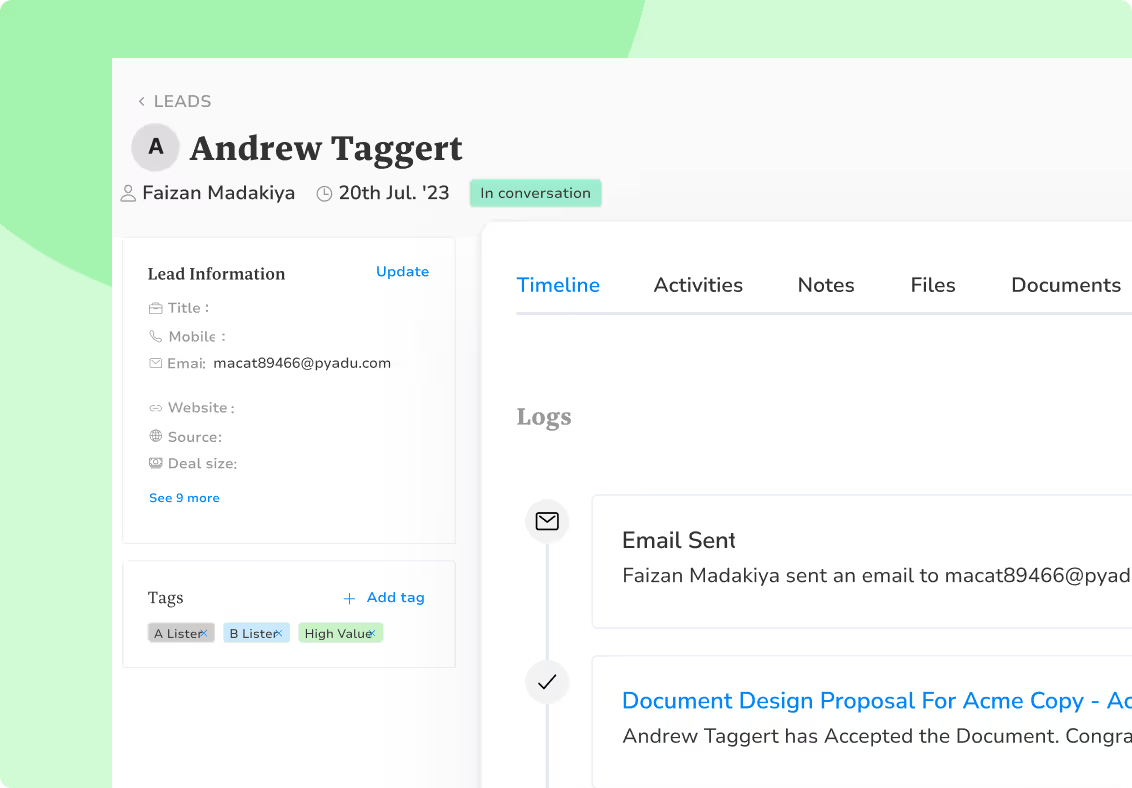
Keep every sales interaction inside the deal record. Discovery calls, meetings, follow-ups – log all of it in the activity feed so delivery can quickly understand how the conversation evolved.
Inside your Synup dashboard, go to Sales Pipeline > [Deal Name] > Activity Feed.
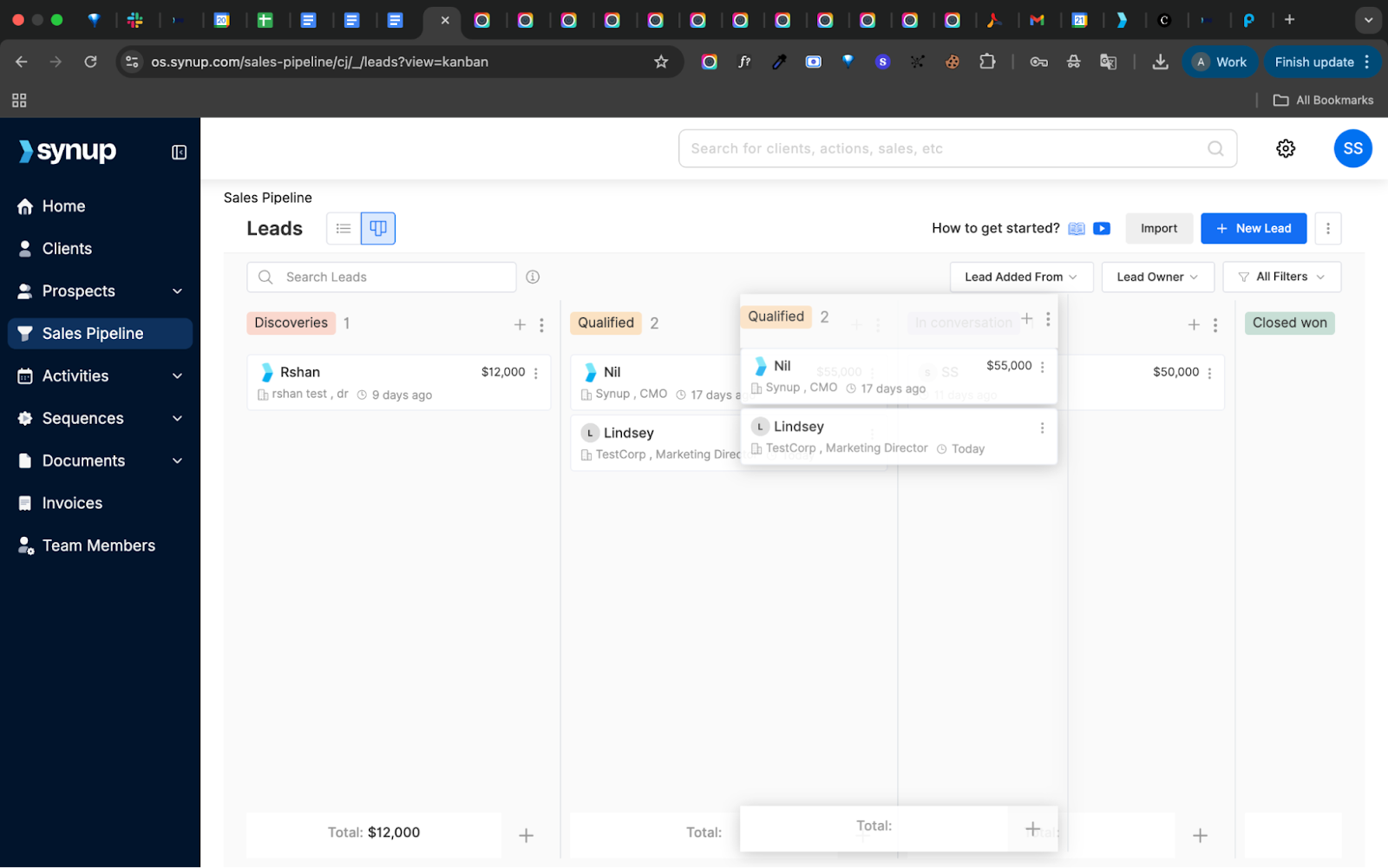
When the AM takes over, they have a chronological narrative of the entire sales journey.
- Custom Fields (The Enforcement Mechanism)
Create required custom fields in Synup that must be completed before a deal can move to “Closed-Won” status.
Navigate to: Settings > Custom Fields > Add Custom Field
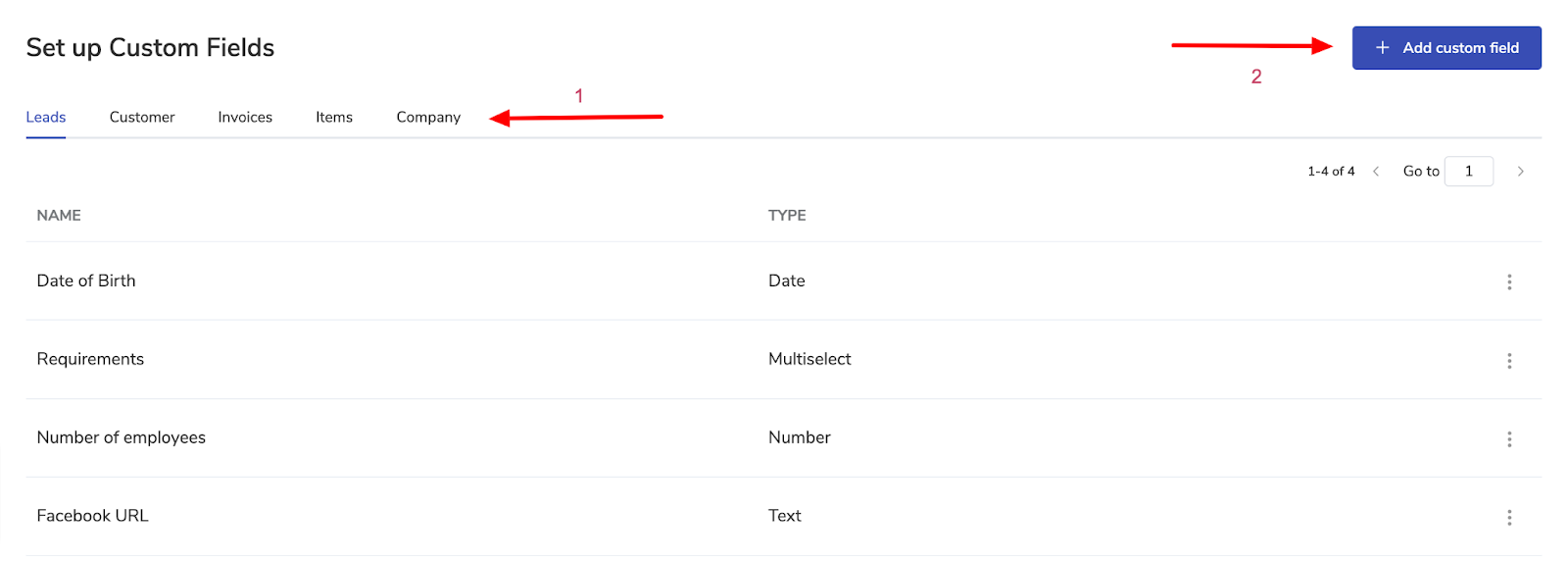
Select the Deal module. Set the Field Name and select Field Type (Text/Date/Dropdown/Multi-Select).
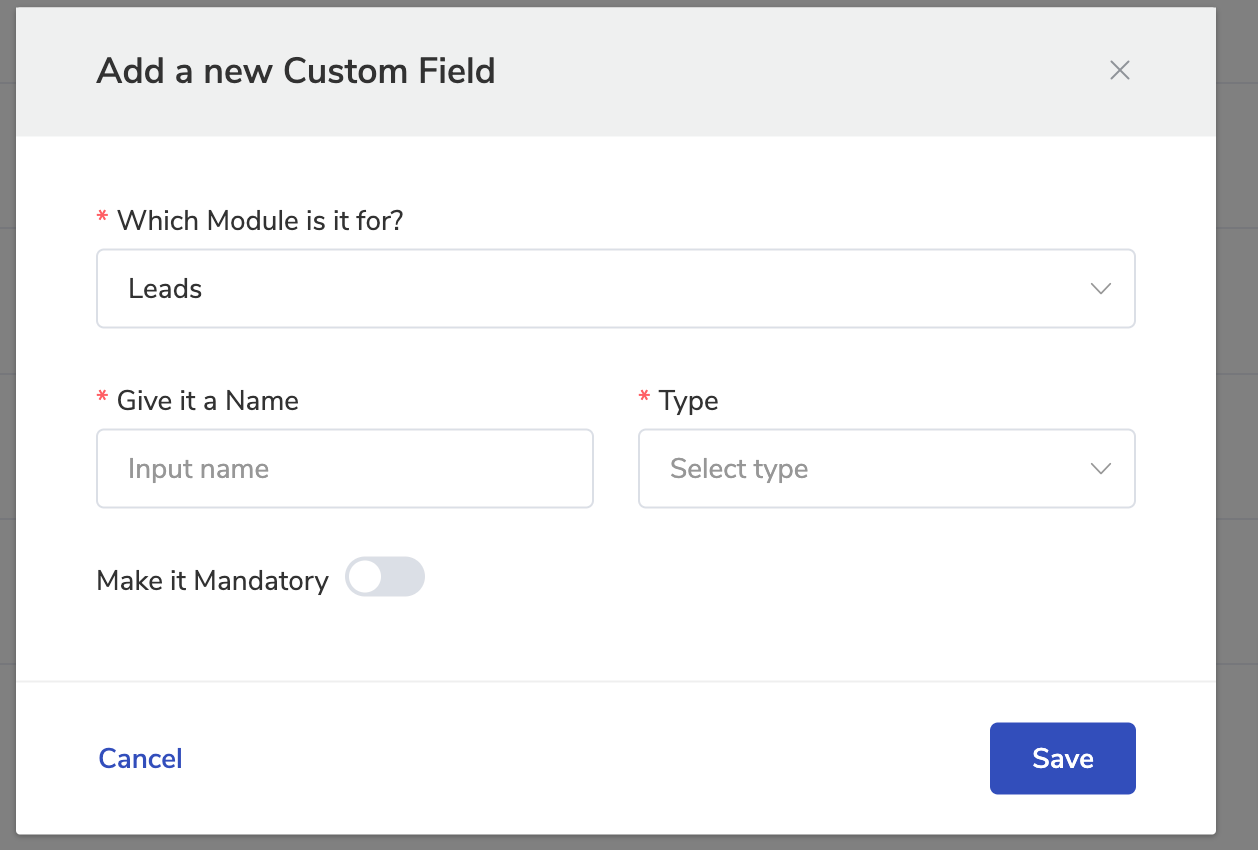
Create fields such as:
- Why They Bought (Text)
- Primary Business Goal (Text)
- Promises Made (Text)
- Promised Timeline (Date)
- Red Flags / Concerns (Select or Multiselect)
The key: Make these fields mandatory at the “Proposal Sent” or “Negotiation” stage. Sales physically cannot move the deal to “Closed-Won” until data is entered.
Pro tip: Add a custom field called “Handoff Brief Status” with options: Not Started/In Progress/Complete. When marked “Complete,” a PDF of the brief automatically attaches to the deal record.
Phase 2: The Internal Sync (The “Download”)
The non-negotiable rule: No client kickoff can be scheduled until the Internal Sync happens.
This one step (a pre-kickoff meeting between Sales and Delivery) is the simplest, most powerful fix for handoff failures, yet 90% of agencies skip it.
The Format
For standard projects: 15-minute stand-up
For enterprise/complex projects: 45-minute deep dive
Attendees:
- Sales Rep (holds relationship context)
- Account Manager or Project Lead (holds execution responsibility)
- Optional: Creative/Technical lead if specialized requirements exist
The Agenda
- Review the Handoff Brief: Sales walks through the completed brief line by line. It’s verbal context transfer.
- Translate Emotional Context: Some details don’t show up clearly in written notes. Use this time to explain the subtext behind the deal.
“When the client said ‘We need fast results,’ what they really meant was their board reviews performance quarterly, and they’re presenting in 60 days. They’re personally anxious about having something to show.”
Context like this helps Delivery communicate more effectively during onboarding.
- Reality-Check the Timeline: Review the proposed timeline together and confirm it aligns with the scope and resources. If adjustments are needed, it’s better to reset expectations before kickoff than to explain delays afterward.
- Identify Knowledge Gaps: Delivery identifies anything still missing before kickoff: platform access, approval workflows, stakeholder roles, or technical dependencies. If something’s unclear, assign a quick follow-up so Delivery isn’t chasing answers later.
And that about covers it. With a short internal sync, your handoff stops being a rushed conversation and starts becoming a repeatable process.
Automating the Sync Trigger
Once your process is defined, the next step is making sure it happens every time. Use Synup to automatically trigger the internal sync when a deal closes.
- Automated Workflow Trigger
Create an automation that runs when a deal moves to Closed-Won.
Go to: Automations > All automations > Setup automations > Event-based automations
Trigger: Deal stage updated to “Closed-Won”
Action: Create task “Schedule Internal Sync Meeting”
Assigned to: Sales Rep
Due date: Within 2 business days
Priority: High
- Document Central Repository
Attach key documents directly to the Client Summary in Synup – proposal/SOW, signed agreement, handoff brief, and discovery responses.
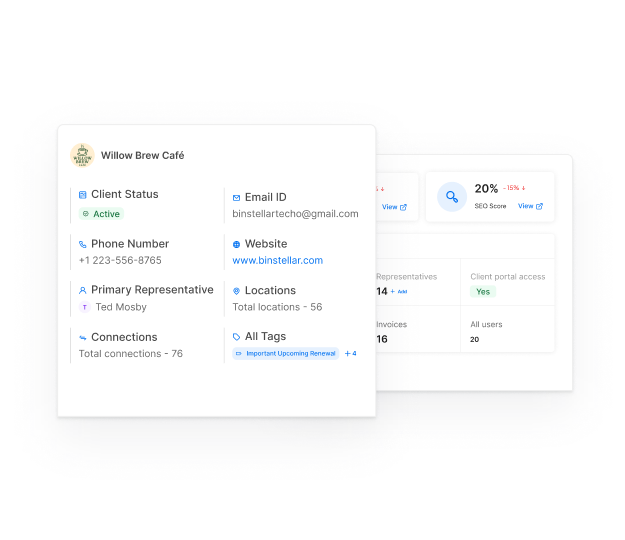
Keeping everything in one place makes kickoff preparation faster and more consistent.
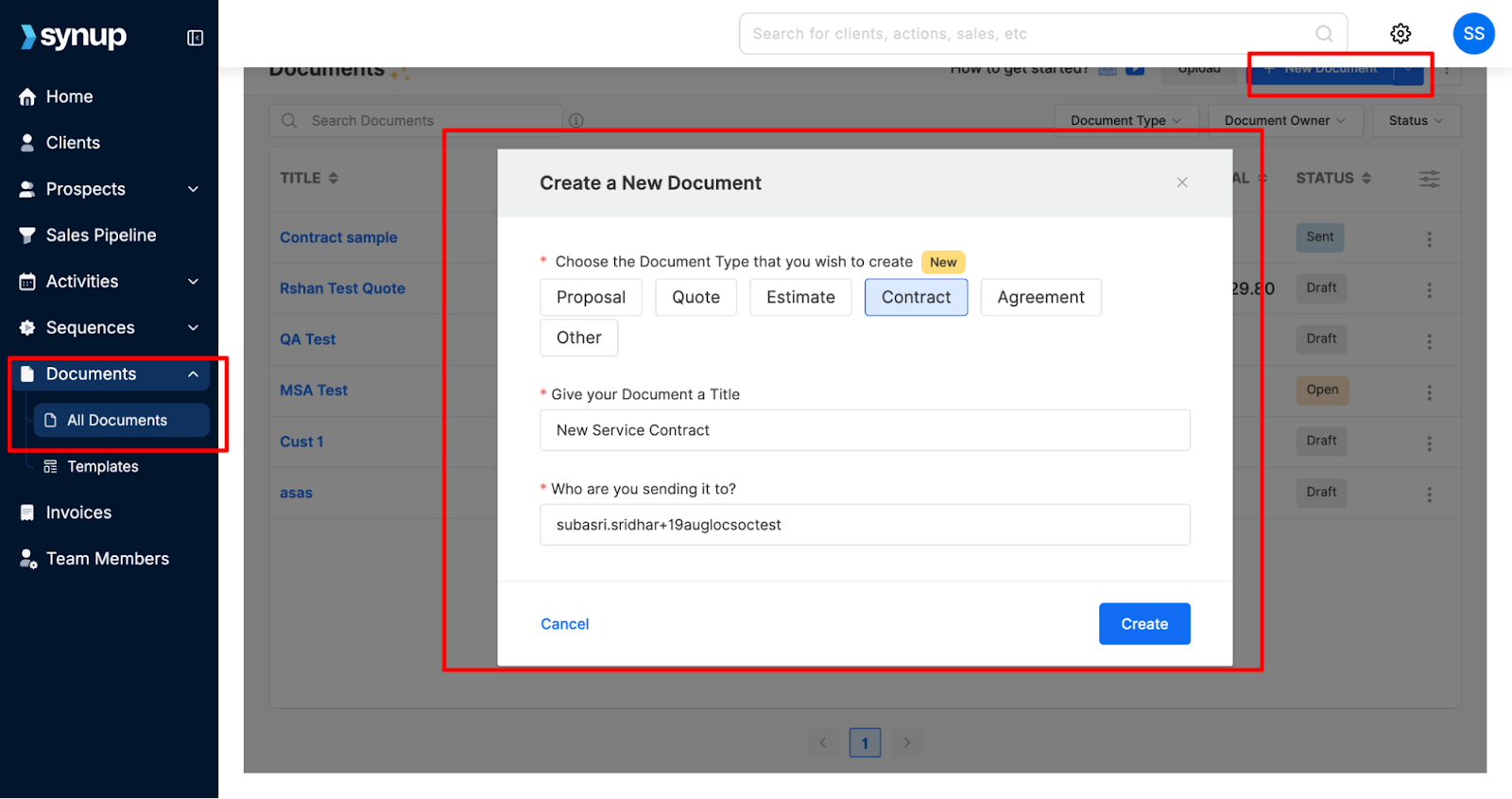
Navigate to: Documents > New Document.
Enter Document Title and select a Receiver. Then click Create.
Phase 3: The Client Kickoff (The Transfer of Trust)
Every kickoff call is different, but they usually serve the same purpose: confirm the client’s decision, introduce the execution team, and outline what happens next. At this stage, the client is excited but also looking for reassurance that they made the right choice.
Follow the steps below to turn your kickoff into a smooth transition from Sales to Delivery.
The “No Repeats” Rule
Start from what you already know. The client shouldn’t have to repeat information they shared during the sales process.
Bad Kickoff (Delivery Ignorance):
“So, tell us about your business and what you’re hoping to achieve with this engagement.”
Good Kickoff (Delivery Preparedness):
“We know your primary goal is increasing inbound leads by 40% before Q3 when you launch your new product line. We’ve analyzed your current digital footprint and prepared a 90-day roadmap targeting the neighborhoods where your competitors are weakest. Let’s walk through the strategy.”
The difference: In the good kickoff, the client feels known, and the work feels already in motion. Trust deepens.
Structuring the Call
Of course, you have to impress within the call itself, not just prior to and after. Here’s some direction:
- Sales Rep Opens (5 minutes)
Have the sales rep open the call with a short transition. This validates the partnership and introduces the account manager as the primary point of contact.
Keep it simple:
- Reinforce the client’s goals
- Confirm the team structure
- Transition ownership to delivery
This helps the client see the handoff as intentional, not abrupt.
- AM Takes Over (30 minutes)
Once introductions are complete, the account manager walks through the initial plan. Reference the client’s goals, past challenges, and priorities captured during sales. Then outline how the first phase of work addresses those areas.
You don’t need a full strategy presentation – just a clear direction and next steps.
- Sales Rep Exits (Symbolic)
After introductions and the initial strategy presentation, Sales leaves the call. This symbolizes the transfer of authority.
If Sales stays on every delivery call, clients continue reaching out to Sales instead of building rapport with the AM. The transition must be clear.
Creating a Strong First Impression with Synup OS
Once your kickoff structure is in place, use Synup to show clients that execution has already started.
- Your Client Portal Setup
Before the kickoff call, set up the client’s white-label portal in Synup with their business details and initial data.
Add essentials like:
- Client logo
- Custom domain (clientname.youragency.com)
- Business information (pulled from sales CRM data)
- Initial dashboard with their current digital presence audit
- The Kickoff Portal Reveal
Midway through the kickoff call, say: “We’ve already set up your dedicated client portal. Let me show you…”
Share screen showing their branded portal with:
- Their logo at the top
- A dashboard showing their current Google Business Profile metrics
- Initial audit findings (missing local listings, review count, etc.)
- Their project timeline and next milestones
Why is this powerful? Because most agencies promise “we’ll get you set up.” You’re showing them work has already started before the kickoff even ended. This creates immediate confidence and excitement.
Synup’s auto-scan features pull the client’s existing digital presence data (reviews, listings, social profiles) automatically, so the portal shows real intelligence rather than placeholders.
Phase 4: The Tech Stack & Automation
Every agency’s onboarding process usually starts with a welcome message, document setup, billing, access collection, and internal coordination. The problem? Most teams handle these manually, and that’s where things start slipping.
Your First 30 Days (“The Red Zone”)
The first 30 days after a deal closes are when expectations take shape. This is when clients decide, consciously or not, whether your agency feels structured and reliable or reactive and scattered.
That’s why automation matters. You don’t want your most important workflows to depend on memory.
Also Read: How To Automate Sales Follow-Ups To Book More Clients
The Automation Checklist
When a deal moves to Closed-Won, a handful of actions should happen automatically. No reminders. No sticky notes.
Here’s the baseline system most agencies should run.
Action 1: Welcome Email from Founder
Personalized email from agency founder/CEO welcoming the client and reinforcing their decision.
This small touch increases perceived importance. Clients feel like they’re working with a team, not entering a queue.
Action 2: Folder Structure Created
Automatically generate organized Google Drive/Dropbox folders:
- /Clients/[Client Name]/Contracts
- /Clients/[Client Name]/Deliverables
- /Clients/[Client Name]/Reports
- /Clients/[Client Name]/Assets
Action 3: Invoice Generated and Sent
First invoice auto-generates based on contract terms and sends via email with a payment link.
Action 4: Onboarding Form Sent
Automated email with a form requesting:
- Website login credentials
- Google Analytics access
- Social media account access
- Logo files and brand assets
- Key stakeholder contact info
Automating Workflows & Templates Inside Synup
Inside Synup, automation connects your CRM data to onboarding execution, so when a deal closes, the system handles the busywork.
- Email Template Automation
Create reusable templates for:
- Kickoff confirmation
- Onboarding form request
- 7-day check-in
- 30-day milestone update
Go to: Sequences > Templates > New Template
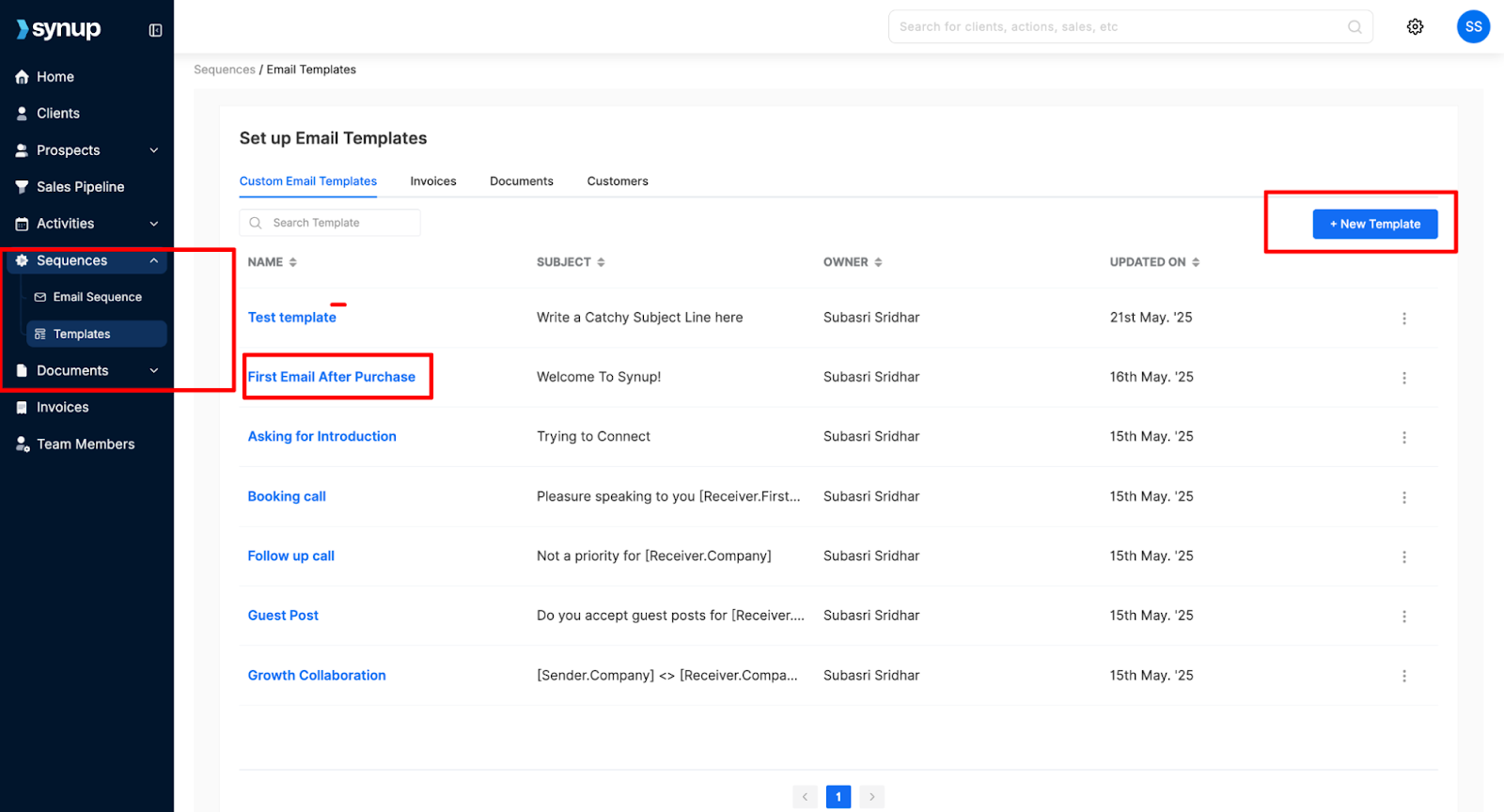
Then configure an event trigger:
When the deal stage is marked “Closed-Won,” send the “Welcome Packet” email automatically.
- Client Summary as Your Source of Truth
Synup’s Client Summary acts as the central hub for delivery.
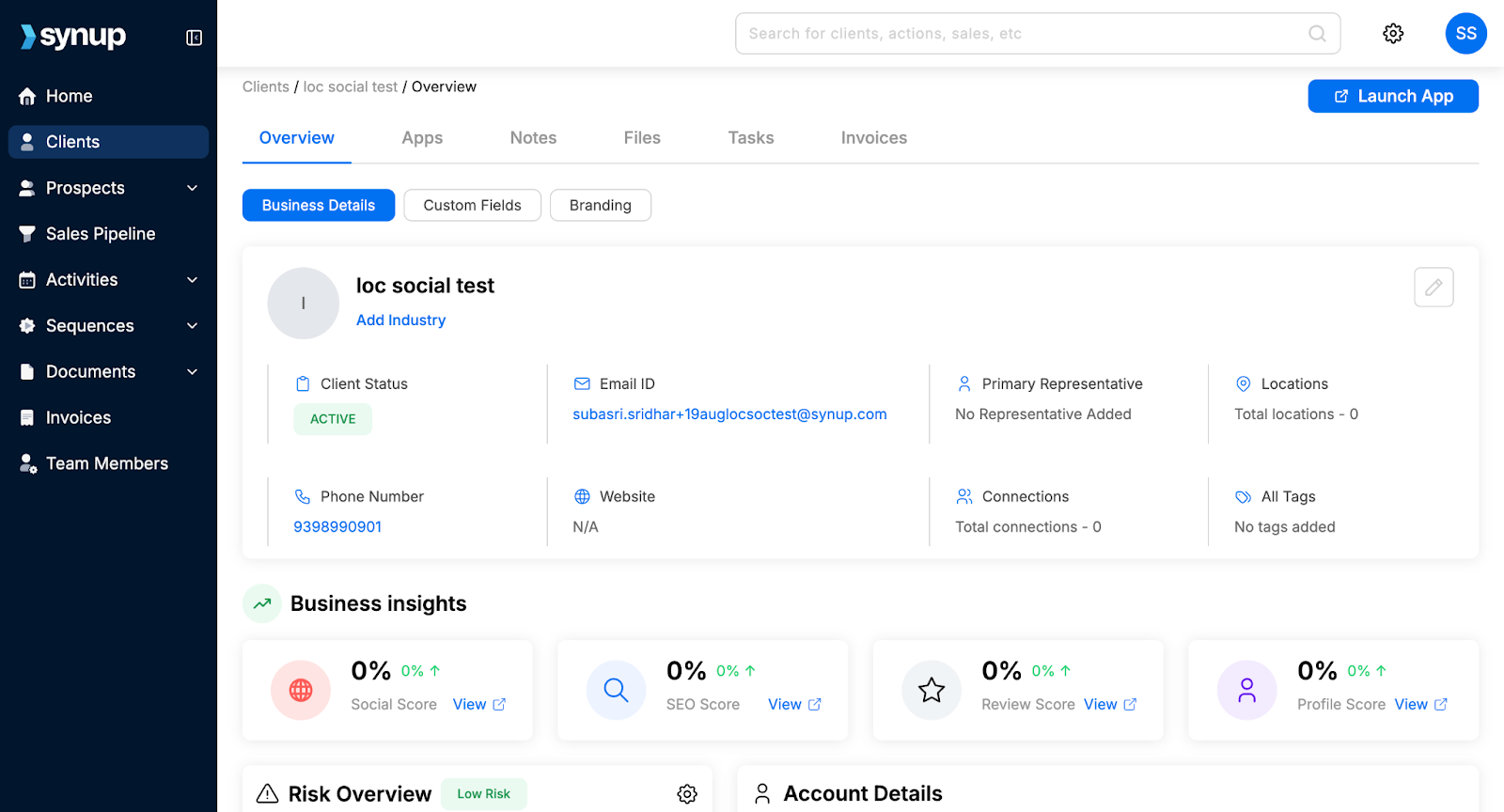
What goes in the Client Summary:
- Primary contact: Name, phone, email, preferred communication method
- Business details: Address, hours, website, GBP link
- Account specifics: Monthly retainer amount, services included, contract end date
- Project status: Current phase, upcoming milestones, blockers
- Communication log: All emails, calls, and meetings are timestamped
The rule is simple: if someone needs client context, they check the Client Summary first – never email threads or Slack messages.
Go to: Clients > [Client Name] > Summary
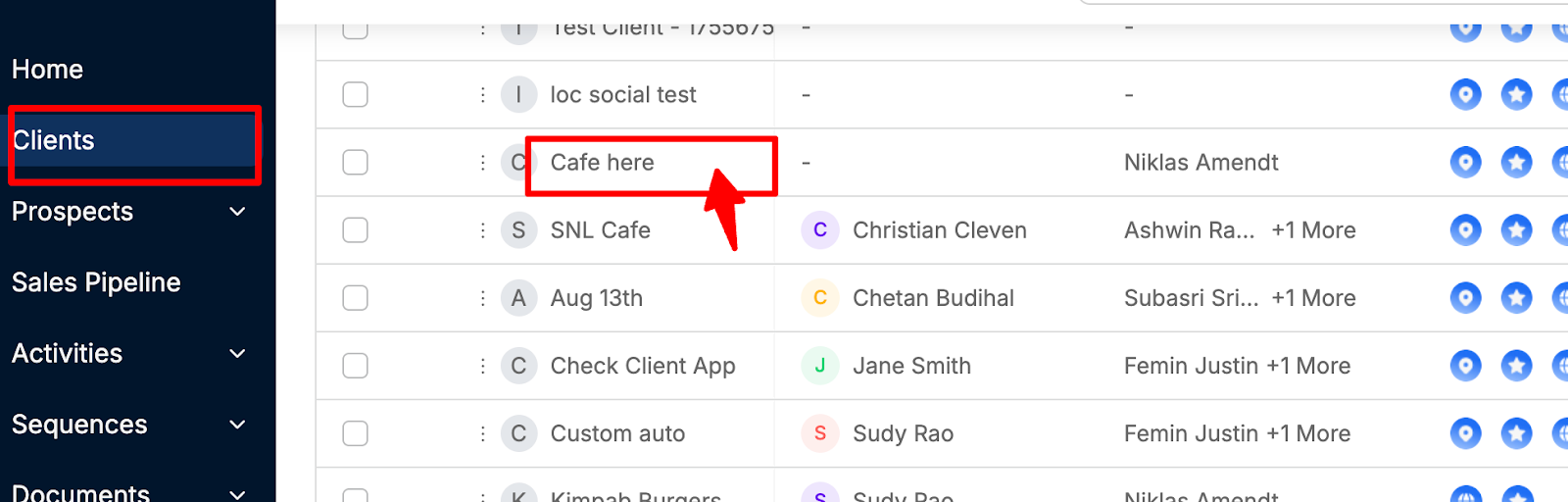
Three months into the engagement, when someone needs the original scope or the client’s IT contact, everything is already organized.
Phase 5: Closing the Loop (The 30-Day Check)
The feedback mechanism: Handoffs break if nobody fixes the leaks. Most agencies never analyze why handoffs fail; they just keep repeating the same mistakes.
The 30-Day Retro Meeting
Who attends: Sales Rep + Account Manager + Sales Manager (optional)
When: 30 days after client kickoff
Duration: 15-20 minutes per client reviewed
The Questions
To gauge the progress made, use the following line of questioning:
- “Did the project scope match what was sold?”
If the AM discovered that what Sales sold doesn’t match client needs, why? Was the discovery process inadequate? Did Sales overpromise to close the deal?
- “Was the client's budget accurate?”
If the client is now saying they can’t afford additional services that Sales implied were included, what went wrong in contract negotiations?
- “Did we miss any critical assets or access?”
If the kickoff was delayed because the client didn’t have Google Analytics access or brand assets ready, should Sales have collected those during the sales process?
- “What emotional context did we miss?”
What nuances about the client's motivations or concerns only became clear during delivery? How can Sales capture that information better next time?
Closing the Feedback Loop
The goal isn’t blame; it’s systematic improvement.
Action items from retro meetings:
- Update the Handoff Brief template to capture overlooked information
- Add new required Custom Fields in Synup
- Train sales reps on a realistic timeline setting
- Refine proposal templates to clarify scope boundaries
Synup OS: Churn Risk Forecasting
Synup’s Churn Risk parameters analyze client engagement patterns to flag potential issues early.
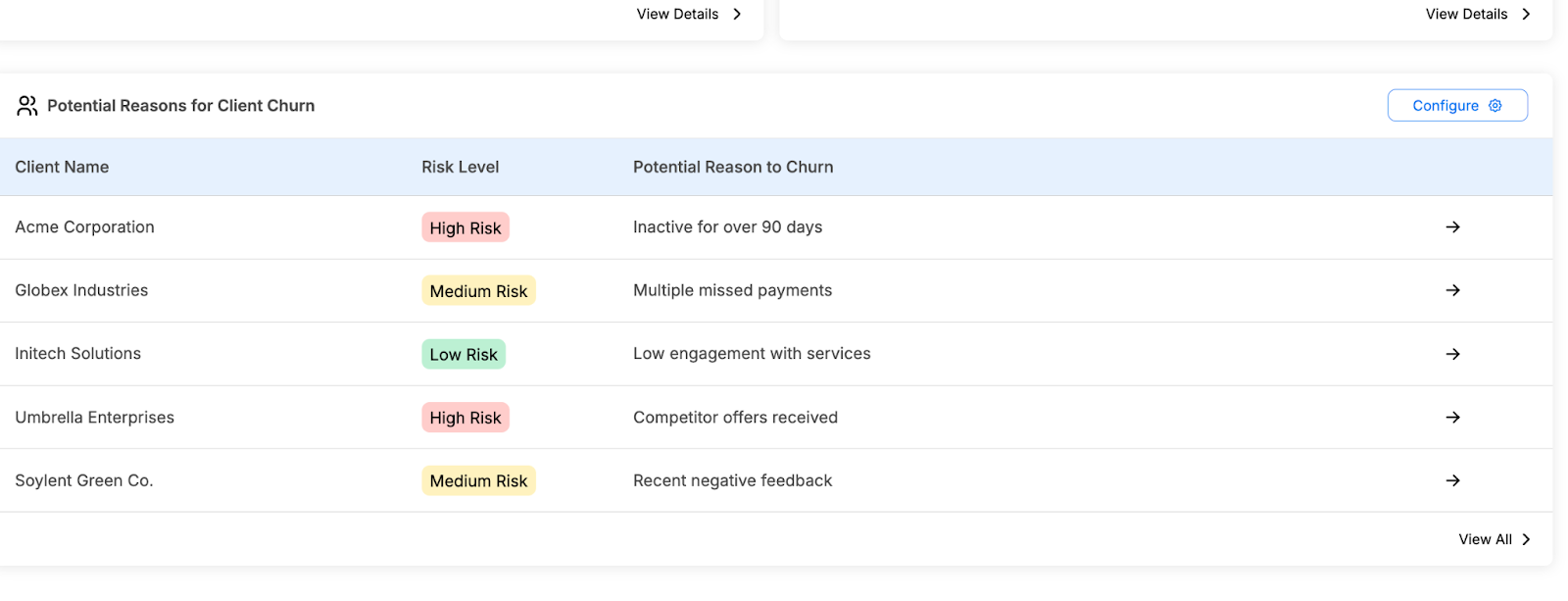
Signals Synup tracks:
- Low email open rates
- Missed scheduled calls
- Delayed payment
- Decreased portal login frequency
- Negative sentiment in communications
Go to: Clients > [Client Name] > Risk Overview
You can also configure risk criteria by clicking on the Settings (gear) icon.
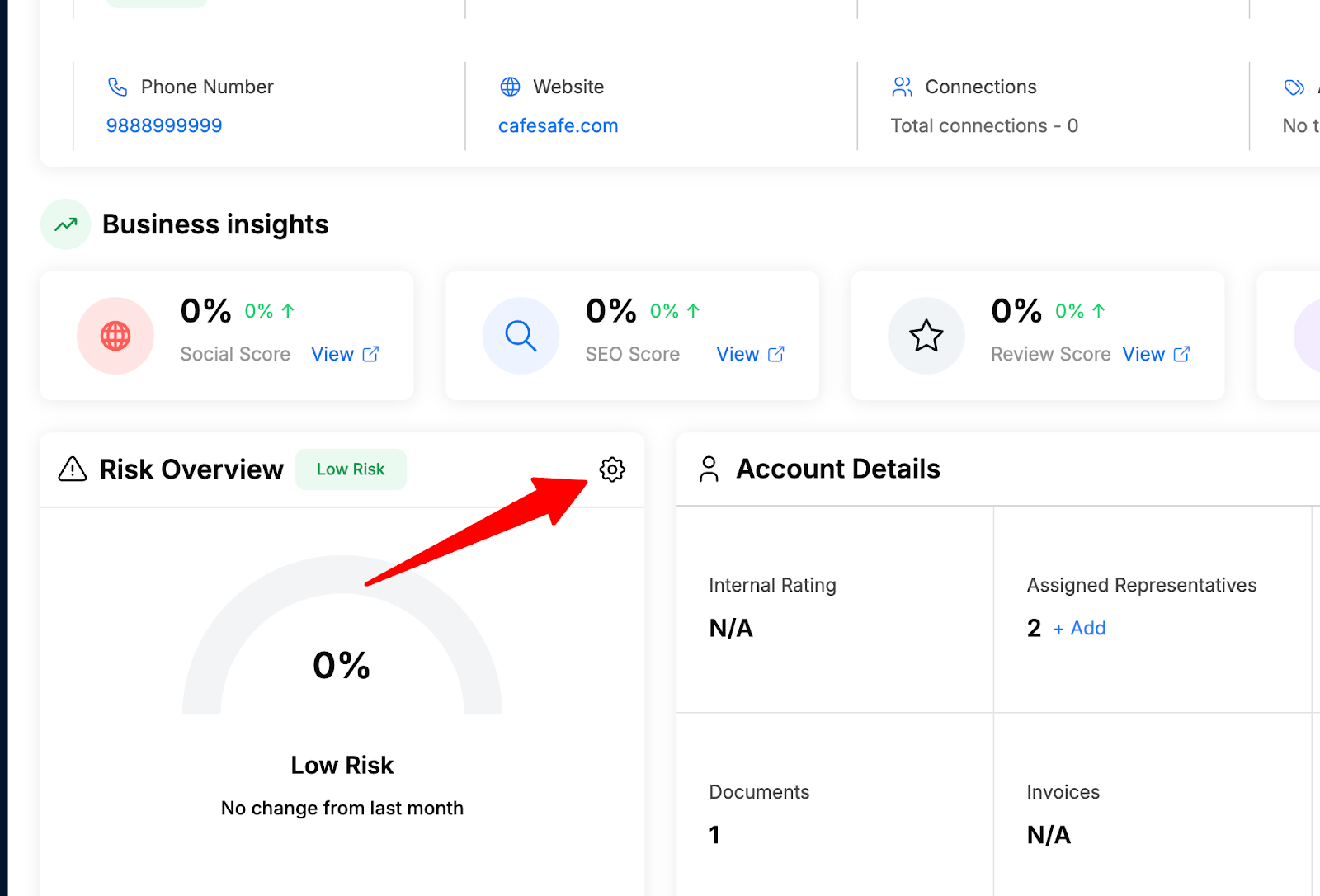
If a client shows “High Risk” within the first 30 days, trace it back to the handoff:
- Were expectations set incorrectly?
- Did we miss critical context about their priorities?
- Is there a mismatch between sold services and actual needs?
Use this data to retrain the sales team: “When clients churn in Month 1-2, it’s usually a handoff problem, not a service problem. Here’s what we’re seeing…”
Conclusion
The sales-to-delivery handoff isn’t magic. It’s methodology.
The three pillars of a perfect handoff:
- Radical Context Transfer (Pre-Handoff)
- Defined “Handoff Event” (Internal Sync)
- Automated Accountability (Tech Stack)
The reality: Most client churn happens in the first 90 days. Not because your services fail, but because trust fractures during a sloppy handoff. A well-executed handoff makes customers 3.5x more likely to continue their journey with your brand.
The agencies that scale to 7-8 figures aren’t the ones with the best sales closers or the most talented creatives. They’re the ones who systematize the transfer of trust, so every client feels known, prepared for, and confident from day one.
Build the Operating System with Synup. Enforce the process and close the feedback loops. Book a demo to learn more.
That’s how you turn “Sales Hero, Delivery Villain” into “Sales + Delivery Dream Team.”
FAQs
- How long should the internal sync meeting take?
15 minutes for standard projects with straightforward scopes. 45 minutes for enterprise or complex engagements with multiple stakeholders, custom requirements, or significant promises made during sales. The key is making it mandatory; even 15 focused minutes dramatically improves handoff quality compared to no meeting at all.
- What if sales reps resist filling out the handoff brief?
Make it a requirement for commission payout or deal closure approval. Configure your CRM (e.g., Synup) so deals cannot be moved to “Closed-Won” status without completing required custom fields. When compensation depends on it, compliance follows. Frame it as “protecting your commission.” Sloppy handoffs cause churn, which triggers clawbacks.
- Should sales stay involved after the handoff?
Minimally. Sales should attend the kickoff call for the formal introduction and transition of authority, then exit. Continuing involvement creates confusion about who the client’s primary contact is.
